Hide the submit button based on a value in a form | Community
Skip to main content
Adele_Grono2
Level 2
May 9, 2018
Solved

Hide the submit button based on a value in a form

  • May 9, 2018
  • 2 replies
  • 10114 views

Hi there

I would like to hide the button "enter now" if field value = New Zealand.

Have read some other posts on the community for example https://nation.marketo.com/message/121474#comment-121474  apologies I'm having problems solving.
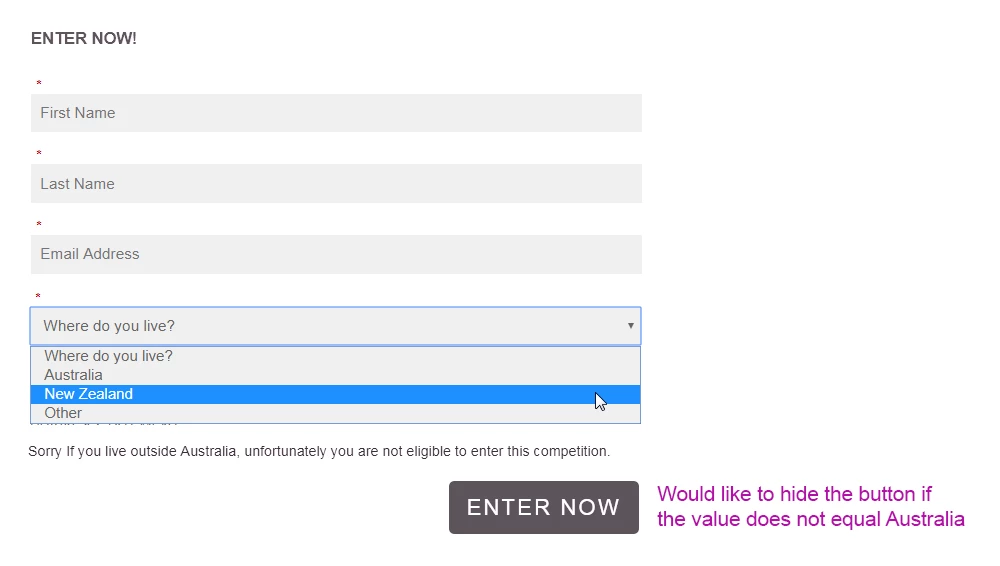
I have also visited...

MktoForms2 :: Conditionally Show Submit - JSFiddle

Looking at the CSS where do I enter the name of the field for example "Country and the value in the field, for example "New Zealand"

The aim is when a lead selects the value "New Zealand" the submit or "Enter Now" button should be hidden.

.mktoFormRow[data-wrapper-for="__showSubmit"] .mktoButtonRow,

.mktoFormRow[data-wrapper-for="__showSubmit"] .mktoPlaceholder,

.mktoFormRow[data-wrapper-for="__showSubmit"] .mktoFormCol {

  display: none !important;

}

.mktoFormRow[data-wrapper-for="__showSubmit"][data-default-state="false"] .mktoFormCol ~ .mktoButtonRow {

  display: inline-block !important;

}

Sorry are you able to assist?  Many thanks 

Sanford Whiteman​   

Best answer by SanfordWhiteman

Hmm, that demo is quite an oldie and I don't think the Fiddle is working anymore. I probably wouldn't do it that way as of 2018, but at the very least here's how it's supposed to work, now in CodePen:

     MktoForms2 :: Conditionally Show Submit

That should give you more guidance about how to structure the Visibility Rules, since it actually works!

2 replies

SanfordWhiteman
SanfordWhitemanAccepted solution
Level 10
May 10, 2018

Hmm, that demo is quite an oldie and I don't think the Fiddle is working anymore. I probably wouldn't do it that way as of 2018, but at the very least here's how it's supposed to work, now in CodePen:

     MktoForms2 :: Conditionally Show Submit

That should give you more guidance about how to structure the Visibility Rules, since it actually works!

Adele_Grono2
Level 2
May 10, 2018

Thank you so much

I copied CSS from MktoForms2 :: Conditionally Show Submit into the forms CSS editor. Thanks so again Sanford Whiteman the form looks great.

May 16, 2018

Thank you for this!! I am trying to do something similar. This CSS works for the most part but I am trying to do it with a custom field.

I am not wanting the submit button to show till they pick one of the following options under, "Why are you contacting us?"

bkd.com/video-test.htm

I am not sure what the data field would be?

Can anyone help? Sanford Whiteman​ @Adele Grono​

Thomas_Rosen3
Level 1
October 1, 2019

@Sanford Whiteman‌ It's been a while. Hope all is well.

I'm trying this code out but messed it up somewhere.

I think its an issue with the naming on the RT element but not 100% sure.

Any help is greatly appreciated.

-Thomas