Hide or Style specific labels on Forms 2.0 | Community
Skip to main content
February 5, 2015
Question

Hide or Style specific labels on Forms 2.0

  • February 5, 2015
  • 6 replies
  • 2500 views
Hello All!
So I was able to successfully hide form labels, but my form also has a check box (.mktoCheckboxList), which I have to have the actually display the label for, because otherwise it is just a box with no context:
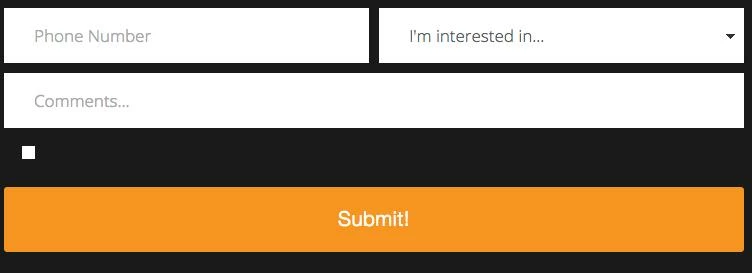

Is it possible to isolate, and style a single label?

Thanks!
This post is no longer active and is closed to new replies. Need help? Start a new post to ask your question.

6 replies

Level 4
February 5, 2015
have you tried something like this in your css
 
.mmktoCheckboxList label.mktoLabel {
display:block;
}
February 5, 2015
Hey John!

I have tried similar things, and just tried that, but still no luck :(
Matt_Stone2
Level 9
February 5, 2015
You could use an attribute selector, but it won't help you with older browsers: http://www.w3schools.com/css/css_attribute_selectors.asp
February 5, 2015
doing this with jquery would probably be more effective post render. 

$("#ID").css('display','block');

it might give some hint as to why its not working as well, i suggest trying it in the google/firefox javascript console first. 

there is also ways to grab elements by xPath for when they have the same ID/Name..etc
February 5, 2015
Thanks all- I'll try these out tomorrow
SanfordWhiteman
Level 10
February 6, 2015
@Devan remember your selectivity rules.  The built-in CSS already has .mktoForm .mktoCheckboxList > label which is more selective than .mktoCheckboxList > label.  You either have to use the same selectivity (yours will win because of the cascade) or use !important.