Hero image rendering incorrectly in outlook | Community
Skip to main content
Jessie_Coluccio
Level 2
February 20, 2019
Solved

Hero image rendering incorrectly in outlook

  • February 20, 2019
  • 2 replies
  • 7047 views

Hello Community,

Email is created and ready to send so I forwarded a sample to my boss...

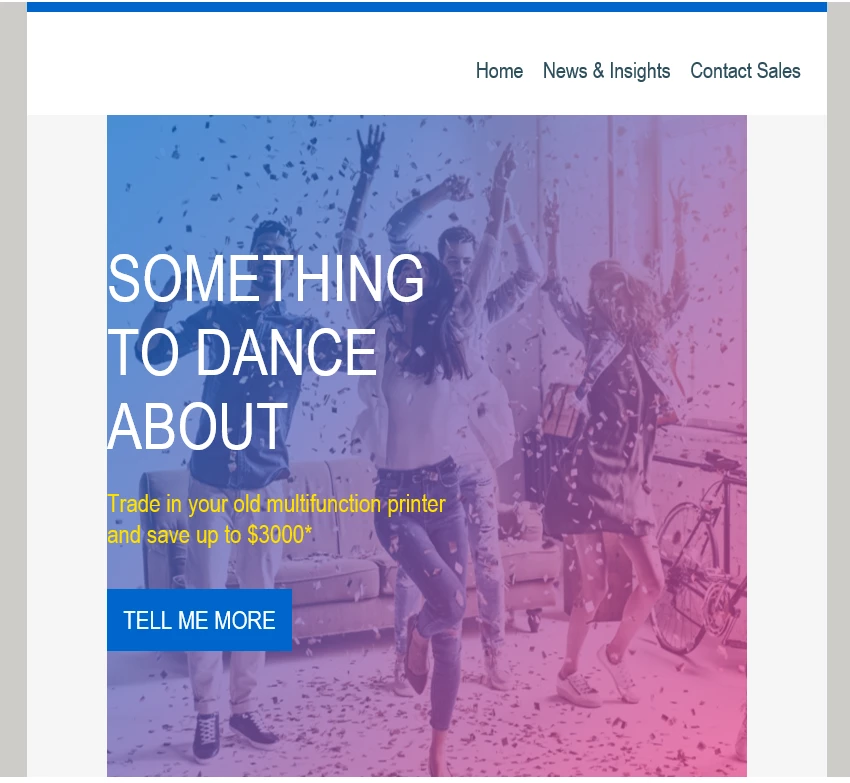
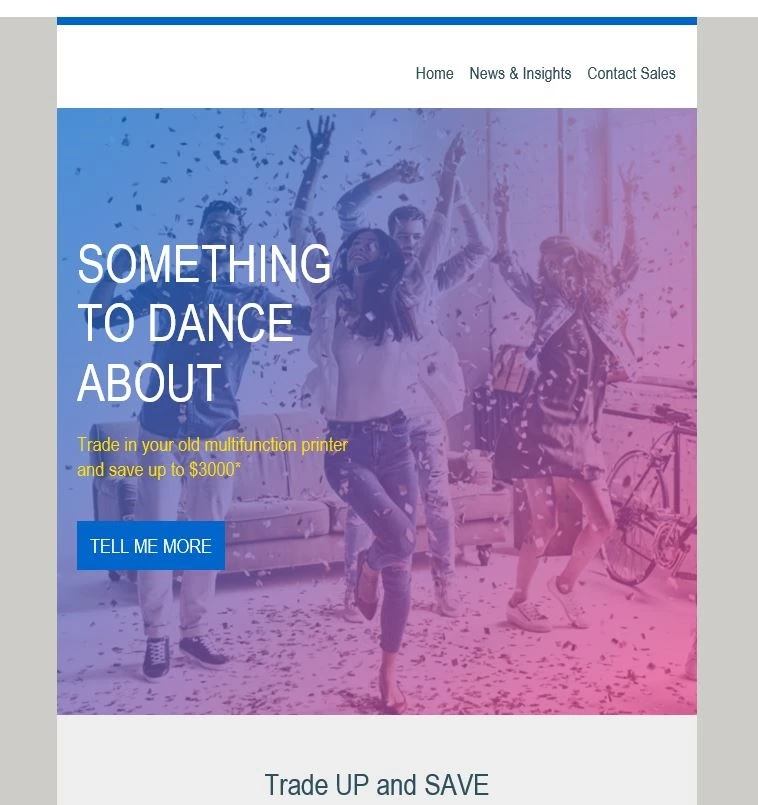
Unfortunately the hero image is being "cut" down to look more narrow.

Any idea why that might be?

Left is my outlook and right is hers.

This post is no longer active and is closed to new replies. Need help? Start a new post to ask your question.
Best answer by Dave_Roberts

hahah, that's a darn good question Jessie. Im not sure if it's the case with this specific scenario, but in short - YES, (especially w/ Outlook's variety of rendering) it's possible for something in the code to make a difference for one Outlook and not the other. It also looks like the one that's messing up is the 120dpi version which is for "zoomed" in displays so what you're seeing there is a scaled-up version of your email. Notice the width of the image is consistent with the rest of the display, but the width of the body is "zoomed in" (wider) than the rest? That's what's making me think the image is staying in the 600px frame and not "zooming in" with the rest of the email.

Im not an expert on VML code and frankly, I do my best to avoid things like that b/c they're error prone and very particular to size. I'd guess this has something to do with that tho since the rest of the Outlook's (which dont use the DPI scaling) are showing up ok.

This article: https://litmus.com/community/discussions/151-mystery-solved-dpi-scaling-in-outlook-2007-2013 explains a bit more about it and proposes a soultion using inline styles to declare the dimension instead of the height="" and width="" attributes. I usually will write those to be redundant, including both the attribute value for each as well as the inline style: style="height:__px; width:___px;". Maybe that'd help here?

2 replies

Grace_Brebner3
Level 10
February 20, 2019

Hey Jessie,

First, when you say you "forwarded a sample", do you mean you sent them a test out of the system, or that you forwarded them a test that you received?

If the latter, forwarding emails frequently breaks them in a way that you can't realistically expect to control for, so if that's the case the answer you'll generally find on community will likely be not to bother with putting in the effort to try fix it. Pretty much everyone's emails break when forwarded

But if the former, you'll need to share the code with us for us to be able to assist (plus it'd be helpful if you can advise what version of outlook + on which device). Looking at the layout (presumably background image with live text overlay), there's probably some MSO conditional code that isn't doing what you want here.

Jessie_Coluccio
Level 2
February 20, 2019

Thanks for the quick response!

Sorry I should have written i sent her a sample from Marketo- not forwarded form my email.

I am using Outlook 2016 and just waiting to see what my manager has.

I did a emailonacid check I am thinking maybe she has a different version of 2016.

Is there anything I can do about that?

Jessie_Coluccio
Level 2
February 20, 2019

Same outlook as mine so there goes that theory...

Dave_Roberts
Level 10
February 20, 2019

Hey Jessie-

I haven't done any testing but looking at the code you posted above, it looks like you've got your background image for Outlook (in the VML tags) set to a width of 640:

<v:rect xmlns:v="urn:schemas-microsoft-com:vml" fill="true" stroke="false" style="width:640px;height:607px">

and they're placed inside a container that only has 600px of width:

<td class="background" style="-webkit-text-size-adjust: 100%;mso-table-lspace: 0pt;mso-table-rspace: 0pt;word-break: break-word;-webkit-hyphens: none;-moz-hyphens: none;hyphens: none;-ms-text-size-adjust: 100%;padding-bottom: 0;padding-left: 0;background-repeat: no-repeat;background-position: center center;background:${heroBackgroundImage};background-color:${heroBackgroundColor};padding-top:0;padding-right: 0;background-image:${heroBackgroundImage};border-collapse: collapse;" background="${heroBackgroundImage}" bgcolor="${heroBackgroundColor}" valign="top" width="600">

To my eye, it looks like you're losing about 20px on each side to clipping, this might have something to do with it.You might try expanding the <td> to 640px instead of 600 and sending another test?

Jessie_Coluccio
Level 2
February 20, 2019

Sorry I am just starting to learn code- would the width being 600 only affect one browser?

Or is it a standard?

Dave_Roberts
Dave_RobertsAccepted solution
Level 10
February 20, 2019

hahah, that's a darn good question Jessie. Im not sure if it's the case with this specific scenario, but in short - YES, (especially w/ Outlook's variety of rendering) it's possible for something in the code to make a difference for one Outlook and not the other. It also looks like the one that's messing up is the 120dpi version which is for "zoomed" in displays so what you're seeing there is a scaled-up version of your email. Notice the width of the image is consistent with the rest of the display, but the width of the body is "zoomed in" (wider) than the rest? That's what's making me think the image is staying in the 600px frame and not "zooming in" with the rest of the email.

Im not an expert on VML code and frankly, I do my best to avoid things like that b/c they're error prone and very particular to size. I'd guess this has something to do with that tho since the rest of the Outlook's (which dont use the DPI scaling) are showing up ok.

This article: https://litmus.com/community/discussions/151-mystery-solved-dpi-scaling-in-outlook-2007-2013 explains a bit more about it and proposes a soultion using inline styles to declare the dimension instead of the height="" and width="" attributes. I usually will write those to be redundant, including both the attribute value for each as well as the inline style: style="height:__px; width:___px;". Maybe that'd help here?