Hello, Does anyone know how to turn off just a single stream in an engagement program with multiple streams? | Community
Skip to main content
Ivette_Gomez
Level 2
January 9, 2023
Solved

Hello, Does anyone know how to turn off just a single stream in an engagement program with multiple streams?

  • January 9, 2023
  • 1 reply
  • 1751 views

Hi, 


We have an engagement program in our Marketo Engage instance that contains multiple streams. 


1) We want to stop using/turn off 1 of the streams.  How can I do that without losing the stream history? 


Do I simply archive all of the assets in under/within that stream?  

Do I need to somehow "turn off" the stream?  I know that there's a way to turn off entire engagement programs ( that's not what I want to do) but I don't see a "turn off" option for just a single stream. 


2) the filters that we use in this stream to define the audience entry and transition rules ( etc. If product interest updates to X) , we now want to redirect that audience to a different stream.  
Do I simply delete the entry rules for this stream and give them to the other stream where we want this audience to go into ?  


Your help is appreciated! 


Many Thanks 🙂


This post is no longer active and is closed to new replies. Need help? Start a new post to ask your question.
Best answer by Darshil_Shah1

1) We want to stop using/turn off 1 of the streams.  How can I do that without losing the stream history? 


Do I simply archive all of the assets in under/within that stream?  

Do I need to somehow "turn off" the stream?  I know that there's a way to turn off entire engagement programs ( that's not what I want to do) but I don't see a "turn off" option for just a single stream. 

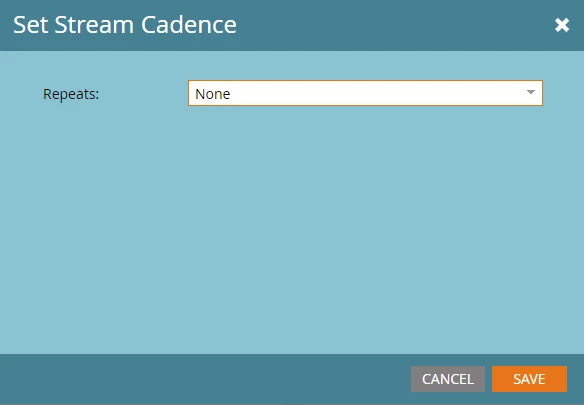
There isn't an on/off option/setting for the engagement program streams (unlike the whole engagement program). You should not just archive/deactivate all assets in the stream as people in it would still run through the stream on each cadence. You can update the stream's cadence to "Repeats: None" to stop letting people in that stream receive content from it (reference snapshot below). If you wish you could transition people in it to another active stream (based on certain criteria, if required), so people don't sit idle w/o receiving any engagement program content from it (again transitioning people to a separate stream or letting them stay in their original stream until they meet other streams' entry criteria depends solely on your use case/strategy). 


2) the filters that we use in this stream to define the audience entry and transition rules ( etc. If product interest updates to X) , we now want to redirect that audience to a different stream.  
Do I simply delete the entry rules for this stream and give them to the other stream where we want this audience to go into ?  


Your help is appreciated! 


Many Thanks 🙂


Yes, if you plan on turning this stream off, then it would not make sense to have active transition rules that are adding people to it. You could update other streams' transition rules so that people start getting pulled into those streams instead of this (the one that you plan on retiring). You could also deactivate the content assets in the stream, as you'd be deactivating the stream itself. Per your question, I don't think you're using smart campaigns for managing stream transitions, but if you're, then you'd need to update those.


Hope this is helpful! Let us know if you have questions.

1 reply

Darshil_Shah1
Community Advisor and Adobe Champion
Darshil_Shah1Community Advisor and Adobe ChampionAccepted solution
Community Advisor and Adobe Champion
January 10, 2023

1) We want to stop using/turn off 1 of the streams.  How can I do that without losing the stream history? 


Do I simply archive all of the assets in under/within that stream?  

Do I need to somehow "turn off" the stream?  I know that there's a way to turn off entire engagement programs ( that's not what I want to do) but I don't see a "turn off" option for just a single stream. 

There isn't an on/off option/setting for the engagement program streams (unlike the whole engagement program). You should not just archive/deactivate all assets in the stream as people in it would still run through the stream on each cadence. You can update the stream's cadence to "Repeats: None" to stop letting people in that stream receive content from it (reference snapshot below). If you wish you could transition people in it to another active stream (based on certain criteria, if required), so people don't sit idle w/o receiving any engagement program content from it (again transitioning people to a separate stream or letting them stay in their original stream until they meet other streams' entry criteria depends solely on your use case/strategy). 


2) the filters that we use in this stream to define the audience entry and transition rules ( etc. If product interest updates to X) , we now want to redirect that audience to a different stream.  
Do I simply delete the entry rules for this stream and give them to the other stream where we want this audience to go into ?  


Your help is appreciated! 


Many Thanks 🙂


Yes, if you plan on turning this stream off, then it would not make sense to have active transition rules that are adding people to it. You could update other streams' transition rules so that people start getting pulled into those streams instead of this (the one that you plan on retiring). You could also deactivate the content assets in the stream, as you'd be deactivating the stream itself. Per your question, I don't think you're using smart campaigns for managing stream transitions, but if you're, then you'd need to update those.


Hope this is helpful! Let us know if you have questions.

Ivette_Gomez
Level 2
January 13, 2023

This is exactly what I was looking for. Thank you so much @darshil_shah1 ! Much appreciated.