"Get Marketo Certified" picture is covering up help articles | Community
Skip to main content
February 28, 2013
Solved

"Get Marketo Certified" picture is covering up help articles

  • February 28, 2013
  • 5 replies
  • 1230 views
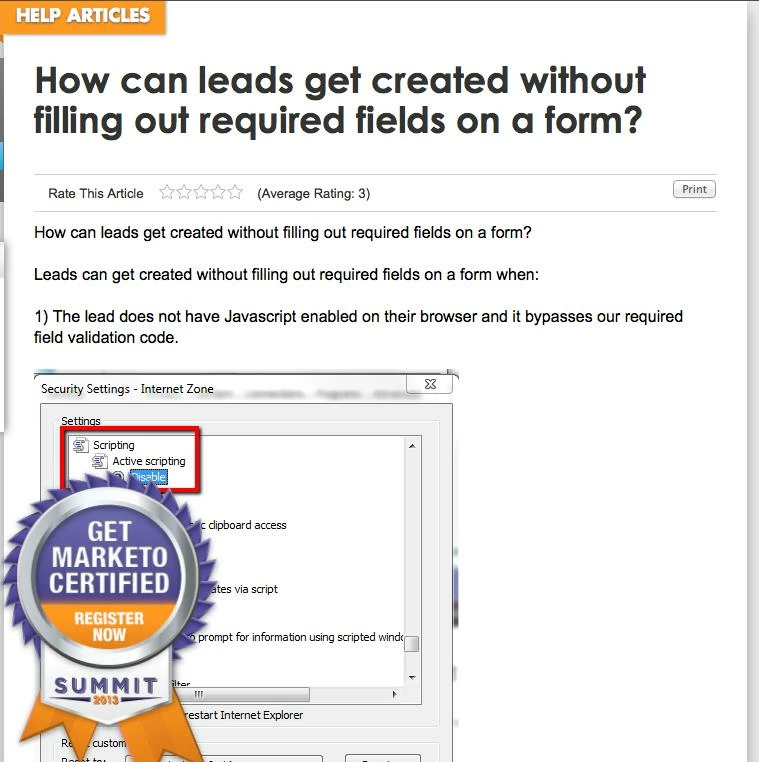
Not sure if this is unique to me, but on all help articles the Get Marketo Certified picture is appearing over the articles (see picture).

This only happens on the help articles, not on discussions or ideas. I tried closing out the browser and using a different one, but the same issue occured.
This post is no longer active and is closed to new replies. Need help? Start a new post to ask your question.
Best answer by
Thomas,
This should be fixed, can you please confirm? 
Thanks,
Liz 

5 replies

February 28, 2013
I just tried replicating this in Firefox, IE and Chrome. The badge isn't on the page anywhere, let alone in the middle of the page like on your image. Interested to see if anyone else has the same issue.

I also tried the same article that you have in the picture...no issues.
February 28, 2013
I am going to guess that something installed on your browser (extension, add-on, etc...) is preventing the CSS to completely load, and it is causing this issue.
Accepted solution
March 6, 2013
Thomas,
This should be fixed, can you please confirm? 
Thanks,
Liz 
March 6, 2013
Hi Liz,

It looks like it has been fixed.

Thanks!
March 6, 2013
Great to hear, thanks for bringing the issue to our attention. Would you mark this as "solved" please?