Forms 2.0 - format submit button | Community
Skip to main content
February 4, 2014
Solved

Forms 2.0 - format submit button

  • February 4, 2014
  • 5 replies
  • 1718 views
Anyone else having issues with buttons in forms 2.0? I can't figure out how to control where it appears on the page. It doesn't seem to align with anything.

This is how it comes up when I add to a landing page:
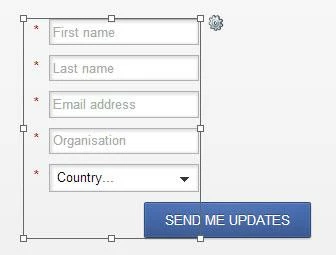

I've tried moving the labels to "above" instead of "left" but nothing changed.
This post is no longer active and is closed to new replies. Need help? Start a new post to ask your question.
Best answer by
Just got off the phone with Marketo support. Turns out the way to fix it is to click and drag the button! Works perfectly.

5 replies

Josh_Hill13
Level 10
February 4, 2014
Did you modify the CSS or javascript on the Form or on the page? There's probably a conflict.

Although...it might be that your field lengths are too short?
Accepted solution
February 4, 2014
Just got off the phone with Marketo support. Turns out the way to fix it is to click and drag the button! Works perfectly.
Jamye_Breidenba
Level 3
February 6, 2014
So glad I saw this post!  :)  I was having the same problem.
February 17, 2014
What if you don't want the Submit button to be below the form, ie - a single field with the Submit button to the right?  Not being able to move the submit button out of it's row seems like an arbitrary and unnecessary limitation.
February 20, 2014
Glad to see there is a solution, but I'm sorry ... In what world is that intuitive or user friendly? This is just like renaming things in Marketo. There is no visual cue letting the user know it's anything more than a static element.