Forms 2.0 CSS for hidden field | Community
Skip to main content
December 18, 2016
Question

Forms 2.0 CSS for hidden field

  • December 18, 2016
  • 2 replies
  • 1696 views

Hello!

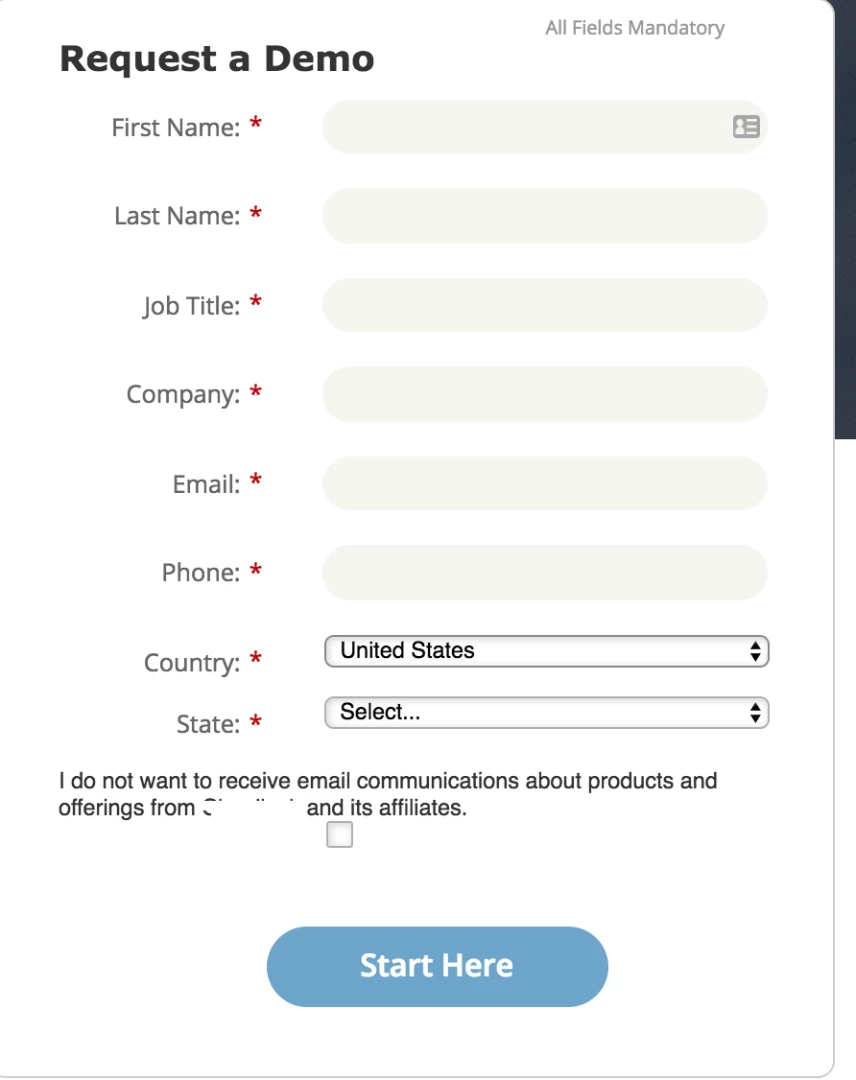
I'm new to the CSS world and have a challenge where I need the text of a hidden checkbox field (displayed by visibility rules) to align better with the rest of the form. In the image below, the text is off and while I have tried adjusting the label/field width, it doesn't work. In terms of CSS for the form, is there a recommended code to adjust only that field so that it's a bit more centered and the checkbox is inline with the rest of the text?
This post is no longer active and is closed to new replies. Need help? Start a new post to ask your question.

2 replies

SanfordWhiteman
Level 10
December 18, 2016

URL, please. Can't troubleshoot a screenshot.

Also, just to be precise: it can't be Hidden (that's an actual, mutually exclusive field type) if it is governed by Visibility Rules. "Conditionally displayed," maybe....

SanfordWhiteman
Level 10
December 19, 2016

Don't know what alignment you're going for ("a bit more centered" isn't enough), but you can start restyling your particular form with this:

.mktoFormRow .mktoHasWidth[for="Unsubscribed"] {

   width: 250px !important;

   float: right;

}

.mktoFormRow .mktoHasWidth[for="Unsubscribed"] ~ .mktoCheckboxList {

   margin-top: 6px;

}

.mktoFormRow .mktoHasWidth[for="Unsubscribed"] ~ .mktoCheckboxList input {

   margin-left: 12px;

}