Forms | Community
Skip to main content
August 21, 2014
Solved

Forms

  • August 21, 2014
  • 3 replies
  • 1499 views
Hi there,
I was working on forms for multiple events and thought it would be easier and orgranized to not have diffrerent forms for each of them. I was wondering if there's any way where i can have a drop down or option button where the user can select the respective event and when the option is selected the forms accordingly to the events show. I was looking into hiding my custom field and using the if optiion but it would always let me do just one field.
Thanks,
Michael A. 
This post is no longer active and is closed to new replies. Need help? Start a new post to ask your question.
Best answer by Dory_Viscoglio
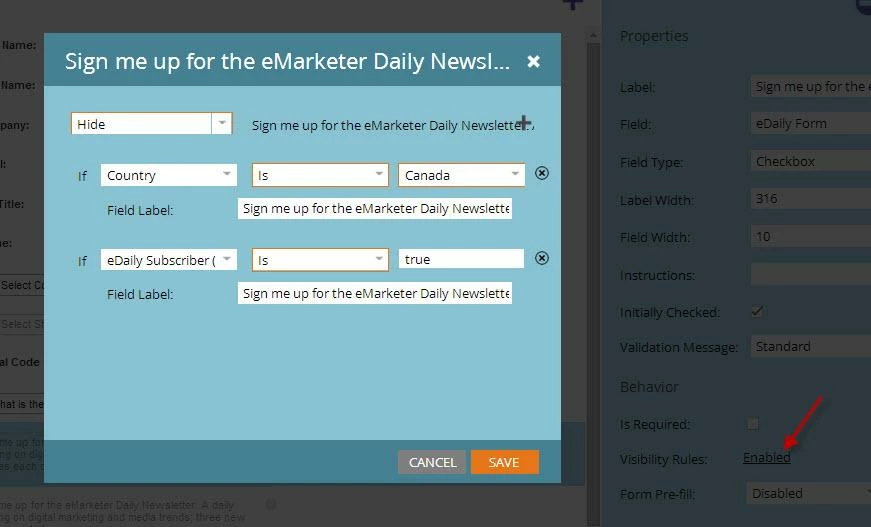
Hey Michael, this can be achieved using conditional visibility.. The way that the conditional visibility fields work is as OR statements. So you could show a specific field if someone selects event x, or event y -- and it wouldn't be shown if they select event z. You would probably want to use "show" instead of "hide" as I have in my example below -- unless you want something to be based on an AND statement. If you want a field to show if multiple criteria are met, then take a look at this thread. 


Hope this helps, but let me know if I can explain this any further using your specific situation!

3 replies

Dory_Viscoglio
Dory_ViscoglioAccepted solution
Level 10
August 21, 2014
Hey Michael, this can be achieved using conditional visibility.. The way that the conditional visibility fields work is as OR statements. So you could show a specific field if someone selects event x, or event y -- and it wouldn't be shown if they select event z. You would probably want to use "show" instead of "hide" as I have in my example below -- unless you want something to be based on an AND statement. If you want a field to show if multiple criteria are met, then take a look at this thread. 


Hope this helps, but let me know if I can explain this any further using your specific situation!
August 21, 2014
Awesome just the answer i was looking for. 
Thank you,
August 21, 2014
Sorry another question, where do i define the value of the event so that the members in my event can see the form and not an empty form? I tried testing it by putting myself as a lead in my event but whenever i go to the landing page the form is empty (the submit button is the only thing that is displayed). I'm guessing my event has to know what the value of the event is when the form is launched so that it can decide?
Thanks,