
Format is distorted in Outlook | Community
Skip to main content
uditmathur
Community Advisor
Community Advisor
January 21, 2026
Solved

Format is distorted in Outlook

  • January 21, 2026
  • 6 replies
  • 188 views

HI Peers,

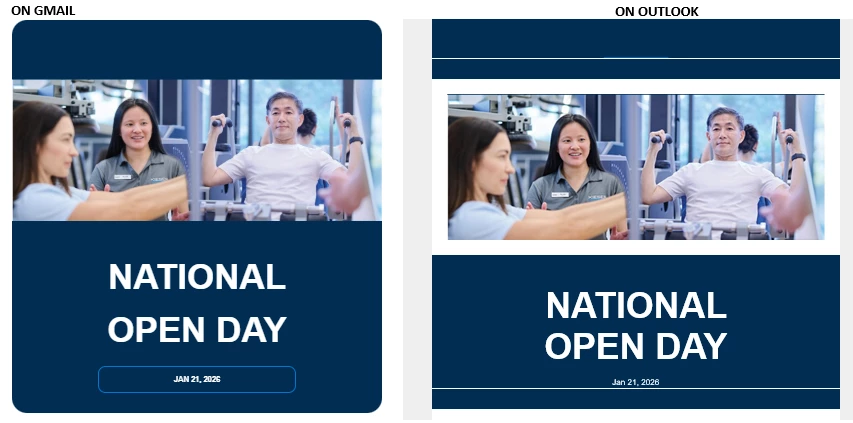
I am facing an issue with email display in Outlook.

I have an email template developed from html for New email editor & when i send the test content in outlook the css is not rendered correctly where as in Gmail its displayed correctly.

Any suggestion/solution will be appreciated.
 

    Best answer by Jasbirka

    Hi ​@uditmathur - The code you shared has all the styles directly added to the button tag, which isn't supported by Outlook clients. The button below is still working better, so you can follow that same approach.

    CLICK HERE TO STAY UPDATED WITH CLINIC NEWS


    6 replies

    Disha_Goyal6
    Community Advisor
    Community Advisor
    January 21, 2026

    Hi ​@uditmathur , please share the screenshot of the setting and please check the padding in style section.

    uditmathur
    Community Advisor
    Community Advisor
    January 21, 2026

    HI ​@Disha_Goyal6 ,

    Setting in outlook?


    This is the PADDING

    <meta name="viewport" content="width=device-width, initial-scale=1.0">
    </head>

    <body style="margin:0;padding:0;background:#efefef;">
    <table width="100%" cellpadding="0" cellspacing="0" border="0" bgcolor="#efefef">
    <tr>
    <td align="center">

    <!-- MAIN WRAPPER -->
    <table width="800" cellpadding="0" cellspacing="0" border="0" bgcolor="#ffffff" style="width:800px;">


    Level 1
    January 21, 2026

    From my understanding, the CTA button should have set width and height values, and the border styles should be removed.

    SanfordWhiteman
    Level 10
    January 21, 2026

    Please give us the full HTML (using the Embed Code option or perhaps a link to an external Gist/etc.).


    Tiny snippets aren’t useful unless you’re 100.00% sure there aren’t other styles affecting the output.

    uditmathur
    Community Advisor
    Community Advisor
    January 22, 2026

    <!DOCTYPE html>
    <html data-source-chatid="2bcf426b-a0c0-4424-9092-8fec77349c34"><head><meta charset="utf-8"><!--[if gte mso 9]><style acrite-mso-css="true">.image-container div { display: block;}.structure__table td { padding: 0; border: none;}.button-container { border: none !important; padding: 0 !important; margin: 0 !important; line-height: normal !important;}.acr-structure { margin: 0 !important;}.acr-component, .acr-tmp-component { margin: 0 !important; border: none !important;}.acr-fragment { margin: 0 !important; border: none !important;}.colspan1, .colspan2, .colspan3, .colspan4, .colspan33, .colspan66 { box-sizing: border-box !important;}.divider-mso-hidden { border: none !important;}</style><![endif]--><style data-name="default" type="text/css">.acr-dark-img{display:none;}</style><style data-name="media-custom-prefers-color-scheme-dark" type="text/css">@media (prefers-color-scheme: dark){.acr-dark-img{display:block!important;}.acr-light-img{display:none!important;}}</style><title>HI</title></head><body style="margin:0;padding:0;background:#ffffff;font-family:'arial';" class="is-html-mode" data-contenteditable="true"><table width="100%" border="0" cellspacing="0" cellpadding="0" bgcolor="#efefef" style="background-color:#efefef;"><tbody><tr><td align="center" data-source-chatid="d189cff8-a038-42c6-9876-8def8d99cdc4"><table width="800" border="0" cellspacing="0" cellpadding="0" style="max-width:800px;background-color:#ffffff;padding:30px;" data-source-chatid="79392619-5865-425e-bdb1-e49e5bc757e2"><tbody><tr><td align="center" bgcolor="#012d52" style="padding:40px;border-radius:30px 30px 0 0;" data-source-chatid="2db07a66-7a27-411e-871e-02587ee11627"><img src="http://images/logo-white.png" data-img-inline="true" data-medialibrary-id="10533">
    <a href="#"></a>
    </td></tr><tr><td>
    <img src="http://images/secondemaillayoutbanner.png" width="100%" style="display:block;">
    </td></tr><tr><td align="center" bgcolor="#012d52" style="padding:40px;font-family:'arial';border-radius:0 0 30px 30px;">
    <h2 style="text-transform:uppercase;color:white;font-weight:bold;font-size:70px;margin:20px 0;">National <br> Open Day</h2>
    <button style="text-align:center;color:white;padding:16px;background:transparent;font-size:15px;border:2px solid #0076cd;font-weight:700;width:60%;font-family:'arial';font-weight:200;border-radius:15px;text-transform:uppercase;font-weight:bold;display:inline-block;">
    {{system.date}}</button>
    </td></tr><tr><td align="center" style="padding:40px 20px;font-size:22px;color:#000;" data-source-chatid="af8e56d3-f972-4e2a-8162-746486f8900e"><p style="margin:0;text-align:left;font-family:'arial';color:#012d52;font-weight:bold;">Hi {{lead.First Name}},</p><br><p style="margin:0;text-align:left;font-family:'arial';font-weight:200;line-height:1.4;" data-source-chatid="dcd5d998-3891-41ed-8bc0-bf78358aa4ae">
    Do you know someone who could benefit from?
    Invite your friends and family to come and experience
    at our first-ever National Open Day.</p><p style="text-align:left;font-family:'arial';font-weight:200;line-height:1.4;" data-source-chatid="2d96403b-ac33-46f2-9666-3684a69ba341">
    It’s the ideal opportunity to discover
    how strength training
    can support people of all ages and conditions.</p><p style="color:#012d52;text-align:left;font-weight:700;margin:0 0 10px;font-family:'DejaVu Sans';" data-source-chatid="d6062177-5648-4302-a2e6-ee1cfed38dba">
    Our Open
    Day is their chance
    to:</p><ul style="text-align:left;margin:0 0 0;font-family:'arial';font-weight:200;padding-left:40px;"><li style="font-family:'arial';line-height:1.4;" data-source-chatid="150ef39d-048e-49d3-98d2-a1621a64e9a8">trial our Swiss‑engineered
    strength machines</li><li style="font-family:'arial';line-height:1.4;">connect with our
    university‑qualified health
    professionals</li><li style="font-family:'arial';line-height:1.4;" data-source-chatid="ce59e4e4-8561-4371-aed6-7e307e895b12">learn how strength training
    can help manage
    pain, prevent injury and support
    lifelong health</li><li style="font-family:'arial';line-height:1.4;">attend free presentations
    by our
    physiotherapists, exercise physiologists &
    exercise scientists.</li></ul></td></tr><tr><td bgcolor="#f9f9f9" style="padding:00px;"><table width="100%" border="0" cellspacing="0" cellpadding="0"><tbody><tr><td valign="top" style="padding:30px;"><table width="100%" cellpadding="6"><tbody><tr><td width="40">
    <img src="http://images/location.png" alt width="30">

    </td><td style="color:#012d52;font-size:20px;font-weight:bold;font-family:'DejaVu Sans';">{{system.date}}</td></tr><tr><td width="40">
    <img src="http://images/clock.png" alt width="30">
    </td><td style="color:#012d52;font-size:20px;font-weight:bold;font-family:'DejaVu Sans';">{{system.time}}</td></tr><tr><td width="40">
    <img src="http://images/calender.png" alt width="30">

    </td><td style="color:#012d52;font-size:20px;font-weight:bold;font-family:'DejaVu Sans';">{{lead.City}}</td></tr></tbody></table></td></tr></tbody></table></td></tr><tr><td bgcolor="#0076cd" style="color:#fff;padding:30px;border-radius:0 0 20px 20px;margin-bottom:20px;font-family:'arial';" data-source-chatid="b47b81a7-bdf7-4303-a038-0a6594215d9d">
    <h3 style="color:#fff;font-size:40px;font-weight:bold;margin:0 0 20px;">
    Be the reason someone
    takes their first step
    toward better health</h3><table width="100%" cellpadding="0" cellspacing="0"><tbody><tr><td align="center">
    <a href="#" style="display:inline-block;width:100%;text-align:left;padding:15px 20px;font-family:'arial';color:#fff;border:2px solid #fff;text-decoration:none;font-size:16px;border-radius:10px;box-sizing:border-box;" data-source-chatid="2737eb94-3396-4c9c-884d-343c50c0de8c">
    <span data-source-chatid="91c1fea7-c7df-4efd-8b0c-9c21b0b7a9ff" class style="font-size:16px;line-height:18px;font-family:arial;color:rgb(255, 255, 255);text-align:center;font-weight:normal;font-style:normal;">CLICK HERE TO STAY UPDATED WITH CLINIC NEWS</span>
    <img src="http://images/chevron-right.png" width="18" height="18" style="float:right;" data-source-chatid="4fe88ffa-85d3-404c-a5f1-d84a77300f45">
    </a>
    </td></tr></tbody></table></td></tr><tr><td><table width="100%" style="border-top:2px solid #0076cd;border-bottom:2px solid #0076cd;margin-top:25px;"><tbody><tr style="margin-top:20px;"><td align="left" style="font-weight:bold;font-size:16px;font-family:'arial';color:#012d52;" data-source-chatid="33f8e49d-ca35-4284-b5fa-06dc59339bab">
    <a href="http://www." style="text-decoration:none;color:#012d52;" data-source-chatid="2a9439a8-9234-49c0-95b4-08041670275d" data-nl-type="externalLink"> WEBSITE</a> <a href="http://www./location" style="text-decoration:none;color:#012d52;" data-source-chatid="53b737ad-49a0-4231-be66-bc2fdcf27abc" data-nl-type="externalLink"> LOCATION</a> <a href="http://www./contact" style="text-decoration:none;color:#012d52;" class data-source-chatid="1866c4ff-35bb-47ce-947d-0cd327a9b144" data-nl-type="externalLink"> CONTACT</a>
    </td><td align="right">
    <a href="#" style="text-decoration:none;"><img src="http://images/facebook.png"></a>
    <a href="#" style="text-decoration:none;"><img src="http://images/instagram.png"></a>
    <a href="#" style="text-decoration:none;"><img src="http://images/twitter.png"></a>
    <a href="#" style="text-decoration:none;"><img src="http://images/youtube.png"></a>
    </td></tr></tbody></table></td></tr></tbody></table></td></tr><tr><td align="center" style="padding:20px;font-size:16px;color:#000;"><p style="margin:0;font-family:'arial';font-weight:200;font-size:18px;"><a href="#" style="color:#000;" data-source-chatid="24765882-8dd3-4e8f-8fe3-856e4f375282">Unsubscribe</a>
    | <a href="#" style="color:#000;">Manage
    Preference</a> | <a href="#" style="color:#000;">View Online</a></p><p style="font-size:18px;color:#000;font-family:'arial';font-weight:200;">Was This Email Forwarded
    To You? <a href="#" style="text-decoration:underline;font-family:'arial';color:black;">Sign
    Up Here</a></p></td></tr></tbody></table></body></html>

    Hi ​@SanfordWhiteman ,

    Here is the HTML code.

    I have remover identification marks (image urls).


    Jasbirka
    Level 5
    January 22, 2026

    Could you please explain how you created this button? Based on the code, it looks like all the styling is applied directly to the button tag, which Outlook does not support. This is likely why the button appears distorted in Outlook. Also, which specific version of Outlook are you experiencing this issue with?

    Jasbirka
    Level 5
    January 22, 2026

    Hi ​@uditmathur - Could you please explain how you created this button? Based on the code, it looks like all the styling is applied directly to the button tag, which Outlook does not support. This is likely why the button appears distorted in Outlook. Also, which specific version of Outlook are you experiencing this issue with?

    uditmathur
    Community Advisor
    Community Advisor
    January 23, 2026

    Hi  ​@Jasbirka ,

    I may not know how the button is created, i am not a developer my self.

    I am checking this on Outlook 365 MSO (Version 2511)!--endfragment>

    Jasbirka
    JasbirkaAccepted solution
    Level 5
    January 23, 2026

    Hi ​@uditmathur - The code you shared has all the styles directly added to the button tag, which isn't supported by Outlook clients. The button below is still working better, so you can follow that same approach.

    CLICK HERE TO STAY UPDATED WITH CLINIC NEWS


    Jasbirka
    Level 5
    January 22, 2026

    Could you please explain how you created this button? Based on the code, it looks like all the styling is applied directly to the button tag, which Outlook does not support. This is likely why the button appears distorted in Outlook. Also, which specific version of Outlook are you experiencing this issue with?

    Level 2
    January 23, 2026

    Hi @udithmathur,

    This is a classic Outlook rendering limitation, not an issue with Marketo’s new editor or your HTML itself.

    Outlook (especially desktop versions) uses the Microsoft Word rendering engine, which:

    • Does not fully support modern CSS (flexbox, background images on divs, border-radius, padding on divs, etc.)

    • Often ignores or reshapes container-level styles that work perfectly in Gmail and web clients

    Recommended fixes:

    • Use table-based layouts only (no div-based structure for core layout)

    • Apply styles inline (avoid embedded or external CSS)

    • Avoid background-image on divs; use table cells with fallback colors

    • Keep fixed widths (600px max) and avoid CSS shorthand

    • Test using Litmus or Email on Acid before final sends


    Hope this helps.

    saurabh from miinfotech.com
    uditmathur
    Community Advisor
    Community Advisor
    January 27, 2026

    Hi ​@ss2026 ,

    Thanks for the suggestions.

    I will ask me dev to implement & check.