January 26, 2016
Question

Form in landing page having issues in ipad

  • January 26, 2016
  • 2 replies
  • 1946 views

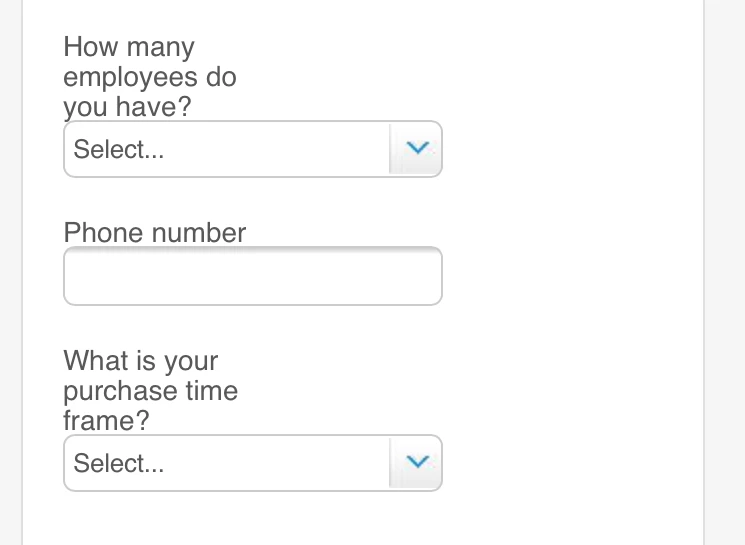
Hello, I'm having a problem on the form when viewing the landing page in ipad. Please take a look screenshot below. So much gap. It first exist when I inserted this dropdown on form.

Hope someone could guide me on this. Thanks.
This post is no longer active and is closed to new replies. Need help? Start a new post to ask your question.

2 replies

Josh_Hill13
Level 10
January 26, 2016

Rolando,

It would help to have the URL. It would also help to understand what gap you are referring to. Is this page set to Mobile or is it responsive?


Might be best to ask a web dev if you have one available.

February 21, 2016

Here's my test URL: http://marketo.ringcentral.com/testform123.html

I also having problem on the image besides the button of the form. Some browsers doesn't  display correctly and also the footnote below the form. Please see screenshot below with red box.

How can I add this image logo besides the button and the footnote into the form itself rather than inserting this into landing page. Because right now I only add this through editing the landing page and then add a custom HTML. I want it to be added into form itself.

Thanks.

February 21, 2016

This is how it looks on IE Browsers

Community Advisor
January 26, 2016

Agree with Josh that we need a bit more info. But I'm assuming the gap you're referring to is the gap on the right, and that on a mobile device you probably want 100% width; (Responsive as Josh mentioned). Should be able to customize/fix with simple CSS. Do you have any custom CSS on the page now that you could share that may be contributing?