May 17, 2018
Question

Form Fields Question

  • May 17, 2018
  • 2 replies
  • 3978 views

Hello,

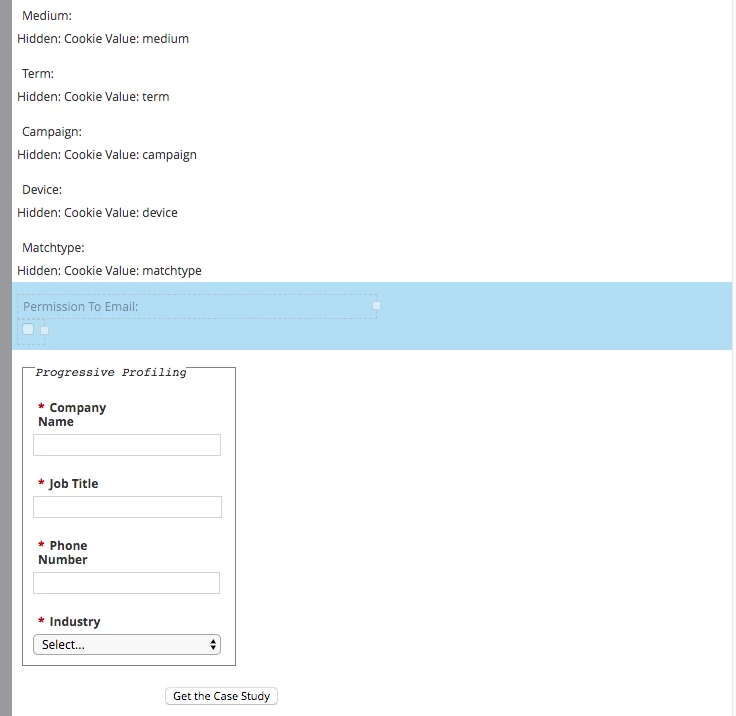
I'm trying to create a field with visibility rules to appear when specific countries are selected (Yes GDPR related). But I want this at bottom, but I can't seem to put it below progressive profiling fields. Is there a work around this? I want the permission to email field at the bottom of form.
This post is no longer active and is closed to new replies. Need help? Start a new post to ask your question.

2 replies

SanfordWhiteman
Level 10
May 17, 2018

You'll need to include FormsPlus::Tag and FormsPlus::Reorder, which are both linked in this CodePen: MktoForms2 :: Demo :: Override Field Order 1.0.1  (Download those 2 JS files and re-host on your server.)

Then the 1-2 lines of code, as shown in the demo, to choose field order.

May 17, 2018

Hi thanks. I'm not the web developer on my team so just want to clarify.

Where are we hosting this? On our website or within Marketo somewhere?

Calon Alpar

Demand Generation Manager

Movable Ink

5 Bryant Park, 9th Floor | New York, NY 10018

O: 512-731-9639| movableink.com

Come join us in pioneering the evolution of digital marketing - We're

Hiring! <https://movableink.com/careers>

On Thu, May 17, 2018 at 2:18 PM, Sanford Whiteman <

SanfordWhiteman
Level 10
May 17, 2018

It's safest to host it on your website, not Marketo, since Marketo has trouble consistently serving JS files from Design Studio (other file types are fine).

Jay_Jiang
Level 10
May 18, 2018

The following is very specific for the question originally posted, i.e. form has only 1 conditional visibility field, and the field should be moved to the bottom of the form above the submit button

Stop using the script if your requirements change.

MktoForms2.loadForm("//app-asdf.marketo.com", "munchkin", formid, function(form) {

var formEl = form.getFormElem()[0];

if(formEl.getElementsByClassName("mktoPlaceholder").length){

var visrow = formEl.getElementsByClassName("mktoPlaceholder")[0].parentNode;

var btnrow = formEl.getElementsByClassName("mktoButtonRow")[0];

formEl.insertBefore(visrow,btnrow)

}

});

May 18, 2018

Hi Jay,

Where are you inserting this? Is this different than the one Sanford gave above? Basically I want a field below the Progressive Profiling box.

SanfordWhiteman
Level 10
May 18, 2018

Jay's snippet is for the specific case where the first field that is subject to Visibility Rules -- regardless of what field that is -- is the one you want to move to the bottom of the form, just above the Submit button.

Jay bundled it with part of the form embed code, which might be confusing you. It actually stands alone like so, and you don't need to alter anything you've already got, just add this after the standard Forms 2.0 embed code (also shortened the snippet, as long as we're going for the lightest-weight approach):

<script>

MktoForms2.whenReady(function(form){

  var formEl = form.getFormElem()[0],

      firstRowWithVisRule = formEl.querySelector(".mktoPlaceholder").parentNode,

      submitButtonRow = formEl.querySelector(".mktoButtonRow");


  if (firstRowWithVisRule) {

    formEl.insertBefore(firstRowWithVisRule,submitButtonRow);

  }

});

</script>

However (as Jay cautions) this code won't work anymore if you change your form structure (order of fields and/or number of fields w/VRs) because you aren't telling it anything about the real form field names, just the form field positions as of this point in time.

For code that continues to work even if you change how the form looks/behaves, you'd include the 2 FormsPlus scripts, then call reorderFields like this:

<script>

MktoForms2.whenReady(function(form){

  var fieldOrder = ["PermissionToEmail"];

  reorderFields(fieldOrder);

});

</script>

Where PermissionToEmail is of course the name of the field you're targeting. As you can see, the site-specific code here is even shorter than the standalone code snippet above, but you do have to grab copies of the FormPlus JS for this to work. If that's proving too difficult you can use the standalone/single-use way.  Note also that you don't have to include the FormsPlus scripts as external <script src> tags and host the files anywhere. If it's easier, you can just copy-paste the code + copyright and paste into 2 local <script> blocks. Put those <script>s above the <script> that calls reorderFields is all.