Forcing RCE to display rows or columns where all cells contain zeroes | Community
Skip to main content
Level 1
March 17, 2023
Solved

Forcing RCE to display rows or columns where all cells contain zeroes

  • March 17, 2023
  • 1 reply
  • 2233 views

Is there any way to force Revenue Cycle Explorer to display all values in a field, even when all cells contain 0's?
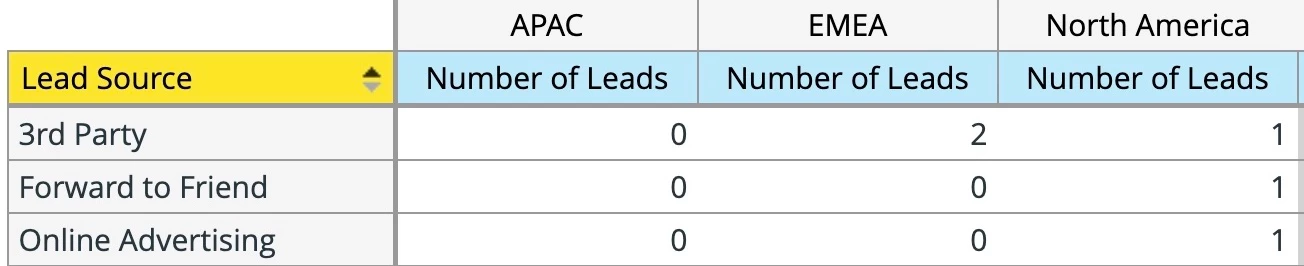

For example, in this report showing new leads collected in a week, one person (from North America) came in as "Forward to Friend" and one came from "Online Advertising."


Next week, however, if no one comes from "Forward to Friend," RCE will not show that line in the report at all, so "Online Advertising" will be the second line in that report instead of the third. These shifting lines complicate work our analytics team does with these reports.


Does anyone have a workaround to force all values to appear in the report every time, regardless of the cell contents? 

This post is no longer active and is closed to new replies. Need help? Start a new post to ask your question.
Best answer by Darshil_Shah1

Interesting! I don't see an option in the RCE to include rows for values that have 0 leads (measure attribute) in them natively. You could load test leads to ensure that there's at least one person for each lead source value. However, if you're exporting this data in the CSV format, then it's relatively simple to adjust the rows/check and insert missing rows as a pre-processing step before injecting data to your analytics platform to ensure that rows are always in the same order. Almost all programming languages have extensive libraries for you to manipulate CSV data.

1 reply

Darshil_Shah1
Community Advisor and Adobe Champion
Darshil_Shah1Community Advisor and Adobe ChampionAccepted solution
Community Advisor and Adobe Champion
March 18, 2023

Interesting! I don't see an option in the RCE to include rows for values that have 0 leads (measure attribute) in them natively. You could load test leads to ensure that there's at least one person for each lead source value. However, if you're exporting this data in the CSV format, then it's relatively simple to adjust the rows/check and insert missing rows as a pre-processing step before injecting data to your analytics platform to ensure that rows are always in the same order. Almost all programming languages have extensive libraries for you to manipulate CSV data.

Level 1
March 20, 2023

Thanks for the suggestion, Darshil! I've exported a few reports to CSV to share with the team so they can test with them.

Darshil_Shah1
Community Advisor and Adobe Champion
March 21, 2023

Great and you're very welcome! 🙂