Flow Conditions and Random Sample | Community
Skip to main content
February 3, 2014
Solved

Flow Conditions and Random Sample

  • February 3, 2014
  • 3 replies
  • 1474 views
Hey all, just looking for a quick sanity check on something. 

I have an email with three variations: 

1 is our control
2 is a test with a new subject line
3 is specifc to a particular acquisition campaign and should ONLY go to people acquired via that campaign

I want to set up my conditions on the Send Email flow step so that anyone part of the campaign gets the campaign specific email, then all other leads are random sampled 50/50 to test the control vs. the new subject line. 

Here's my setup -- does this make sense? I am assuming that since only the first matching condition applies, then anyone with the matching lead source notes will get caught by the first condition, then the rest of the group will be divided 50/50. 
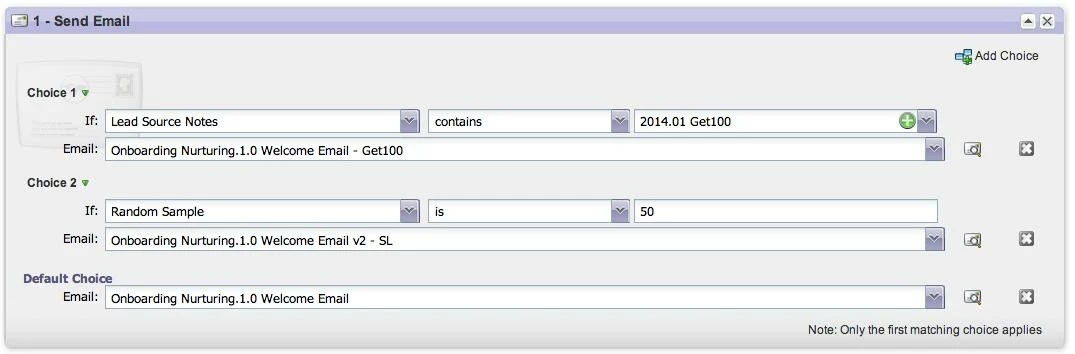


Thanks!
This post is no longer active and is closed to new replies. Need help? Start a new post to ask your question.
Best answer by Josh_Hill13
Breno is right on this. This will not have the desired effect.

You might consider breaking this up into two or three steps:

campaign 1: Lead Source Notes Email
Smart List = Group 1 people who meet whatever it is + Lead Source Notes CONTAINS ZZZ
Send Email X

Campaign 2: Smart List = if Group 1 who Was Not Sent Email X, then go to
Flow where Send Email Random Sample 50, Default = Y which is the 50/50 split method.

Make sure that count in Campaign 2 sounds right. Pretty sure you want Was Not, but check the count and leads who get returned.

3 replies

February 3, 2014
I would suggest revisiting Choice 1. 

Is 2014.01 Get100 a static/smart list/campaign?

Choice 1 may return a record set while Choice 2 is processing 50% of your smart list, not necessarily reflecting the actual goals.

The article "Random Sample Made Easy" would highlight a safe approach
Josh_Hill13
Josh_Hill13Accepted solution
Level 10
February 3, 2014
Breno is right on this. This will not have the desired effect.

You might consider breaking this up into two or three steps:

campaign 1: Lead Source Notes Email
Smart List = Group 1 people who meet whatever it is + Lead Source Notes CONTAINS ZZZ
Send Email X

Campaign 2: Smart List = if Group 1 who Was Not Sent Email X, then go to
Flow where Send Email Random Sample 50, Default = Y which is the 50/50 split method.

Make sure that count in Campaign 2 sounds right. Pretty sure you want Was Not, but check the count and leads who get returned.
February 4, 2014
Thanks Breno and Josh for the feedback. 

I had hoped that after the leads from the specific campaign were sent the specific variation, then the random sample would take 50% of the remaining members. But sounds like you can't combine them that way based on what you guys were saying. 

Josh your proposed solution was also what I had in mind as a fallback -- thanks!