First Touch GCLID Time Stamp Smart Campaign Help | Community
Skip to main content
Ellie_Cary
Level 2
November 22, 2019
Question

First Touch GCLID Time Stamp Smart Campaign Help

  • November 22, 2019
  • 1 reply
  • 1822 views

Hello,

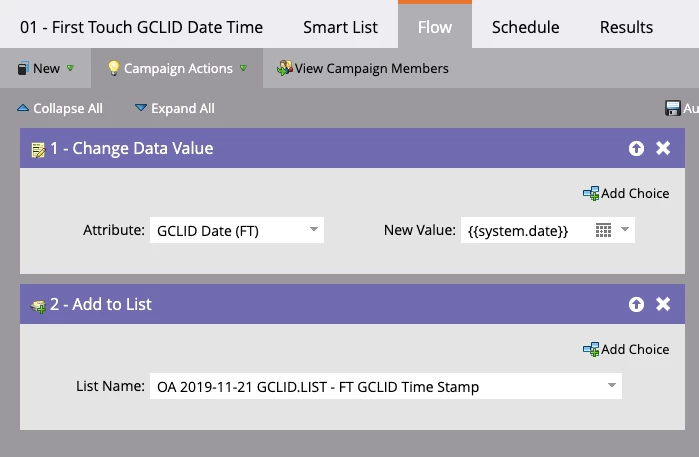
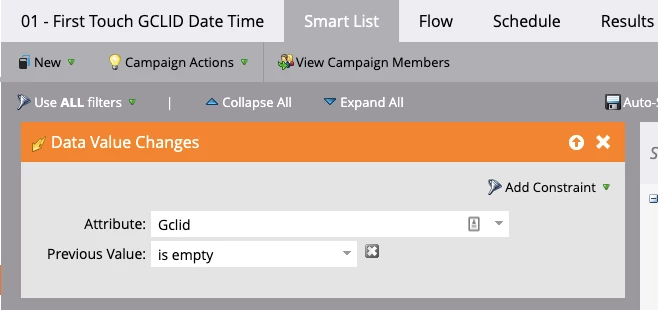
I'm trying to time stamp whenever a GCLID is submitted for the first time on a contact (whether it's a new or existing contact). I've set up my filters and then tested the form I submitted. The GCLID is populating, but the timestamp is not. Is there something I am doing wrong with my respective smart list and flow below?

I originally thought I could include the date stamp on the form as a hidden field but I need to make sure this is for first touch only.

Thanks!
This post is no longer active and is closed to new replies. Need help? Start a new post to ask your question.

1 reply

SanfordWhiteman
Level 10
November 22, 2019

When a lead is created, that's not a Data Value Change.

I wouldn't use a Smart Campaign here. Add the value as a hidden field only if gclid is also present. Set the field to Block Updates from form fills (as you should be doing with the first gclid field already). Then they will be set together, and only once.

Ellie_Cary
Level 2
November 22, 2019

Much appreciated @Sanford Whiteman! 

Do you have a recommendation for how to treat a contact if they were to fill out the form again with a second Gclid code? We have leads who pop back up after a period of time, so it's not unusual.  I'm needing to call out first touch but also don't want to completely ignore multi-touch if someone comes back in and fills out the form again at a later date. 

Thanks,

Ellie