
Filtering Email Bot Activity Feature V2 | Community
Skip to main content
Sreekanth_Reddy
Adobe Employee
Adobe Employee
March 16, 2022

Filtering Email Bot Activity Feature V2

  • March 16, 2022
  • 33 replies
  • 23383 views

May 2022 release details: https://nation.marketo.com/t5/product-documents/filtering-email-bot-activity-feature-may-2022-release/ta-p/324860


With a focus to address bot's impact on Email engagement, in 2021 we have launched our first version of filtering email bot activities. We have seen that this version of the solution is capturing an average of 2 Million bot activities per week for nearly 1000 Marketo customers. The impact is 3% of all email clicks and opens logged, while the industry average is ranging from 15% to 30%.


We got feedback from a lot of customers and from the Marketo community. We have categorized the feedback into the following themes:


Themes

Description

More Transparency

The current version identifies the bot and doesn't log activities identified as bots.
Almost every customer and community expressed they would like to log the activities and do their own analysis

More Robust filtering

The current version completely relies on the IAB list and we need to introduce more sophisticated filtering to identify bot activities

More Control

As a customer, I find few user-agents/IPs that are creating bot activities and would like to include them in bot activity filtering criteria


We have been working on enhancing the feature that is more sophisticated patterns and gives more control to customers. As part of this effort, in the March release we have made the following enhancements:


  • Now Marketing admins have the option to opt for logging activities that are identified as bot
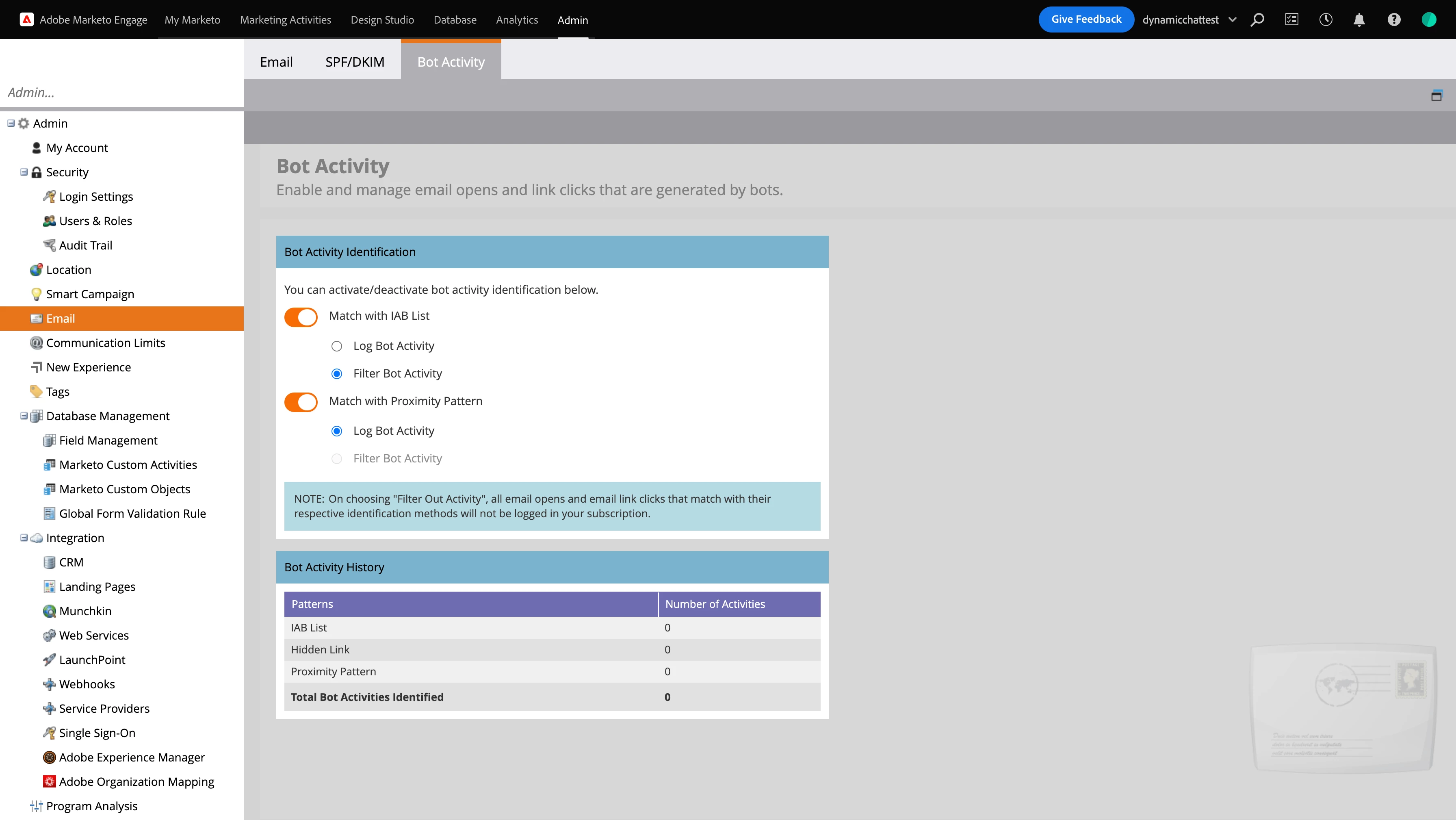
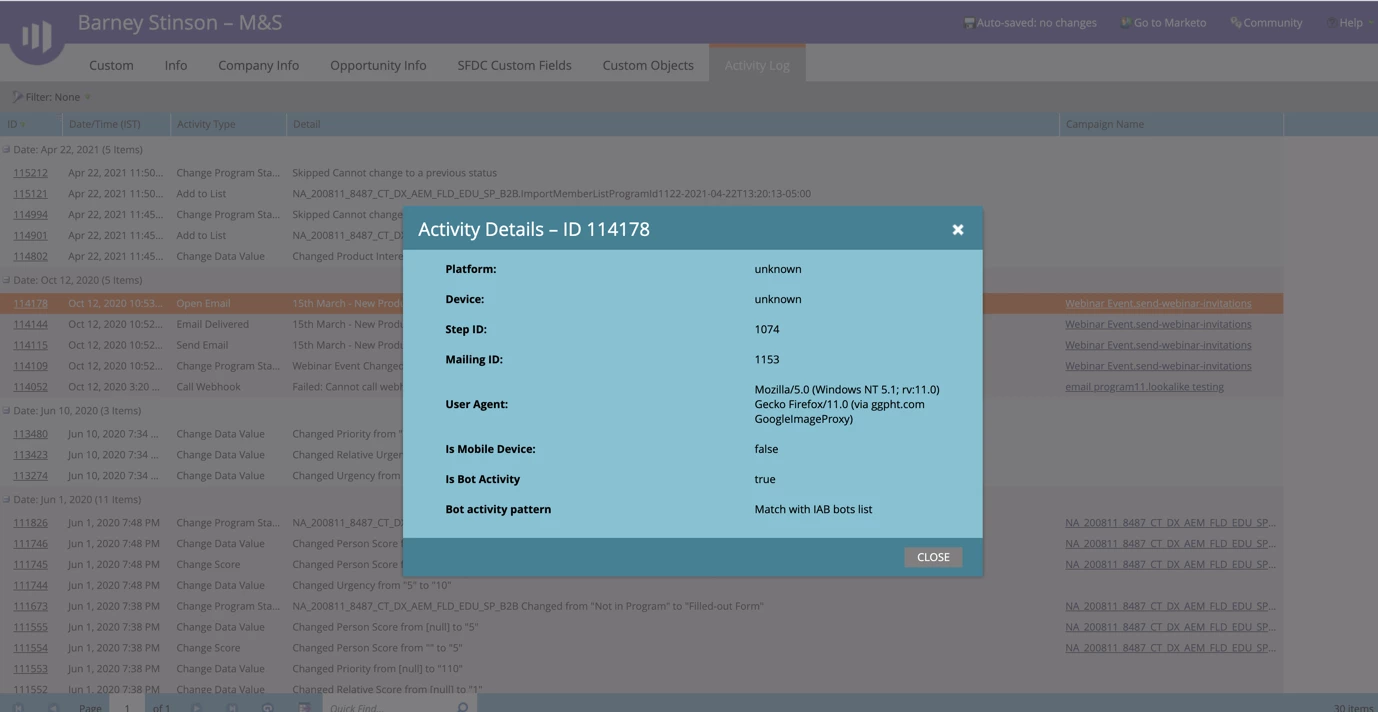
  • We have added 2 new attributes to email click, email open activities
    • “Is Bot Activity”, is a boolean value (True/False) and will be marked as true if the activity is identified as bot activity
    • “Bot activity pattern”: To highlight the pattern respective activity matched with. In this current release, all activities that are identified as bot will have value “match with IAB bot list”
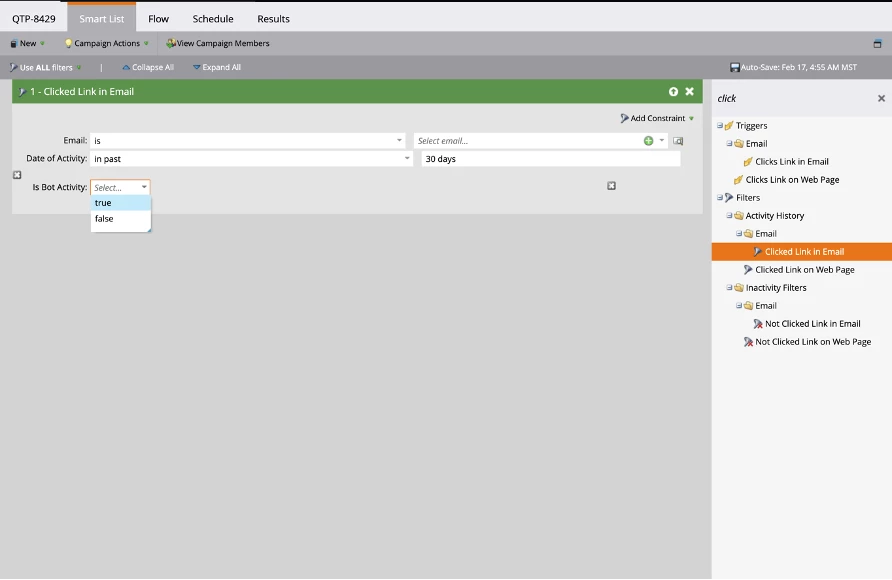
  • These attributes are available as constraints in filters and trigger of these respective activities i.e Clicked link in email, Clicks link in email
     

Useful Links:

This post is no longer active and is closed to new replies. Need help? Start a new post to ask your question.

33 replies

Vinay_Kumar
Community Advisor
Community Advisor
March 16, 2022

Thanks for the update @sreekanth_reddy 

This will be helpful for filtering and analyzing the bot email addresses. 

Level 2
April 13, 2022

I see additional values to choose from in the "Bot Activity Pattern" constraint. What are these additional value besides "Match with IAB bots list" and how do they work?

Tmosco23
Level 2
April 16, 2022

@rajnikant-modi I was wondering the same thing since no people appear for the first three options, but 4k+ show up for "N/A" in my instance. I'm not sure what the difference is between an empty value and "N/A" at this point.  

Sreekanth_Reddy
Adobe Employee
Adobe Employee
April 17, 2022

@rajnikant-modi Those are the easter eggs for the upcoming release :). Currently, filtering still works based on Match with the IAB bot list. In the next release, we are introducing 2 new ways of identifying Email bot activity. 


  • Match with Hidden link UA/IP: We going to a hidden link to your email and capture UA/IP clicks coming from these links. Activities that match with these UA/IPs will be marked as bots
  • Event close to other bot activity or "Proximity pattern": When more than multiple activities happen at the same time they are identified as bots too

More details will share post-release, but for now as I mentioned filtering is being done only based on IAB list of UA/IPs

Sreekanth_Reddy
Adobe Employee
Adobe Employee
April 17, 2022

@tmosco23 Thank you for bringing this up. In the last release, we added an option to opt for logging the bot activities into your Marketo instance. We have introduced new attributes to flag activities as bots or not.  So,

  • Activities that are identified as bots will have "Bot Activity" as "True" and Bot Activity Pattern as "Match with IAB list"
  • Activities that are identified as not bots will have "Bot Activity" as "False" and Bot Activity Pattern as "N/A"
  • Activities that happened before we introduced these attributes will have "Bot Activity" as " " (empty) and Bot Activity Pattern as " " (empty)

I hope this makes sense. Let me know you comments

Darshil_Shah1
Community Advisor and Adobe Champion
April 17, 2022

This is super-helpful, @sreekanth_reddy. Thank you so much! I was also curious about the new filter values.


Does pattern matching make use of AI/ML capabilities or does it rely solely on the proximity of events to classify bot-like activity?


Also, can we possibly include some details in the Filtering Email Bot Activity documentation page around the new filter values?

Sreekanth_Reddy
Adobe Employee
Adobe Employee
April 18, 2022

@darshil_shah1 

No AI/ML at this point but we are looking into it. Regarding the documentation page, as I mentioned above other two patterns are part of May 2022 release and documentation will be updated accordingly

Darshil_Shah1
Community Advisor and Adobe Champion
April 18, 2022

Awesome, thank you for the clarification, @sreekanth_reddy, appreciate it.

Level 2
April 26, 2022

@sreekanth_reddy - Thank you so much Sreekanth for the detailed description. This is really helpful.

Adobe Employee
May 6, 2022

Hi @sreekanth_reddy 

The Hidden link in emails, is that added to emails automatically, if the logging feature is turned on? Do emails need to be re-approved, re-created to include the link?

Also, will we be able to filter the Bot clicks out of Email Performance reports?

Thanks!