
Field is Wrapping Below Label on Form - How to Avoid?
The following Marketo form is in a lightbox on our website. It uses the Simple template with custom CSS. The Country's Selector and Opt_in's Checkboxes fields are wrapping to the next line - any idea why this is happening and how to avoid this from happening? I'd like them on the same line. See the custom CSS below as well.
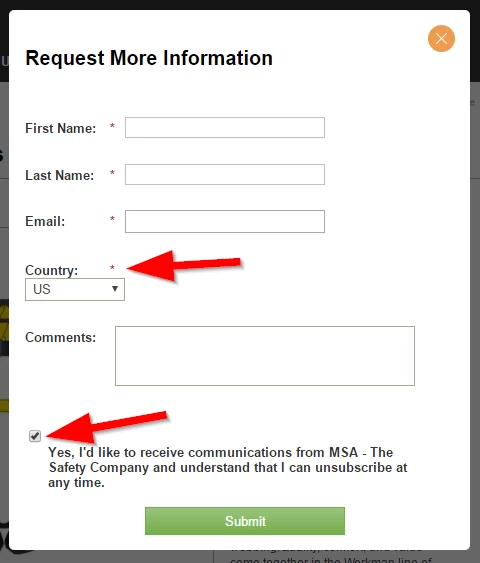
Here is this code:
/* Add your custom CSS below */
.mktoForm .mktoButtonWrap.mktoSimple .mktoButton {
width:200px;
}
.mktoGutter {
display: none;
}
.mktoAsterix {
margin-right: 0
}
.mktoForm select.mktoField {
width:100px !important;
}
.mktoForm textarea.mktoField {
width:300px !important;
}
/* css to customize the field width */
.mktoForm input[type=text], .mktoForm input[type=url], .mktoForm input[type=email], .mktoForm input[type=tel], .mktoForm input[type=number], .mktoForm input[type=date] {
width:200px !important;
margin-left: 10px;
}
.mktoFormCol, .mktoFieldWrap {
width:520px !important;
}
/* css to customize the vertical spacing */
.mktoForm .mktoOffset {
float: left;
height: 1.2em;
width:10px;
}
Thanks for your help!