
Feeding the Durable Unsubscribe List without increasing the database
One common question is how can we add a list of emails to the durable unsubscribed list, coming for instance from other systems, without increasing the size of the Marketo database. This is a key requirement as soon as you use other systems than Marketo to send emails and want to keep complying with legal requirements.
This getting even more complex if one has to manage the fact that some of these leads already exist in the Marketo database and should be kept there, together with their historical information.
The idea is to create a simple program that will handle this efficiently and automatically. Here are the components of the program :
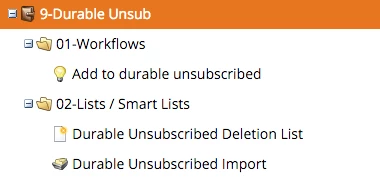
- Let start with the "DurableUnsubscribed Import" list : This is where the durable unsubscribed will be imported. Once the process is finished as we will see, the list will be empty.
- The "Durable Unsubscribed Deletion List" will contain all the leads that are unsubscribed but should not be kept in the database. In other words, they were added to Marketo when you imported leads to the Durable Unsubscribe Import list. It's filters are set as is :
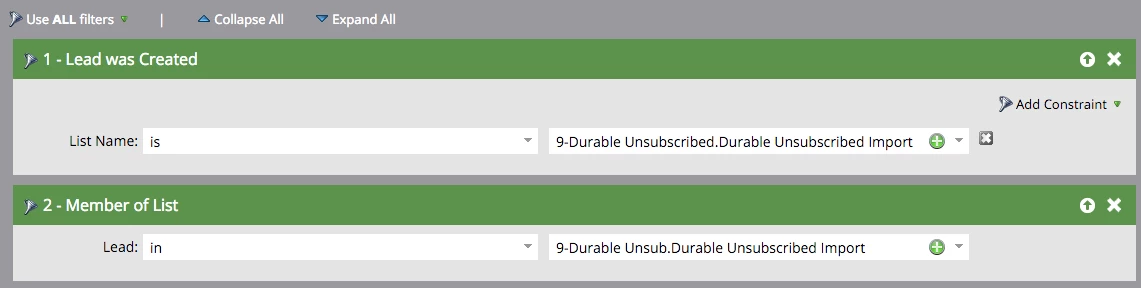
- Please note the usage of the "lead was created" filter with a "List Name" constraint : it enables you to detect specifically the leads that were added only to be added to the DUL.
- We combine this with a "member of list" filter that also checks during the process that the lead is still a member of the import list. As the lead deletion will occur after 2 hours, it enables you to change your mind and remove a lead from the list.
- The smart campaign that does the job is a triggered one
- It will fire when the lead is added to the list

- As it is not allowed to change the "unsubscribe" field through an import, we need to handle it in the smart campaign flow :
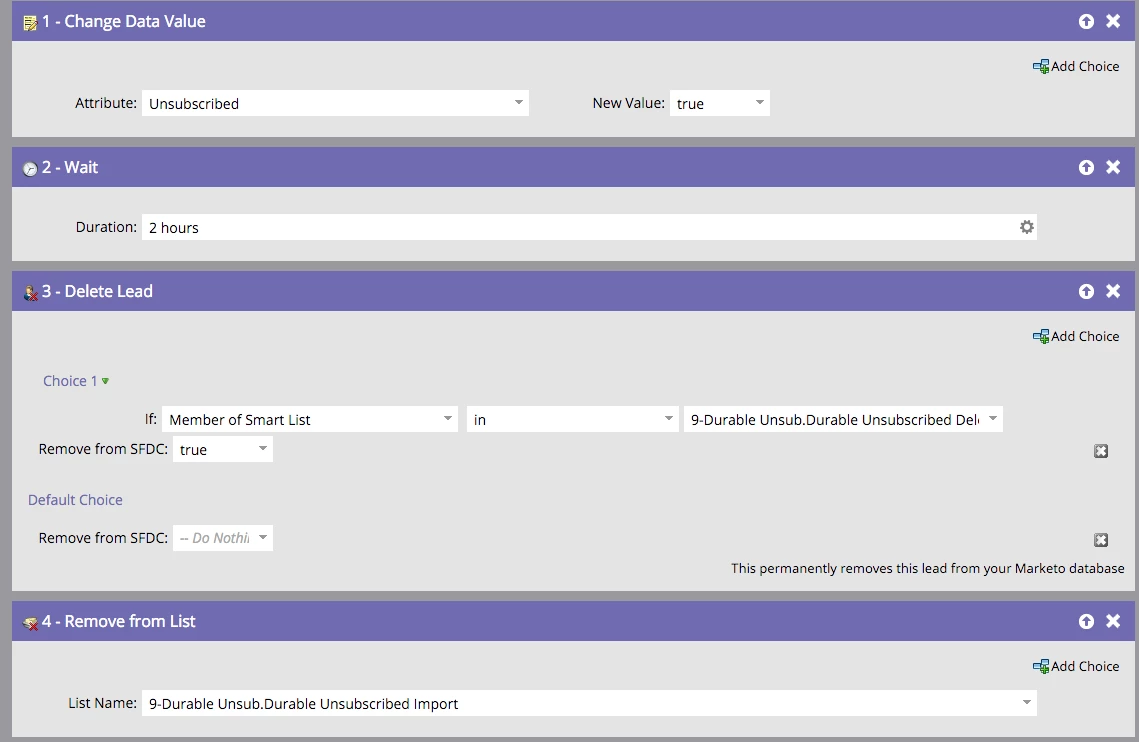
Then we wait 2 hours to leave Marketo ample time to log the un-subscription (We can even leave it 1 day, but do not make it too short). After this delay, we check the lead is still there, waiting for deletion and has been created during the import. For this, we check the lead still belong the the "Durable Unsubscribed Deletion List" smart list and, if so, we delete it.Finally, if the lead has not been deleted (meaning it was there already and is supposed to have some history in the database), we remove it from the Import List
- It will fire when the lead is added to the list
Alternatively, we can set the smart campaign as a batch and run it manually after completing an import in the Import List. In this case, we would replace the trigger with the following filter :
This process will also work if you use the import list API calls and import them to the "Durable Unsubscribe Import" List :
Do not hesitate to provide feedback and alternatives, I'll incorporate them.
-Greg