Feedback Needed: Automated Birthday Greetings Setup in Marketo | Community
Skip to main content
Level 3
March 12, 2024
Solved

Feedback Needed: Automated Birthday Greetings Setup in Marketo

  • March 12, 2024
  • 3 replies
  • 3564 views

I've arranged automated birthday greetings in Marketo, but I want to know if there are any mistakes in the setup that I need to fix. Can you provide feedback or help me correct any errors?


1st step- smart campaign with scheduled recurrence every day

smart list- 
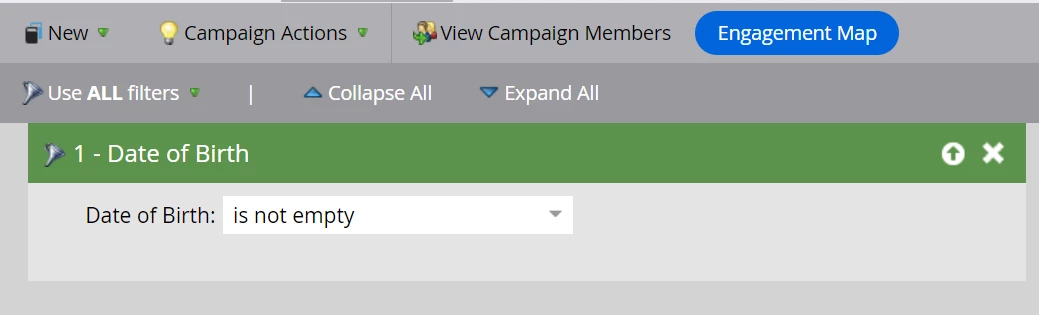
Flow- 
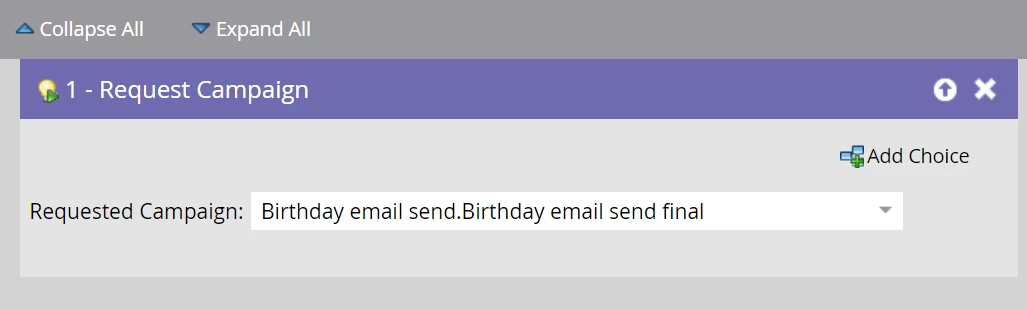
 

2nd Step Trigger campaign which will run every 365 days once

Smart list-
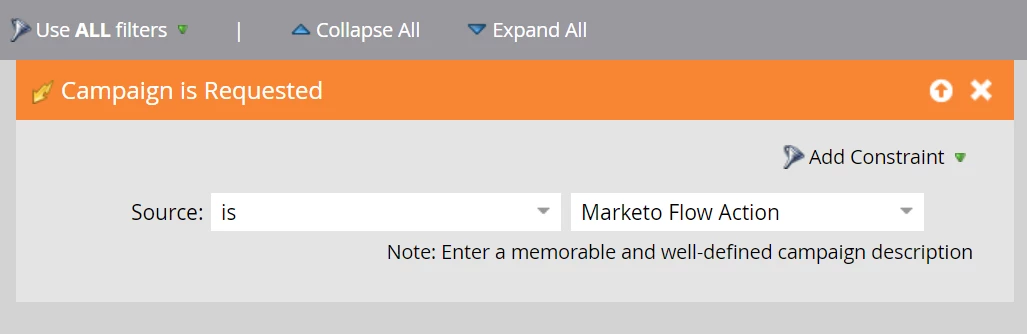
Flow-

I have used the advanced wait step
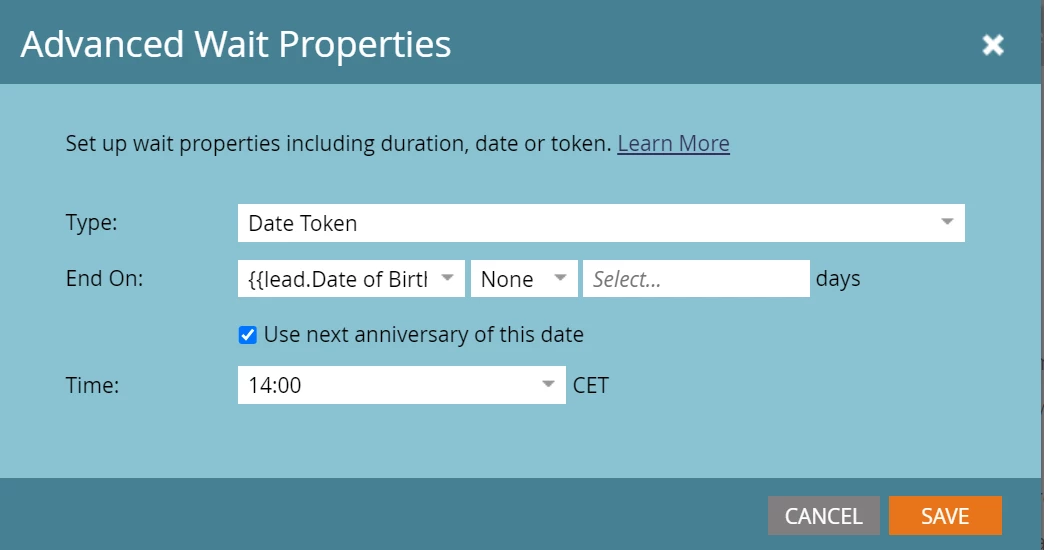
The next step is to send an email


Thank you

This post is no longer active and is closed to new replies. Need help? Start a new post to ask your question.
Best answer by Jo_Pitts1

@karthick77 ,

I've tried to wrap up the approach detailed by a few people into a nice neat package for you.


Create a field called Next Birthday.  You'll need to prime this for all your existing records en masse and for all new records as they come in.


Then create a filter like this:


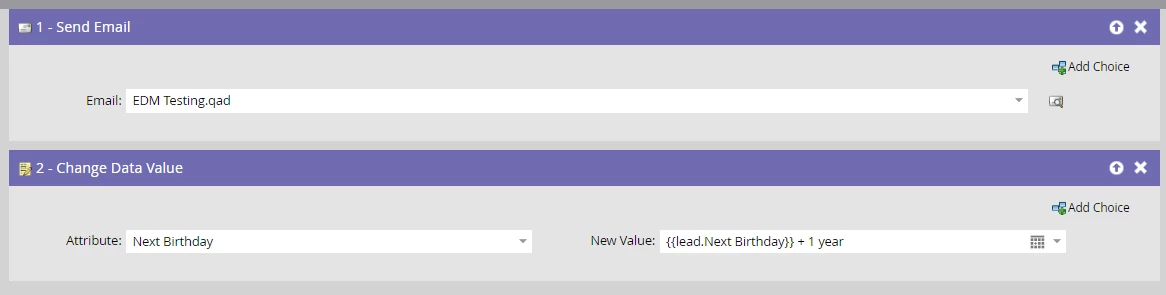
And the following flow steps:


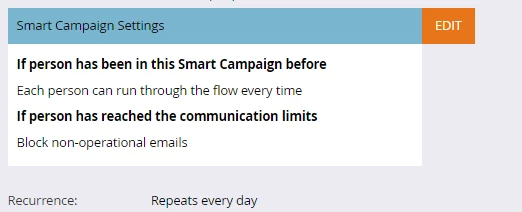
And make sure your schedule like so:


I'd recommend using FlowBoost and a webhook to prime the next birthday field for any new records that come into Marketo (or any updated records that get a new Birthdate).  You can't use Marketo's date math to get you over the line for the priming.  You'll need to work out if the day and month of their birthdate are before or after 'today'.  If they are before, then their next Birthday is happening next year.  If they are after then their next birthday is happening this year.  If you need help with that code, let us all know.


Regards

Jo


3 replies

SaurabhGoyal_GN
Level 4
March 12, 2024

Hi @karthick77 - 

I wanted to discuss a potential solution for the task at hand.

Instead of using multiple smart campaigns, I believe that implementing a single recurring batch smart campaign would be more efficient.

Here's my proposed solution:

1. In the smart list, set the criteria to include individuals with a Date of Birth falling within the current day. Screenshot attached.
2. In the flow, configure the campaign to send an email AND add a step to adjust the DoB for next year - Chage data value - DoB - {{lead.date of birth}} + 1 year.
3. In the qualification criteria, ensure that each person can only enroll once per day. This will account for any changes in Date of Birth. (In case DOB is chaged for anyone, they should get the email on new date as well)
4. Schedule the campaign to run on a daily recurring basis, at a time of your choosing.

By following this approach, we can avoid creating any campaign queues in the process.


If this solution meets your requirements, please mark it as the solution.

Darshil_Shah1
Community Advisor and Adobe Champion
March 12, 2024

@saurabhgoyal_gn, this isn’t that simple, and Date of Birth in the time frame today won’t work as the Date Of Birth would not have year set to current year- the year would be person’s actual birth year, and the exact birthday date would never repeat.


@karthick77, check out this thread where Sandy discusses the solution of setting the next birthday date in an alternative field and then sending the Birthday email every year based on that. 

SaurabhGoyal_GN
Level 4
March 12, 2024

@darshil_shah1 - Agreed! I assumed that the field will contain current year only.

A new field can be created which can contain the date of current year and then we can add the 1 year right after sending the email.

Thanks for highlighting!

Jo_Pitts1
Community Advisor
Jo_Pitts1Community AdvisorAccepted solution
Community Advisor
March 12, 2024

@karthick77 ,

I've tried to wrap up the approach detailed by a few people into a nice neat package for you.


Create a field called Next Birthday.  You'll need to prime this for all your existing records en masse and for all new records as they come in.


Then create a filter like this:


And the following flow steps:


And make sure your schedule like so:


I'd recommend using FlowBoost and a webhook to prime the next birthday field for any new records that come into Marketo (or any updated records that get a new Birthdate).  You can't use Marketo's date math to get you over the line for the priming.  You'll need to work out if the day and month of their birthdate are before or after 'today'.  If they are before, then their next Birthday is happening next year.  If they are after then their next birthday is happening this year.  If you need help with that code, let us all know.


Regards

Jo


Jo_Pitts1
Community Advisor
Community Advisor
March 12, 2024

@karthick77,

I was thinking more on the priming requirement.


Existing

For existing records, I'd be inclined to:

  1. Create a smart list that contained all your records where the birthdate field was not empty.
  2. Export the records in the smart list.  Make sure the view you export contains the lead ID and the Birthdate fields.
  3. Use something like Excel to calculate the next birthday for those records.  This formula will get you over the line if you use Excel.  It presumes the birthdate is in column A.  Adjust as needed.
    =IF(DATE(YEAR(TODAY()),MONTH(A1),DAY(A1))>TODAY(),DATE(YEAR(TODAY()),MONTH(A1),DAY(A1)),DATE(YEAR(TODAY())+1,MONTH(A1),DAY(A1)))​
  4. Use bulk import (through the Marketo REST API) to load the next birthday data against the correct lead records.  In this instance 'correct' means using the the ID to match the records.

New and Updated

if you decided to take my recommended approach of using a flowboost powered webhook to prime the next birthday for your new and updated records, this code would work:


const birthDate = new Date('1971-01-15'); const thisYear = new Date().getFullYear(); if (birthDate.setFullYear(thisYear) > new Date()) { var yearAdjust = thisYear } else { var yearAdjust = thisYear + 1 } var nextBirthday = new Date(birthDate.setFullYear( yearAdjust )) return(nextBirthday)


You'd replace the '1971-01-15' (including the quotes) with the birthday field in your database (e.g. {{lead.birthday}}), and map the returned value to your next birthday field in Marketo.


I'm sure those better at JS than I can given you an even more elegant solution.


Once it's primed, there is no need to call the webhook; just use Marketo's internal date math as per my previous post.


Cheers

Jo

Level 3
March 13, 2024

Thanks for all the valuable input and guidance.


My campaign is working fine now. I'm going with a simple Marketo campaign to greet the leads on their birthdays.


Thank you for explaining the ideas to me. @jo_pitts1 @darshil_shah1 @sanfordwhiteman @saurabhgoyal_gn 


Karthcik R