Fake clicks followed by fake web visits | Community
Skip to main content
Level 2
February 1, 2018
Question

Fake clicks followed by fake web visits

  • February 1, 2018
  • 6 replies
  • 9001 views

Hello,

We've had a lot of issues with fake, server/spam filter clicks in the past. I have read several posts in the community and have never really found a fully-functioning solution. That said, some people have suggested that requiring a web page visit to also occur is an option. We are now seeing fake web visits that are accompanying the fake clicks. Is anyone else experiencing this? Is there a solution out there or a post about this already? You can see in the image below that upon delivery all of the links in the email are being clicked and then all of the web pages are being visited.
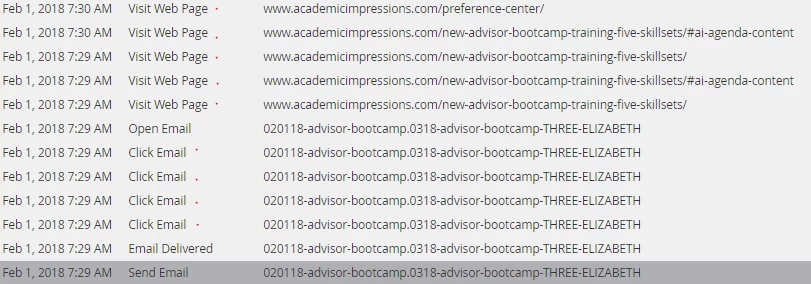
This is a data nightmare!

Thank you,

Frank

This post is no longer active and is closed to new replies. Need help? Start a new post to ask your question.

6 replies

SanfordWhiteman
Level 10
February 1, 2018

This is just a sign of a thorough mail scanner.  In order to determine the final, unattended target of a link, it's necessary to load the page in a headless browser and see where it goes. The headless browser will probably not run GA as it's a super-well-known analytics package, but other packages like Munchkin will still execute because there's no way of knowing if they're mere trackers or directing the user experience.

Josh_Hill13
Level 10
February 2, 2018

Marketo needs to fix this.

We had this happen and now it's triggering visits pages on our attempted spam scanner trap. It might become self aware one day.

Level 4
February 2, 2018

I'm not sure this would work, but I've thought of putting an "invisible" link as the first link of my emails (in the pre-header) and ANYTHING that clicks that link is garbage. You would have to set success to false or somehow mark this (temporarily) as not being a successful interaction. Perhaps a filter campaign in this instance would be used, so:

If main CTA is clicked, AND invisible link is NOT clicked AND there's a CTA linked website visit, then SUCCESS, otherwise, do nothing.

The downside is, if there IS an interaction post scanner, you'd never know it.

Wait! What if you timestamped that initial invisible click, and your filter campaign could be set to look at the timestamp and let's say positive interaction that happens 5-10 minutes after that timestamp would be considered a "live" interaction?

Josh_Hill13
Level 10
February 2, 2018

I have tried this. The scanners do see that link and try it and also block your email and then create a Visit Page. So sure, you could block that lead.

I am skeptical that this would be a long term solution due to lower delivery rates in some situations.

Level 4
February 2, 2018

I'm stoked I had the same idea as you, Josh!!

So the mail scanners see that link and essentially mark it as spam?

Oz_Platero
Level 6
March 23, 2018

@frankbuzzanca

Marketo should have a new feature to help detect those link scanners.  File a support ticket and ask to see if it is turned on in your instance.

Thank you,
oz

Dan_Stevens_
Level 10
March 23, 2018

We have this turned on in our instance and it doesn't help.

Oz_Platero
Level 6
March 28, 2018

There was an article around this feature, but it has been taken down due to incorrect information. The article is being re-written by Marketo.  It seems the feature is still in development stages at this time.

In the meantime you can take some action on clicks on some of these types of false positives.

False positives for email clicks

nation.marketo.com/docs/DOC-4693

Suggestion by a user is to look for clicks on images too small to see.  1x1 Pixel

https://nation.marketo.com/message/117336#comment-117336

Thank you
Oz

SanfordWhiteman
Level 10
March 23, 2018

There is a solution for identifying a true click on an email link if it leads to another deliberate human action, i.e. submitting a form on the LP, or even just navigating to the next web page after the LP.

It's really only the first pageview,of the LP -- the one that isn't a specifically human action -- that can't be attributed to a true click.

Grégoire_Miche2
Level 10
March 23, 2018

Even scrolling on a long page is a good sign, if only we could detect it in Marketo...

Could we imagine a solution that would analyse the referrer, the traffic source and the behavior on the page and log a specific event through the munchkin API ?

-Greg

SanfordWhiteman
Level 10
March 24, 2018

Even scrolling on a long page is a good sign, if only we could detect it in Marketo...

We could detect scrolling on the browser side and use that as another type of human confirmation.

Could we imagine a solution that would analyse the referrer, the traffic source and the behavior on the page and log a specific event through the munchkin API ?

No need to analyze that other data, you just need to wait for an interaction (human-driven event), which could be a keypress, click, form submission, or (now that you've suggested it) a scroll.

At the point that you capture such an event, you can reissue the Clicked Email activity (exactly as usual, with the email asset and clicked link) to Marketo in such a way as to make it distinct from other such events, i.e.

But the remaining gap is the pageview alone, if there's no interaction and it just sits there.

Level 2
September 12, 2018

I just had a convo with Marketo about this, as I was marking success and alerting my sales team based on the click, and totally losing credit, as the person who "clicked" turned out to no longer be at the company.

Here is what they said. 1st thing to check: "email opens" event only fire if you download all the images in the email. So check that you have indeed downloaded these images. You can open the email without the images and Marketo (like any other emailing solution) will not register the open event, but will indeed register the click, since the click is routed through the click detection server.

SanfordWhiteman
Level 10
September 12, 2018

1st thing to check: "email opens" event only fire if you download all the images in the email. So check that you have indeed downloaded these images. You can open the email without the images and Marketo (like any other emailing solution) will not register the open event, but will indeed register the click, since the click is routed through the click detection server.

While this statement is true, it isn't material to any kind of solution. Not sure what you're suggesting here... the lack of an open doesn't mean the lack of a human.

Charlotte_Taft
Level 1
February 1, 2019

Has anyone here found a solution? I know this thread is ageing. We are running into the same issue - our marketo clicks and GA visits are super inflated.