Facing issue in the Velocity Script to trim Date, Time and Timezone from one Attribute. | Community
Skip to main content
Level 2
November 30, 2020
Solved

Facing issue in the Velocity Script to trim Date, Time and Timezone from one Attribute.

  • November 30, 2020
  • 1 reply
  • 2375 views

Hey,


I want to trim the Date, time and timezone from single Attribute of the Marketo.

When I used static value it approves the email without error but when I am using Marketo Attribute for the same one it shows the correct value in Preview but shows error while approving the email.


The value of the ${lead.appointmentStartDateTimeText} is 03/04/2020 01:30:00 PM MST
I wan to fetch the Time 01:30:00 PM from the above value.

===========

Below is the script:

#set ($string = "${lead.appointmentStartDateTimeText}") #set ($s= $string.split(" ")) $s.get(1)

==========

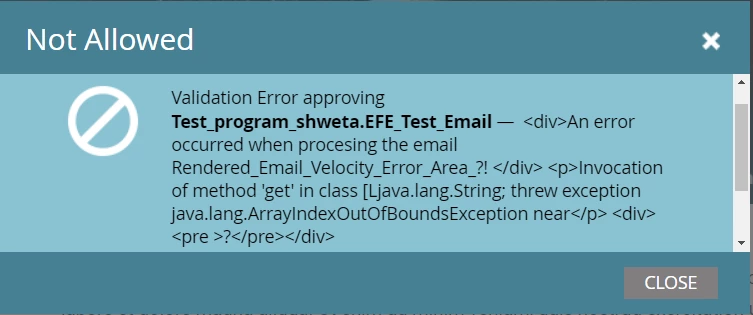
Below is the error:


Validation Error approving Test_program_shweta.EFE_Test_Email — <div>An error occurred when procesing the email Rendered_Email_Velocity_Error_Area_?! </div> <p>Invocation of method 'get' in class [Ljava.lang.String; threw exception java.lang.ArrayIndexOutOfBoundsException near</p> <div><pre >?</pre></div>  


====


Would anyone be able to help me here? We would need to Approve the email in order to use it in smart campaign.


Attached the screenshots of the script and errors.


This post is no longer active and is closed to new replies. Need help? Start a new post to ask your question.
Best answer by SanfordWhiteman

First, pleases don't use generic variable names like $string and $s. This is the wrong way to start w/coding. Use informative names that help your code be self-documenting.


Also, rather than trying to write your own parser for a well-known date format, use Velocity's built-in date awareness.


The direct reason for your error is you haven't coded defensively for the case when the field is empty, as is the case during approval.


You want:

#if( !$display.alt($lead.appointmentStartDateTimeText,"").isEmpty() ) #set ( $appointmentStart = $date.toDate("dd/MM/yyyy hh:mm:ss a", $lead.appointmentStartDateTimeText) ) ${date.format("hh:mm:ss a", $appointmentStart)} #end

Note in this particular case I'm not including the timezone (z) in parsing. This is only okay because you can both parse and output in the system timezone for this case. In most other cases, preserving the timezone of the original value is absolutely critical, and without timezone-awareness date code will always be buggy.

1 reply

SanfordWhiteman
SanfordWhitemanAccepted solution
Level 10
November 30, 2020

First, pleases don't use generic variable names like $string and $s. This is the wrong way to start w/coding. Use informative names that help your code be self-documenting.


Also, rather than trying to write your own parser for a well-known date format, use Velocity's built-in date awareness.


The direct reason for your error is you haven't coded defensively for the case when the field is empty, as is the case during approval.


You want:

#if( !$display.alt($lead.appointmentStartDateTimeText,"").isEmpty() ) #set ( $appointmentStart = $date.toDate("dd/MM/yyyy hh:mm:ss a", $lead.appointmentStartDateTimeText) ) ${date.format("hh:mm:ss a", $appointmentStart)} #end

Note in this particular case I'm not including the timezone (z) in parsing. This is only okay because you can both parse and output in the system timezone for this case. In most other cases, preserving the timezone of the original value is absolutely critical, and without timezone-awareness date code will always be buggy.

Level 2
December 1, 2020

Hey Sanford, Thanks for the solution.


This solution works for the string/text Data Type but my attribute's Data Type is DateTime and its a constraint under Marketo activity. So using this script I don't see any value in the Preview.


#if( !$display.alt($Activity_Marketo__cList.get(0).Appointment_Start_Date_Time_Text__c,"").isEmpty() ) #set ( $Appointment_Start = $date.toDate("yyyy-MM-DD hh:mm:ss a", $Activity_Marketo__cList.get(0).Appointment_Start_Date_Time_Text__c) ) ${date.format("hh:mm:ss a", $Appointment_Start)} #end


The output of the above script is : ${date.format("hh:mm:ss a", $Appointment_Start)}

but If I remove get(0) from above attribute it shows nothing.


Can you please help for the same when Data Type is DateTime.

SanfordWhiteman
Level 10
December 1, 2020

Please remember to highlight your code so I don't have to edit your post each time, thanks.


This solution works for the string/text Data Type but my attribute's Data Type is DateTime

Doubt it. If you were using split() on it before at all, it's a String (stringified DateTime) in Velocity. DateTimes don't have split().


Since you've now added more to the problem space (you didn't mention anything about Custom Objects before) you also have to make sure the List is not empty.