Solved
Explanation of Email Link Performance Data
For the Email Link Performance reports, what do the various columns mean? I'm not entirely clear.
Clicks - Number of links clicked. (Does it double count clicks if a single recipient clicks twice?)
% Clicks - Percentage of all clicks in the email. (If this captures all clicks, why don't the numbers in each set add up to 100%?)
Leads - Numbe of leads who clicked the link. (Okay. This one makes sense.)
% Leads - Percentage of all leads who clicked a link in the email. (Again, shouldn't the numbers add up to 100%?)
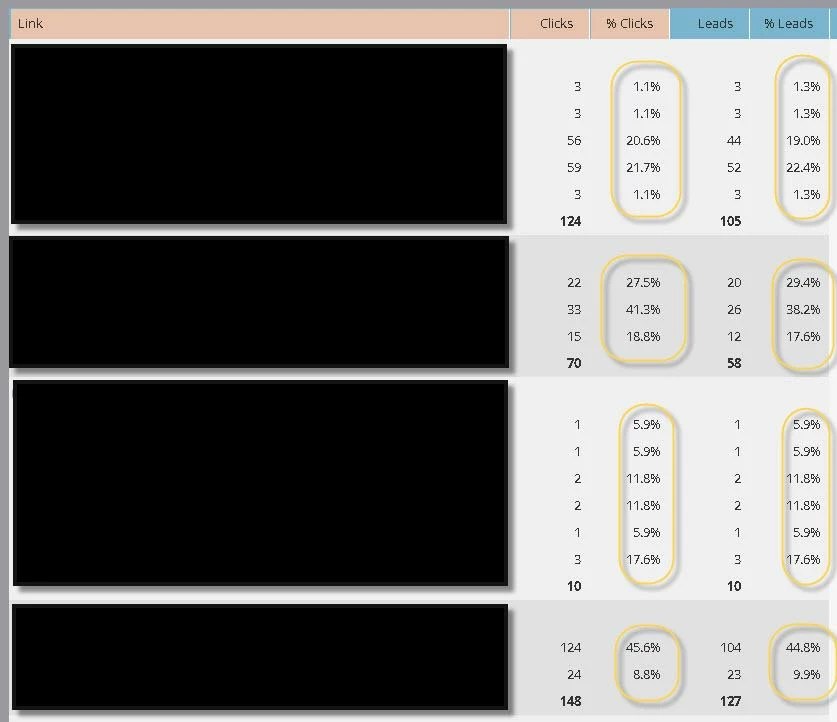
Clicks - Number of links clicked. (Does it double count clicks if a single recipient clicks twice?)
% Clicks - Percentage of all clicks in the email. (If this captures all clicks, why don't the numbers in each set add up to 100%?)
Leads - Numbe of leads who clicked the link. (Okay. This one makes sense.)
% Leads - Percentage of all leads who clicked a link in the email. (Again, shouldn't the numbers add up to 100%?)