
Events App Loading Forever? | Community
Skip to main content
Jessie_Coluccio
Level 2
February 5, 2019
Solved

Events App Loading Forever?

  • February 5, 2019
  • 1 reply
  • 2300 views

Afternoon Team,

I have downloaded the events app and able to see my events- but when I click on an event it comes to the "loading" screen and doesn't progress.

Is this a known issue? Any troubleshooting you can recommend please?

I have been reading the discussions and instructions- already downloaded latest software version for iPad, uninstall + reinstall the app.

Am I missing anything?

Thank you
This post is no longer active and is closed to new replies. Need help? Start a new post to ask your question.
Best answer by Jessie_Coluccio

It did get frustrating just loading loading I downloaded new iPad software, uninstall/reinstall the app, etc.

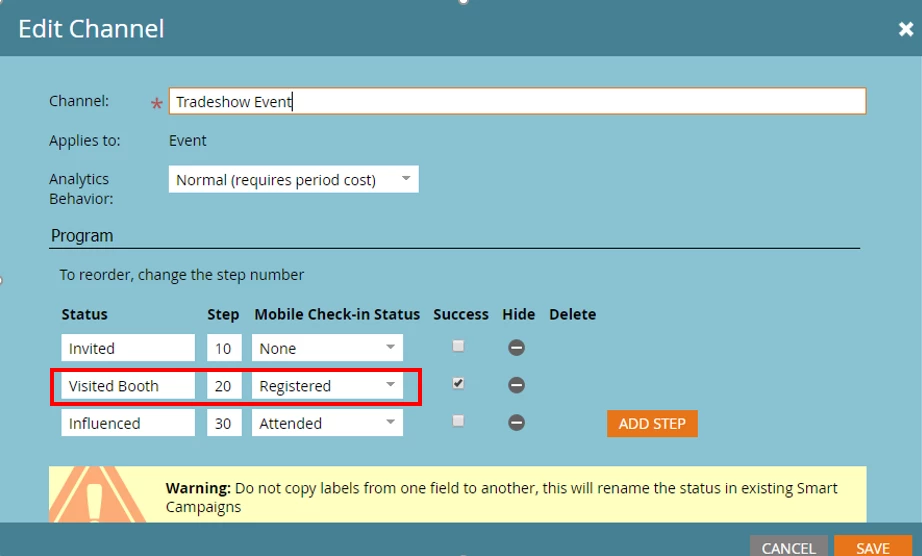
I spoke with support and they said to double check the configuration-for mine it was a tradeshow and I didn't have the registration configured properly.

So if you go to Admin- Tags I had to have my mobile check in status as registered- it was sitting at "none" so nothing was happening.

1 reply

Steven_Rugg
Level 1
February 7, 2019

I am having a very similar issue. My admin role based user is able to see and click on the event but when it loads it displays a "Result data is not valid" pop up and then freezes the entire screen. My only option is then close out of the app entirely from the iPad and start all over to the login screen. It was working fine all week and now all of a sudden it doesn't work.

Like you, Ive tried everything but nothing seems to work. Supports only feedback is try uninstalling and then re installing. My held back reply was "Try updating your terrible app you haven't updated in over 2 years".

Jessie_Coluccio
Jessie_ColuccioAuthorAccepted solution
Level 2
February 11, 2019

It did get frustrating just loading loading I downloaded new iPad software, uninstall/reinstall the app, etc.

I spoke with support and they said to double check the configuration-for mine it was a tradeshow and I didn't have the registration configured properly.

So if you go to Admin- Tags I had to have my mobile check in status as registered- it was sitting at "none" so nothing was happening.