Error adding lead from Marketo to SFDC campaign | Community
Skip to main content
April 18, 2017
Solved

Error adding lead from Marketo to SFDC campaign

  • April 18, 2017
  • 2 replies
  • 4345 views

Hi,

I've added a flow action to add leads who have filled out a form to sync to a SFDC campaign but when I checked, none of the leads had been synced and I found this error message when I looked at the 'results' section of the Smart campaign.
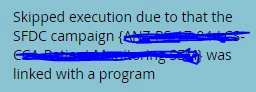
Does anyone know what this error message means and why this flow action has been skipped? The part that's been crossed out was just the name of the SFDC campaign.

Any responses would be greatly appreciated thank you!

This post is no longer active and is closed to new replies. Need help? Start a new post to ask your question.
Best answer by Veronica_Holme4

Hi - when a program is synced to an SFDC Campaign, all the leads that are members of the program and have been given statuses will sync to the Salesforce campaign automatically. The flow steps associated with SFDC campaign sync no longer function (they are what Marketo call "implied sync actions" that will occur automtically because the program is assocaited with the SFDC campaign).

This message is simply telling you that Marketo has skipped that flow step because it is redundant. Check the Summary screen of your program, you'll see the program is synced to a campaign at that level.

If I was to hazard a guess as to why your leads aren't syncing to the SFDC campaign even though your program is associated to the campaign, you may not be correctly assigning Program Statuses to your leads as they come into the program, so they won't sync to the Salesforce Campaign with the correct campaign status. Check that you are using the Change Program Status flow step to assign new leads through the form the appropriate status.

2 replies

Veronica_Holme4
Veronica_Holme4Accepted solution
Level 9
April 18, 2017

Hi - when a program is synced to an SFDC Campaign, all the leads that are members of the program and have been given statuses will sync to the Salesforce campaign automatically. The flow steps associated with SFDC campaign sync no longer function (they are what Marketo call "implied sync actions" that will occur automtically because the program is assocaited with the SFDC campaign).

This message is simply telling you that Marketo has skipped that flow step because it is redundant. Check the Summary screen of your program, you'll see the program is synced to a campaign at that level.

If I was to hazard a guess as to why your leads aren't syncing to the SFDC campaign even though your program is associated to the campaign, you may not be correctly assigning Program Statuses to your leads as they come into the program, so they won't sync to the Salesforce Campaign with the correct campaign status. Check that you are using the Change Program Status flow step to assign new leads through the form the appropriate status.

April 19, 2017

Veronica - you are a lifesaver. Thank you so much for your response! It's working perfectly now (I didn't realise I had to add 'change program status' to the flow as I wasn't really sure what this function was). Thank you a million times again!

Veronica_Holme4
Level 9
May 1, 2017

Hi - the statuses in the program channel must EXACTLY match the campaign statuses in your Salesforce campaign in order to sync. You'll need to check the campaign statuses in Salesforce to ensure they match your channel. Check here for more info on this.