
Empty utm's from embedded form on lead records | Community
Skip to main content
James_Zolinski
Level 4
October 11, 2018
Question

Empty utm's from embedded form on lead records

  • October 11, 2018
  • 1 reply
  • 3104 views

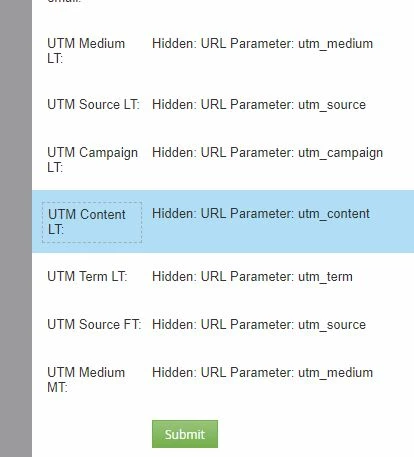
Recently embedded a form on our website using hidden utm's, but when leads fill out the form, the utm's do not appear.

Form with hidden utm's
When I look at the activity log, I see the utm's are there
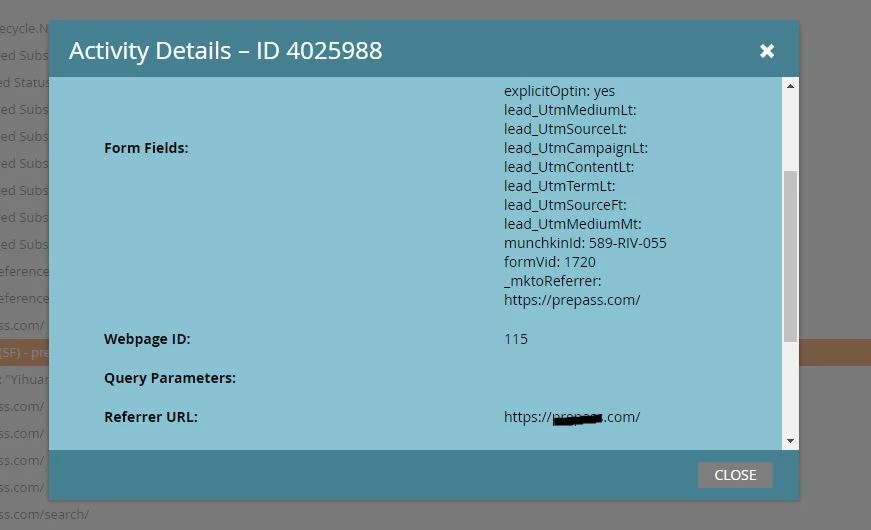
But the utm's are not populating on the lead record when the form is filled.

I do see that on the activity log the query param is missing, but the url for the form does have the query params: https://xxxxxx.com/#?utm_medium=website&utm_source=organic&utm_campaign=contact_me

What am I missing to make this embedded form populate the utm's?

This post is no longer active and is closed to new replies. Need help? Start a new post to ask your question.

1 reply

SanfordWhiteman
Level 10
October 11, 2018

What do you mean by "the URL for the form has the query params"?

Either the person viewed the page w/params or not. It'll show the form either way. If the Visit Web Page didn't have the params... there weren't params.

James_Zolinski
Level 4
October 12, 2018

Aren't the query params the utm string after the ".com/#?" ? I thought in order for the query params to appear in the activity log they needed to be included in the url, yes/no?

The form is hosted on our wordpress page, the url for the page where the form is embedded is www.companyname.com. The "Contact Me" button that leads click to fill out the form has the url and params:

xxxxxx.com/#?utm_medium=website&utm_source=organic&utm_campaign=contact_me

If I understand correctly, in order for this form to populate utm's correctly, I need to create a trigger or filter of Visit Web Page and a constraint of utm_medium=website&utm_source=organic&utm_campaign=contact_me

Or am I just not understanding query params?

Nicholas_Manojl
Level 8
October 12, 2018

In order for the form to populate the UTMs, you just need to visit the page with the form and have the utm params present in the URL. No need for triggers or smart campaigns.. just a form that can scrape the values out of the URL and populate your hidden fields.