Empty Email Address Fields | Community
Skip to main content
April 20, 2016
Solved

Empty Email Address Fields

  • April 20, 2016
  • 2 replies
  • 5031 views

There are several records in our database with email address fields as empty. I can see that this occurred from uploading a static list where some email address fields were blank. My question is: if emails are required and unique identifiers, how are lead accounts created even when the email address field is blank?

Do these error/report as warning but still make it into the system? Any workarounds on this aside from deleting these bad/empty records when or if they make it into the system?

This post is no longer active and is closed to new replies. Need help? Start a new post to ask your question.
Best answer by Grégoire_Miche2

Hi Samantha,

One special thing with Marketo is that it deduplicates on email but does not make this field mandatory You could very well sync leads or contacts from your CRM without an email as well. Still, these leads may count against you licence fee.
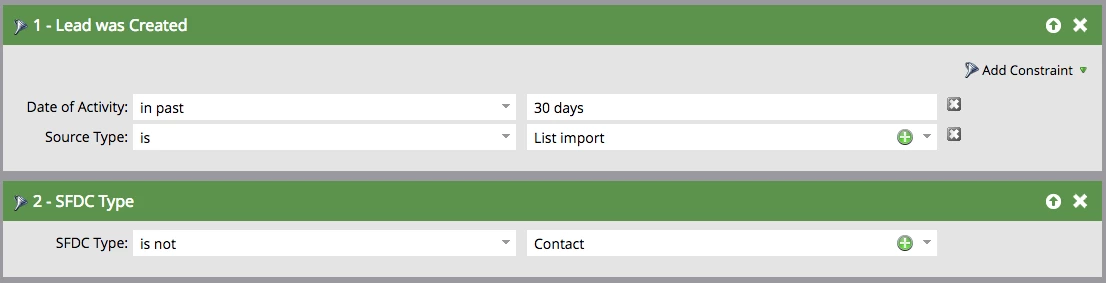
The recommendation is: for any lead created from an import and not yet converted to a contact or not yet pushed to the CRM, delete them.

You may even run a batch smart campaign to do this, if you fear it happens again.

-Greg

2 replies

Grégoire_Miche2
Grégoire_Miche2Accepted solution
Level 10
April 20, 2016

Hi Samantha,

One special thing with Marketo is that it deduplicates on email but does not make this field mandatory You could very well sync leads or contacts from your CRM without an email as well. Still, these leads may count against you licence fee.

The recommendation is: for any lead created from an import and not yet converted to a contact or not yet pushed to the CRM, delete them.

You may even run a batch smart campaign to do this, if you fear it happens again.

-Greg

Juan_de_Dios_Ng
Level 3
April 21, 2016

Hi Samantha,

If the email address is blank, Marketo will always create a new record. The only way to update a record without email address is via the API, while specifying the Marketo ID.

There are many ways to delete bad/empty records from your system (if that's what you want!)

Another easy way to do this would be creating a Smart Campaign using the filters

'Lead is created' (using a date constraint ) AND 'email address is empty' with a Flow 'Delete Lead equal true

For example:

Grégoire_Miche2
Level 10
April 21, 2016

Hi Juan,

The screenshots you are providing will lead to deleting the new leads from the CRM, which is a pretty bad idea. Suppose your sales person entered a contact or a lead without an email, are you going to delete it?

You should rather at least filter by creation source, as I suggested.

-Greg