
Embedded form visibility rules that rely on lead data do not function as intended | Community
Skip to main content
Dan_Stevens_
Level 10
December 8, 2015
Question

Embedded form visibility rules that rely on lead data do not function as intended

  • December 8, 2015
  • 1 reply
  • 2893 views

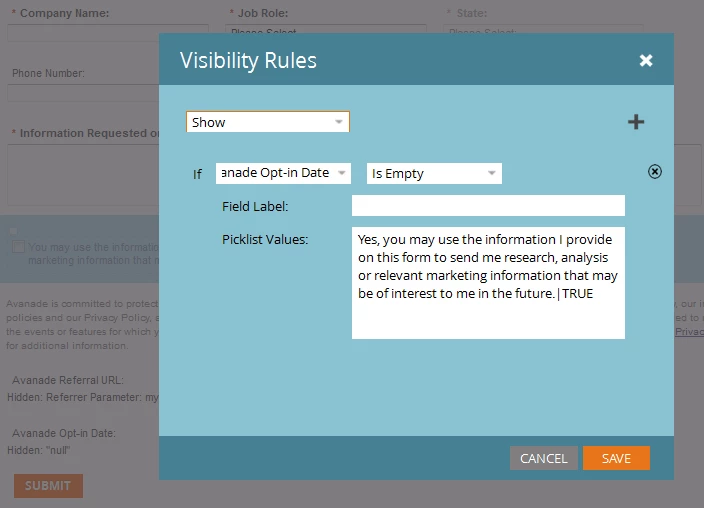
We use embedded forms on our website.  One of the fields is an opt-in checkbox.  When checked, we have a flow step that also populates an "opt-in date" field. If the lead had opted in during a prior form submit, we want to hide that field.  The thought was to define a visibility rule on the opt-in field to only display if the hidden "opt-in date" value was empty.  This isn't working for us.  I'm assuming this is because there's no way for Marketo to prepopulate the hidden date field since this is an embedded form, correct?  I think what's needed are separate trigger campaigns that do all of this processing after the form has been submitted (e.g., "Data Value Changes" of the opt-in field from "false" to "true" AND if "opt-in date" is not empty, then reset "opt-in" to TRUE.
This post is no longer active and is closed to new replies. Need help? Start a new post to ask your question.

1 reply

Josh_Hill13
Level 10
December 8, 2015

This visibility rule only applies to the value on the Form at that moment. So if someone adds a date there, it will display the opt in.

You could prepop the Date field with a Default Parameter, but you'd have to use a token and I'm not sure that'll work. Try it.

Why not use the actual Opt In check box for this? If Opt In=F, show this field.

Dan_Stevens_
Level 10
December 8, 2015

@Josh Hill​, thanks for your input.  When using visibility rules for a field, you cannot use that same field as the conditional constraint - which is why we needed to key off of separate field, like the "opt-in date" field.  This date field is purely operational - no one actually selects the date.  It's populated within the smart campaign flow when someone opts in initially.

We've built a separate set of global trigger campaigns to accommodate what we had set out to achieve here - I was just trying to get some confirmation that by using embedded forms - and the fact that pre-populating fields is not possible - that there was no way to use the visibility rules approach here.

SanfordWhiteman
Level 10
December 8, 2015

Hey Dan, because you're looking only for a non-empty field, you can hack this using progressive profiling (which does work for embeds).

Because ProgPro will de facto hide/show a field based on whether higher-up fields are valued, you can interrogate (using JS) whether your interesting field is filled-in, then apply changes to let the VRs kick in.