
Email Validation Error when adding velocity token for Opportunity field data | Community
Skip to main content
Adam_Mokrzecki1
Level 2
September 9, 2021
Solved

Email Validation Error when adding velocity token for Opportunity field data

  • September 9, 2021
  • 1 reply
  • 2515 views

Hi Community!

I'm hoping someone could help me with an issue I'm having with a velocity script token. After I add the token to an email, I receive an error when I try to approve.
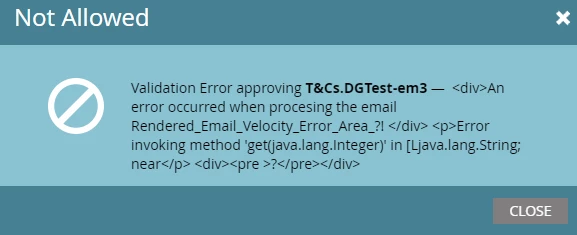
Here's the code I've set up:


#set ($string = "$OpportunityList.get(0).Document_Links__c" ) #set ($output = $string.split('\n')) #set ($docLa = "$output[0]" ) #set ($docLb = "$output[1]" )


The variables are then used in separate script tokens and added to the email to display the output data. 

{{my.doclink-url-1}}
In the Email:


<a href="{{my.doclink-url-1}}" style="font-weight: bold;">{{my.Dynamic-DisplayBrandNameA}} Regular Guarantee</a> <br /><br /> <a href="{{my.doclink-url-2}}" style="font-weight: bold;">{{my.Dynamic-DisplayBrandNameA}} Regular Terms</a>


This code was working for a time then all the sudden stopped recently (I'm guessing maybe it shouldn't have worked the first time)

Interestingly, if I remove the last line in the code, I can approve the email normally. 


Any help would be much appreciated! Thank you!!


This post is no longer active and is closed to new replies. Need help? Start a new post to ask your question.
Best answer by SanfordWhiteman

Simple — the error tells you exactly what’s happening.


You’re trying to access the 1st index in the array without checking if it has a 1st index. Accessing a nonexistent index is a fatal error. You should make sure the Opportunity list is non-empty and that the split string has the expected size.


Some additional Velocity pointers:

  • there’s no need for quotes in that #set directive, they just make it harder to read
  • if you continually access the first (0th) item in the Opportunity list you can’t predict what that will be, unless you’re absolutely sure there will never be more than one
  • generic variable names like $string are poor practice; if it’s the list of “document links” then name it accordingly: $interestingOpptyDocLinks

1 reply

SanfordWhiteman
SanfordWhitemanAccepted solution
Level 10
September 9, 2021

Simple — the error tells you exactly what’s happening.


You’re trying to access the 1st index in the array without checking if it has a 1st index. Accessing a nonexistent index is a fatal error. You should make sure the Opportunity list is non-empty and that the split string has the expected size.


Some additional Velocity pointers:

  • there’s no need for quotes in that #set directive, they just make it harder to read
  • if you continually access the first (0th) item in the Opportunity list you can’t predict what that will be, unless you’re absolutely sure there will never be more than one
  • generic variable names like $string are poor practice; if it’s the list of “document links” then name it accordingly: $interestingOpptyDocLinks
Adam_Mokrzecki1
Level 2
September 9, 2021

Thank you so much Sanford!


I've updated the code, and now the issue appears to be resolved!


updated code:

#if( !$OpportunityList.Document_Links__c.isEmpty() ) #set ($interestingOpptyDocLinks = $OpportunityList.get(0).Document_Links__c ) #set ($output = $interestingOpptyDocLinks.split('\n')) #set ($docLa = $output[0] ) #set ($docLb = $output[1] ) #end
SanfordWhiteman
Level 10
September 9, 2021
You still could be accessing a nonexistent index, unless you are 100.00% sure that the field always has at least one line break.