
Email Template - Outlook table | Community
Skip to main content
Kristina_Schrof
Level 2
September 6, 2016
Question

Email Template - Outlook table

  • September 6, 2016
  • 2 replies
  • 3167 views

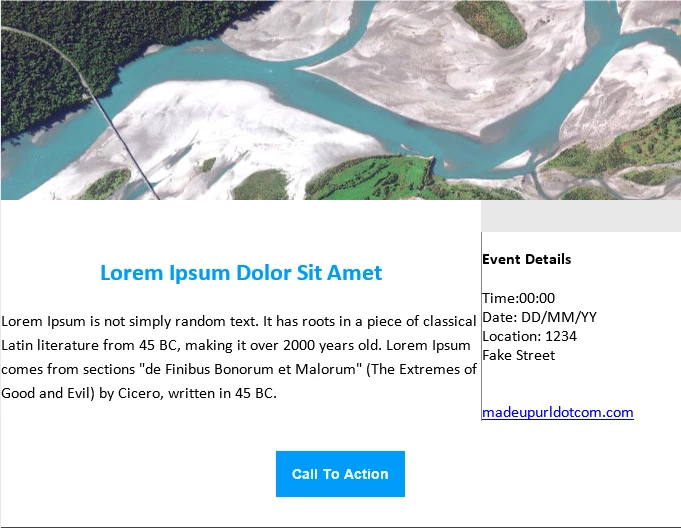
Fairly happy with a template code except for one rendering issue in Outlook the text is very close to the vertical divider and gray bar shows up above event details. Should I work to add some more padding for Outlook? More tabling in the HTML code. Appreciate any insight for designing for Outlook. Thank you.
            <table width="100%" border="0" cellspacing="0" style="background-color:#fff;border:none;margin-bottom:40px">

              <tbody>

                <tr height="30">

                </tr>

                <tr>

                  <td style="padding:0"> <h2 style="color:#009CFB;font-family:calibri,'Helvetica Neue',Helvetica,Arial,sans-serif;font-size:24px;font-weight:700;line-height:36px;margin:0 0 20px 0;padding:0;text-align:center">Lorem Ipsum Dolor Sit Amet</h2> <p class="text" style="font-family:calibri,'Helvetica Neue',Helvetica,Arial,sans-serif;font-size:16px;line-height:24px;margin:0 auto;width:85%; padding:0 20px;">Lorem Ipsum is not simply random text. It has roots in a piece of classical Latin literature from 45 BC, making it over 2000 years old. Lorem Ipsum comes from sections "de Finibus Bonorum et Malorum" (The Extremes of Good and Evil) by Cicero, written in 45 BC.</p> </td>

                  <td width="200" style="border-left:#848484 solid 1px;padding:0;vertical-align:top"> <h3 style="font-family:calibri,'Helvetica Neue',Helvetica,Arial,sans-serif;font-size:16;font-weight:700;line-height:36px;margin:0 0 20px 0;padding:0 0 0 20px">Event Details</h3> <p style=" margin:0; padding:0 20px 0 20px; font-family:calibri,'Helvetica Neue',Helvetica,Arial,sans-serif;"> Time:00:00<br /> Date: DD/MM/YY<br /> Location: 1234<br /> Fake Street<br /> <br /><br /> <a href="#">madeupurldotcom.com</a> </p> </td>

                </tr>

This post is no longer active and is closed to new replies. Need help? Start a new post to ask your question.

2 replies

September 6, 2016

Try increasing the padding for this table

Kristina_Schrof
Level 2
September 7, 2016

Padding worked! Any idea why this is happening only in Outlook? White border after image on the left hand side, very slight but wondering if any advice for this. Thanks!

</head>

  <body style="background-color:#E8E8E8">

    <style>

</style>

    <table width="100%" border="0" cellspacing="0" style="border:none">

      <tbody>

        <tr>

          <td style="padding:0"> </td>

          <td width="540" style="padding:0">

            <table width="100%" border="0" cellspacing="0" style="border:none;margin:10px">

              <tbody>

                <tr>

                  <td style="padding:0"> <img src="explore.digitalglobe.com/rs/782-PEE-248/images/g-logo_promise_e-mail.png" /> </td>

                </tr>

              </tbody>

            </table>

            <table width="100%" border="0" cellspacing="0";border:none">

              <tbody>

                <tr>

                  <td width="540" style="padding:0"> <img class="pic" src="explore.digitalglobe.com/rs/782-PEE-248/images/pic6.jpg" style="max-width:540px;width:100%" /> </td>

                </tr>

              </tbody>

            </table>

            <table width="100%" border="0" cellspacing="0" style="background-color:#fff;border:none;margin-top:40px;margin-bottom:40px">

              <tbody>

                <tr height="30">

                </tr>

                <tr> <td bgcolor="#FFFFFF">

                  <td style="padding:5px"> <h2 style="color:#009CFB;font-family:calibri,'Helvetica Neue',Helvetica,Arial,sans-serif;font-size:24px;font-weight:700;line-height:36px;margin:5px 5px 20px 5px;padding:5px;text-align:center"><div class="mktEditable" id="LeftSide" style=""> Lorem Ipsum Dolor Sit Amet</h2> <p class="text" style="font-family:calibri,'Helvetica Neue',Helvetica,Arial,sans-serif;font-size:16px;line-height:24px;margin:0 auto;width:85%; padding:5px 20px;">Lorem Ipsum is not simply random text. It has roots in a piece of classical Latin literature from 45 BC, making it over 2000 years old. Lorem Ipsum comes from sections "de Finibus Bonorum et Malorum" (The Extremes of Good and Evil) by Cicero, written in 45 BC.</p> </td>


                  <td width="200" style="border-left:#848484 solid 1px;padding:5px;vertical-align:top"> <h3 style="font-family:calibri,'Helvetica Neue',Helvetica,Arial,sans-serif;font-size:16;font-weight:700;line-height:24px;margin:5px 5px 20px 3px;padding:5px 5px 5px 20px"><div class="mktEditable" id="RightSide" style="">Event Details</h3> <p style=" margin:0; padding:5px 20px 5px 20px; font-family:calibri,'Helvetica Neue',Helvetica,Arial,sans-serif;"> Time:00:00<br /> Date: DD/MM/YY<br /> Location: 1234<br /> Fake Street<br /> <br /><br /> <a href="#">madeupurldotcom.com</a> </p> </td>

                </tr>

Lucho_Soto
Level 5
November 1, 2016

Agreed. When coding emails, we only use padding on <td> elements and that should be supported by all the popular email clients.