Email scripting with custom object - show whole list, but only particular fields | Community
Skip to main content
February 11, 2018
Solved

Email scripting with custom object - show whole list, but only particular fields

  • February 11, 2018
  • 2 replies
  • 6002 views

Hi team

I'm trying to output a custom object, but only a particular field. So let's say I have a custom object named CustomObject with the fields Name and Description. I can use:

${CustomObject}

To output all fields. Great. I can also use:

${CustomObject.get(0).Name}

To output the first record of that custom object, and the Name field.

But....I can't for the life of me work out how to output the Name field for every record in that custom object. I've tried things like:

${CustomObject.Name}

${CustomObject.get.Name}

${CustomObject.get().Name}

With no luck. What am I missing here? I'm sure this can't be that hard....

Thanks!

This post is no longer active and is closed to new replies. Need help? Start a new post to ask your question.
Best answer by SanfordWhiteman

#set( $allNames = $display.list($CustomObjectList,"\u001e","\u001e","Name").split("\u001e") )

$display.list doesn't actually force output, it just creates a string, which you can then split.

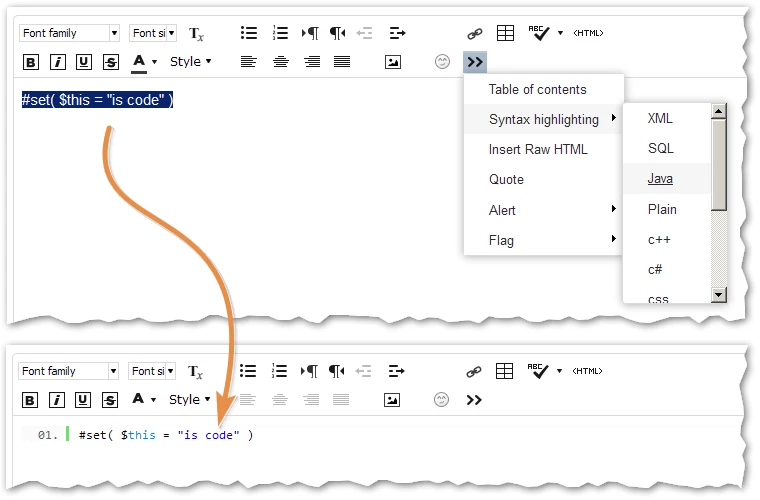
Also, can you use the syntax highlighter please? I tell everyone else, shouldn't let you off the hook.


P.S. The alternative method Nicho is driving at is this:

#set( $allNames = [] )

#foreach( $object in $CustomObjectList )

#set( $tmp = $allNames.add($object.Name) )

#end

Naturally, I like my method more as it's shorter + lets you take advantage of Velocity's underlying Collections support.

Also, for those unfamiliar, Unicode/ASCII character x001e (31) is the Record Separator (RS) character. This is the only character guaranteed per formal standard to not be found within a value, but to only be a separator between values.

That is, we often treat commas and semicolons as separators, but that only works if you know ahead of time that your values will never contain commas and semis, or if you have an additional layer to act as an escape mechanism (double quotes)... which then in turn needs to be escaped... covering all the bases can take a lot of code.

In contrast, if you just use RS between values you're always safe, no need for other escaping. To put it more simply, join(RS).split(RS) always works even if you don't know the data.

2 replies

SanfordWhiteman
Level 10
February 11, 2018

## @param1 list of objects

## @param2 delimiter between all but last 2 objects

## @param3 delimiter between last 2 objects

## @param4 extract only this property from each object

$display.list(

  $CustomObjectList,

  "<br>",

  "<br>",

  "Name"

)

February 11, 2018

Hi Sanford

Thanks! However, I'm afraid I might have to modify the question a little. I'm now looking to pass only those items from the list into a new list. So in my example from before, I want to end up with a list which looks like this:

$names = [$name1, $name2, $name3....$namen]

Since your code will display the items, I think I need something else. I tried:

#foreach( $name in $CustomObject)

#set ($dummy = $names.add(${CustomObject.get(0).dossierCode))

#end

I can't even get this to work....although I know it's going to add the item at index 0 over and over again (I guess foreach.index or velocity.count is appropriate here?)

SanfordWhiteman
Level 10
February 11, 2018

#set( $allNames = $display.list($CustomObjectList,"\u001e","\u001e","Name").split("\u001e") )

$display.list doesn't actually force output, it just creates a string, which you can then split.

Also, can you use the syntax highlighter please? I tell everyone else, shouldn't let you off the hook.

Nicholas_Manojl
February 11, 2018

#foreach ( $x in ${customobject} )

<p> $x.fieldName </p>

#end

SanfordWhiteman
Level 10
February 12, 2018

Have to put the values in an ArrayList too (per revised spec).