
Question
Email Scripting and Text-Only
Hi everyone! I've just started incorporating email scripting into my email templates and I'm running into an issue with the text-only version. It is currently not displaying the content, but rather than token itself. Is there a fix to this?
Here are all the steps that I've taken so far with email scripting.
HTML:
<div class="mktEditable" id="m_button_cta" mktoname="Text">
<a href="${button-link}" target="_blank"style="color: rgb(99, 99, 99); text-decoration: underline; color:#ffffff; font-family:'Proxima Nova', Helvetica, Arial, sans-serif; font-size:13px; font-weight:bold; text-decoration: none; border-radius: 3px; padding: 8px 18px; border: 1px solid #64b245; display: inline-block; letter-spacing:1px;">
${button-text}
</a>
</div>META tags:
<meta class="mktoString" id="button-text" mktoname="Button Text" default="CTA TEXT" mktomodulescope="true">
<meta class="mktoString" id="button-link" mktoname="Button Link" default="https://meraki.cisco.com/" mktomodulescope="true">
Editor Content and Local Variables: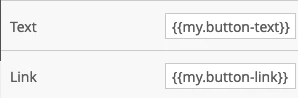
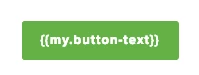
TEXT only Version: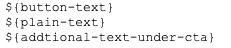
Token Value:
#if($lead.Language__c == "English") LEARN MORE #elseif($lead.Language__c == "French") LEARN MORE #elseif($lead.Language__c == "Spanish") LEARN MORE #elseif($lead.Language__c == "Portugese") LEARN MORE #elseif($lead.Language__c == "German") LEARN MORE #elseif($lead.Language__c == "Japanese") LEARN MORE #elseif($lead.Language__c == "Dutch") LEARN MORE #elseif($lead.Language__c == "Swedish") LEARN MORE #elseif($lead.Language__c == "Chinese") LEARN MORE #elseif($lead.Language__c == "Italian") LEARN MORE #elseif ($lead.Language__c == '') LEARN MORE #else LEARN MORE #endToken Name: my.button-text
Please and thank you for the help!