
Email Script Token not displaying in email | Community
Skip to main content
Justin_Donlon
Level 2
January 23, 2018
Question

Email Script Token not displaying in email

  • January 23, 2018
  • 1 reply
  • 4964 views

I'm trying to create a fairly simple Email Script Token.

We have a Lookup field from Account to a custom object called District.

On District - we have another Lookupfield to User, and then formula fields to grab the user email and phone number.

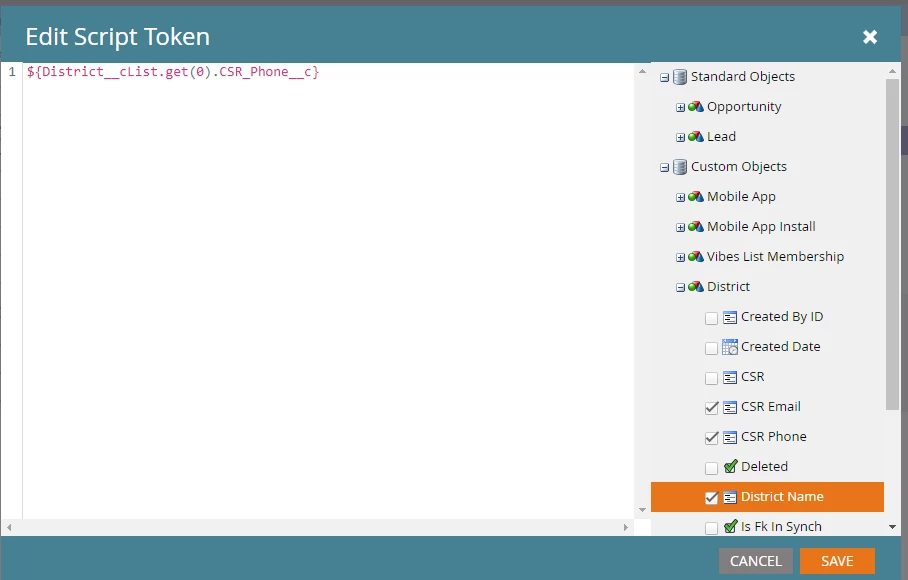
So we created Email Script Tokens for those fields and pull them into the email...

When we send the email with the token the token doesn't translate to the value - but continues to display this: Phone: ${District__cList.get(0).CSR_Phone__c}

Any ideas what we could be doing wrong? Thank you!!
This post is no longer active and is closed to new replies. Need help? Start a new post to ask your question.

1 reply

SanfordWhiteman
Level 10
January 23, 2018

When Velocity encounters an unresolved reference (e.g. nonexistent property) that's when you see the barebones VTL code. Your output suggests the list does not exist for the lead you're testing.

Let's debug the object list.  Add this to the token:

#if( !$context.contains("District__cList") )

  District list does not exist in context.

#else

  District list exists.

  #set( $listSize = $District__cList.size() )

  #if( $listSize == 0 )

    List is empty.

  #else

    List size: $listSize.

    List values: ${display.list($District__cList,"<br>")}

  #end

#end

Justin_Donlon
Level 2
January 23, 2018

Thank you @Sanford Whiteman​ - I added that script as a token and sure enough: District list does not exist in context.

I double checked that the account I am using as the sample has a District linked to it - and that the Marketo Profile in SFDC has read permission to both that lookup field on the account as well as the fields on the District custom object.

Not sure if this is a factor or not - but the relationship is a lookup field from Account to District - so for any one account it would only have one District assigned (as opposed to a list, like a related list) - is that a factor?

Any suggestions on where to from here would be very much appreciated! Thank you!

Level 4
January 23, 2018

Removing the .get(0) or checking to ensure there's no duplicate record with a matching email address are two steps maybe to try as well.