Email Script Token Help | Community
Skip to main content
Level 2
June 19, 2025
Solved

Email Script Token Help

  • June 19, 2025
  • 2 replies
  • 924 views

Good afternoon,


I've created an Email Script Token ({{my.SFDC_Type}}) as follows:


#if( $lead.SFDC_Type.equals("Lead") ) #set( $sfdcindicator = "1" ) #elseif( $lead.SFDC_Type.equals("Contact") ) #set( $sfdcindicator = "2" ) #else #set( $sfdcindicator = "0" ) #end ${sfdcindicator}


The token is to be appended to email links as a querystring, e.g. companynam.com/global/en/corporate/?sfdc_type={{my.SFDC-Type}} and when the email is previewed, the URL renders as expected, e.g. companynam.com/global/en/corporate/?sfdc_type=1



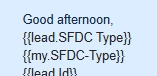
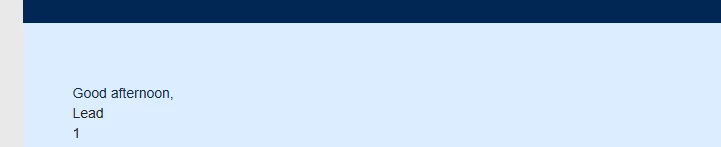
However, when the email is sent, the value is not present in the email URL:



What might be the reason for this, especially because the value does display when the token is included in the email body:


Any help would be greatly appreciated.


Kind regards


Karl


This post is no longer active and is closed to new replies. Need help? Start a new post to ask your question.
Best answer by SanfordWhiteman

Didn’t specifically mean Formula field. Use a standard Number field and set it nightly using Change Data Value w/choices. (Filter on people who’ve had changes to the underlying fields in the previous day.)


Also not sure why you’re adding Original Source Type in there. Someone who originated in Marketo can be synced to SFDC.

2 replies

Michael_Florin-2
Level 10
June 19, 2025

Your script works fine for me.


But you use my.SFDC-Type on your URL parameter, but the name of the token is my.SFDC_Type, isn't it?

SanfordWhiteman
Level 10
June 19, 2025

I wonder, like Michael says, if you don’t have a typo in this particular test.


But fundamentally, what you’re trying to do is not supported. You must output the entire <a> tag from Velocity, not just parts of the href. (In other words, you can’t piece together a URL from parts outside and inside Velocity.)


So you shouldn’t rely on this method either way — there have been many twists and turns over the years in what seems to work in Velocity vs. what’s guaranteed to work. Only outputting the entire <a> works, unless you disable tracking.


Also bear in mind SFDC Type isn’t meaningful unless you also check SFDC Is Deleted. For this task, I would have a separate calculated field instead of what you’re doing.


Level 2
June 20, 2025

Hi Michael and Sandford,


thank you both for your replies and apologies Michael, the initial reference to the program token was a typo and the correct name is {{my.SFDC-Type}} as referenced in the URL tests.


To Sandford's reply, I did come across feedback from yourself to another user with a similar use case. I conducted a subsequent successful test constructing the full <a> reference within the token.


This is great, but my use case in this instance is to append this parameter to all URLs in an email to serve Adobe Analytics reporting, specifically so users can distinguish between lead and contact web activity.


With this in mind, would the solution be to create an Email Script token for every distinct URL in an email as this feels cumbersome and would likely intimidate marketing users?


I did, as suggested create a calculated field, including the SFDC Is Deleted field within the logic, and appended that field as a token to a URL to test but I received the following error message:


Calculated Field:


Append to URL: 


Preview: 


Attempt to execute:


Any further ideas would be appreciated please.


Regards


Karl

SanfordWhiteman
SanfordWhitemanAccepted solution
Level 10
June 20, 2025

Didn’t specifically mean Formula field. Use a standard Number field and set it nightly using Change Data Value w/choices. (Filter on people who’ve had changes to the underlying fields in the previous day.)


Also not sure why you’re adding Original Source Type in there. Someone who originated in Marketo can be synced to SFDC.