Email Program - Send with Smart Campaign | Community
Skip to main content
Level 6
August 30, 2016
Question

Email Program - Send with Smart Campaign

  • August 30, 2016
  • 2 replies
  • 6799 views

I'm posting this to see what other people have to say about it/see if there's any insights or drawbacks to how I have an email program set up.

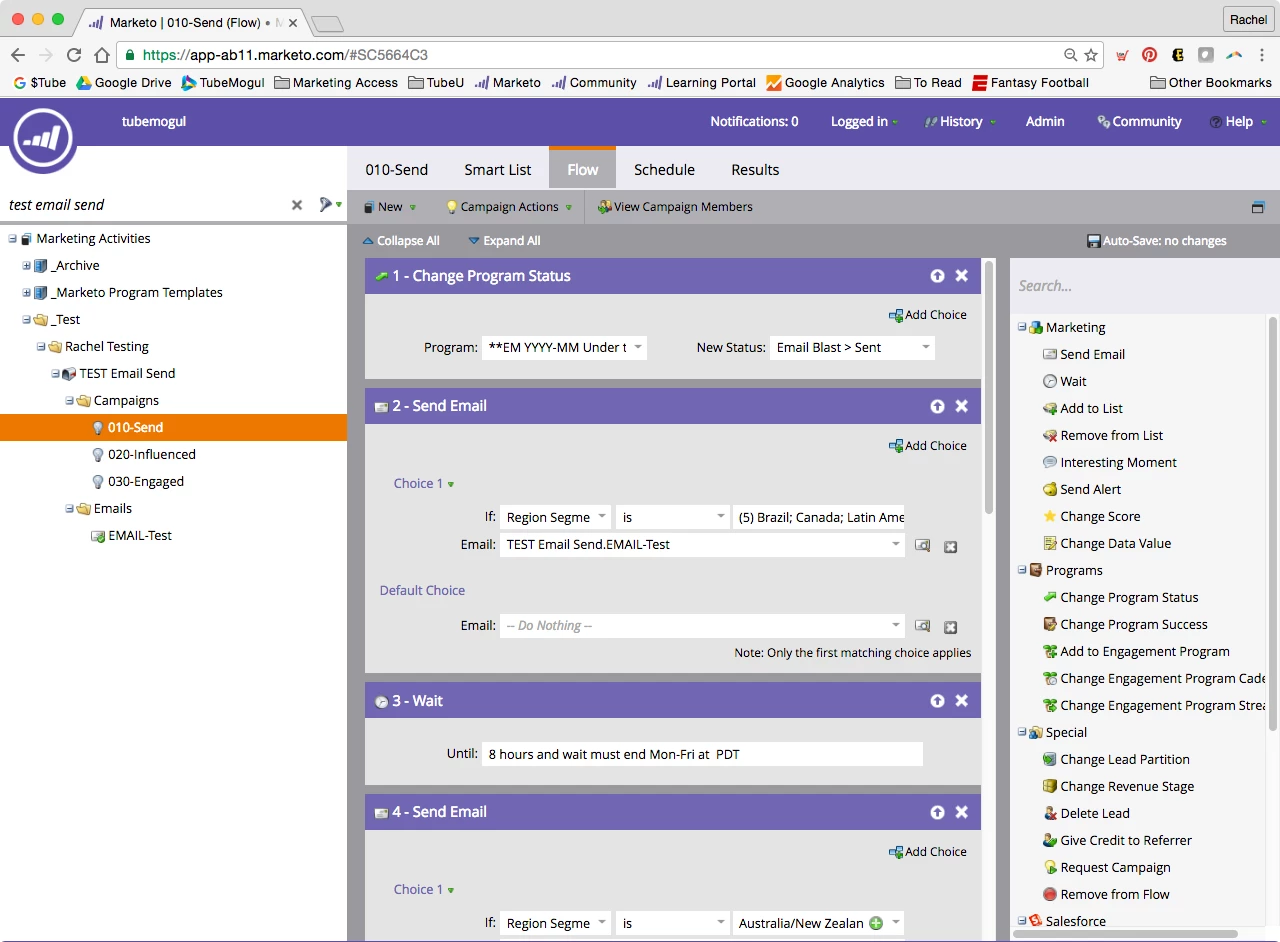
Basically, I ran into the issue that many people have where you can't send an email based on . You also can't have a if you're sending directly from the control panel. I'd still like to use my email program to send emails as it allows me to A) nest them in other programs (like landing pages) and B) I am able to track email success differently than landing page success (which is obviously the point of different channels). If you send your email through a smart campaign, however, you are able to not only set up time zones if you have segmentations/smart lists set up, but you can also still add people to different statuses in the event program.

My question is: what are the drawbacks of using an email program, but not using the email scheduler built in to the program?

I can still get email reporting via an analytics or RCE report, and I can still set the program statuses via smart campaigns (which I would have to do anyway). The only things I really see are that the icon doesn't change so it looks like the program hasn't been run yet, and A/B testing might be a bit more difficult.

I'd love to hear what other people have to say about it!

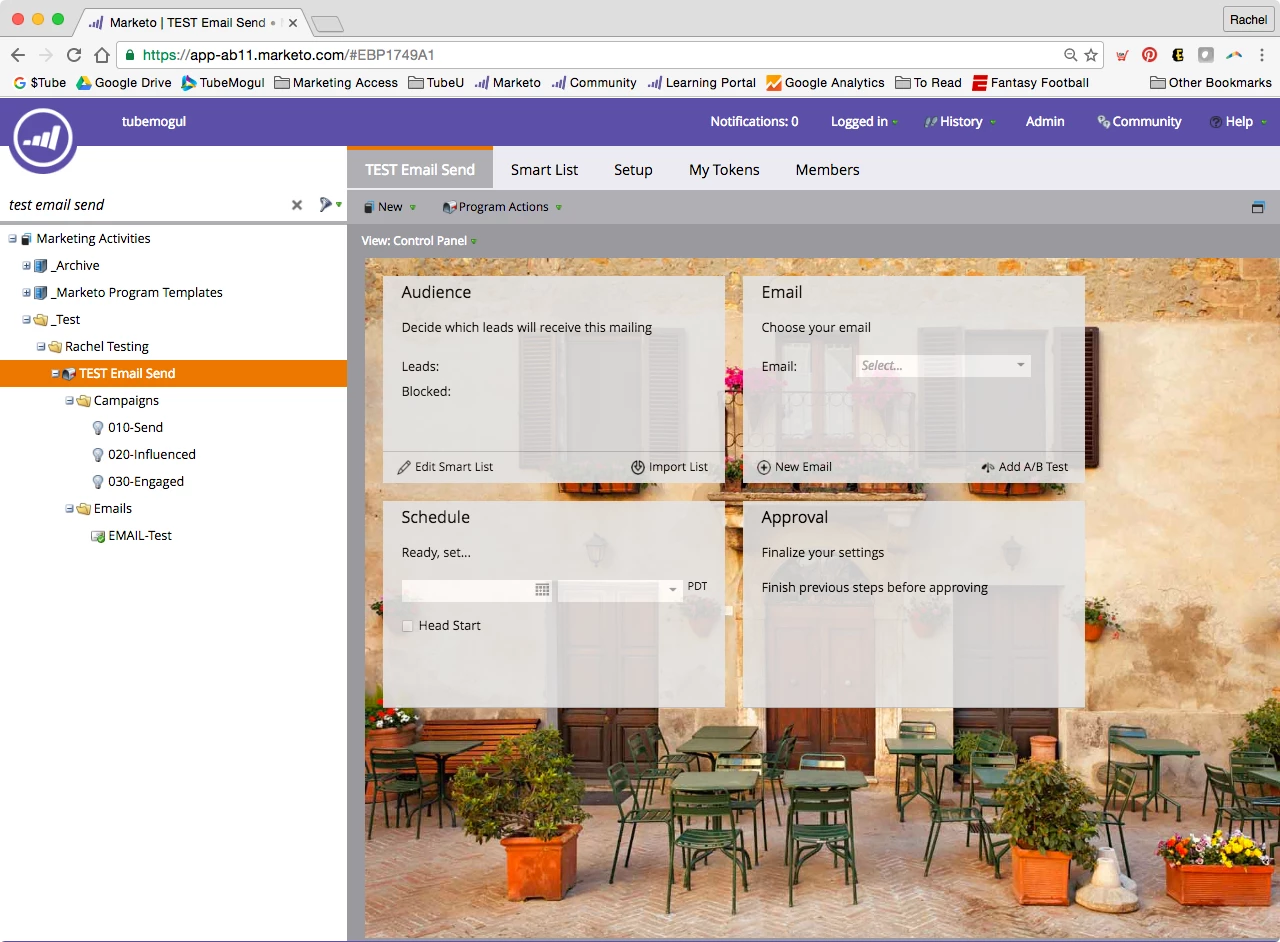
Here are some screen shots to help visualize

Normal setup for email scheduling in an email program
My smart campaign setup for email scheduling in an email program (using my Regional Segmentation)
This post is no longer active and is closed to new replies. Need help? Start a new post to ask your question.

2 replies

Nicholas_Manojl
Level 8
August 30, 2016

The drawback is that it's not as easy.

The positives are you can run it as a batch campaign (ie, more than once) etc.. And it seems like all the stats get updated.

Maybe you'd be better off with a default program, and using the email insights tool for stats - but it all depends on the overall pros and cons of email programs.

I use email programs as a gateway into Marketo for new users.

rachazenAuthor
Level 6
August 31, 2016

Thanks Nicholas.

I've used default programs in the past, but we also run into the issue where the channel statuses don't line up with email sends. So "member" when sending an email means something completely different than "member" when someone's downloading a white paper.

rachazenAuthor
Level 6
August 31, 2016

I guess I should be clear: we only use the "email send" channel and not the "email blast" channel that is built in when we launched our Marketo instance. It feels silly to me that we would have two different types of email programs... but maybe that's because I'm thinking about it all wrong.

Also, the email program(s) in question are generally nested within a landing page program, something you can't do with the default program.

Jenn_DiMaria2
Level 10
August 31, 2016

I've done something similar before for a variety of reasons (ie: used an EP as an umbrella to house smart campaigns that actually sent the emails). The only issue I ran into (that kind of annoyed me) was I thought the reporting from those smart campaigns would trickle up into the EP's dashboard, as that's what it does when you're resending an email via smart campaign in an EP; however, that wasn't the case. I believe this is because the EP wasn't run, so you might be able to accomplish that by scheduling the EP to send to a seed list first, and then everything else might fall into place. I haven't had a chance to test this, though!

rachazenAuthor
Level 6
August 31, 2016

Awesome, thanks Jenn! I will try this out.

January 14, 2017

Rachel,

Just curious. Did you try this and did it work as expected?

Thanks,

Eddie