
Email program dashboard percentages | Community
Skip to main content
Ryan_Worden1
Level 2
May 21, 2015
Solved

Email program dashboard percentages

  • May 21, 2015
  • 1 reply
  • 1859 views

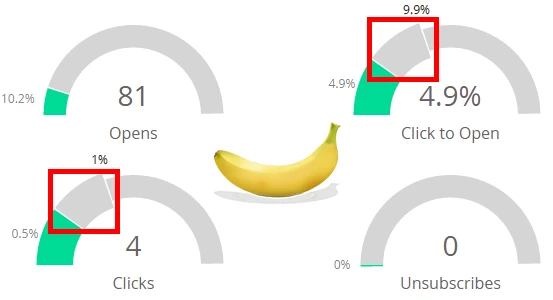
Could someone please tell me what the "additional percentage space"(for lack of a better descriptor) is? I understand that the colored space shows your actual percentages, but I am confused about the additional section. (Banana for scale)
Thanks,

Ryan

This post is no longer active and is closed to new replies. Need help? Start a new post to ask your question.
Best answer by

When the numbers are really small, it zooms in so you can see better. That top section shows you the total scale. For example, it's showing you that your four clicks are 0.5% and that's half of the zoomed in portion, which shows you only 1% of the chart,

1 reply

Accepted solution
May 21, 2015

When the numbers are really small, it zooms in so you can see better. That top section shows you the total scale. For example, it's showing you that your four clicks are 0.5% and that's half of the zoomed in portion, which shows you only 1% of the chart,

Ryan_Worden1
Level 2
May 21, 2015

Makes complete sense, thanks for answering! We had a lot of guesses flying around the office, anything from a "projected percentage" to a "benchmark standard percentage" - so thanks for the clarification.

Cheers,

Ryan