Email Performance Report Setup - has this changed? | Community
Skip to main content
Level 2
February 10, 2023
Solved

Email Performance Report Setup - has this changed?

  • February 10, 2023
  • 1 reply
  • 2608 views

Hi All,


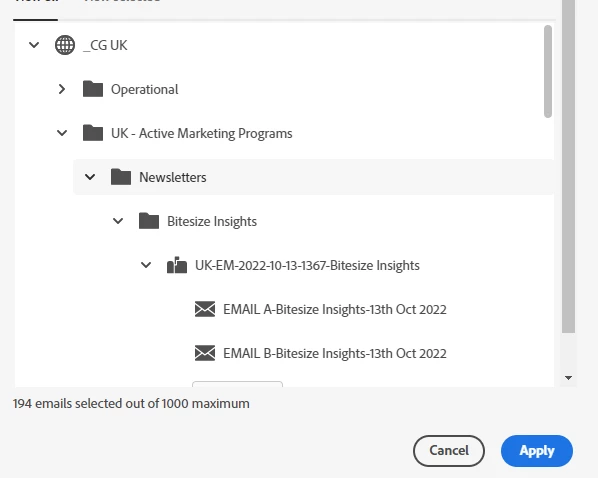
I am trying to set up my weekly email reporting, but am struggling with the new setup of the email filter. The filter tells me how many emails are selected, but doesn't visually show which these are. Up until this week, the setup tab had check-boxes beside the selected emails. I am generating a report for a large number of specific emails, so can't select entire folders. Does anyone have any advice on how to work around this?


This post is no longer active and is closed to new replies. Need help? Start a new post to ask your question.
Best answer by EllenSchwier

You can still select the individual emails. They will show as selected when there is a grey box behind the email (the same way your Newsletters folder looks in the screenshot).


1 reply

EllenSchwier
EllenSchwierAccepted solution
Level 4
February 10, 2023

You can still select the individual emails. They will show as selected when there is a grey box behind the email (the same way your Newsletters folder looks in the screenshot).


Level 2
February 10, 2023

I sometimes struggle with contrast in my eyesight due to chronic illness, so missed this. Thanks very much for flagging! May suggest to Marketo that they make the highlight colour more stark to accommodate disabled users.