
Email Performance Report classified by Program | Community
Skip to main content
Nehansh-2
Level 3
July 29, 2025
Solved

Email Performance Report classified by Program

  • July 29, 2025
  • 1 reply
  • 769 views

Hi,
I am wondering if anyone knows a workaround to classifying an email performance report based on the program.

Use Case: We have a number of default programs being used to send 'n' number of emails per program. Since each program may consist of many emails. It becomes difficult to gauge the overall program's email performance report when the reports are fetched as a workspace level. I am aware that we can fetch them filtered by program by such manual effort is not feasible while pulling all emails in a workspace.

I wanted to check if we can pull a email performance report classified by program name when pulled for all emails sent in last few months/weeks. Looking for suggestions or workarounds.

Thanks in advance,
Nehansh
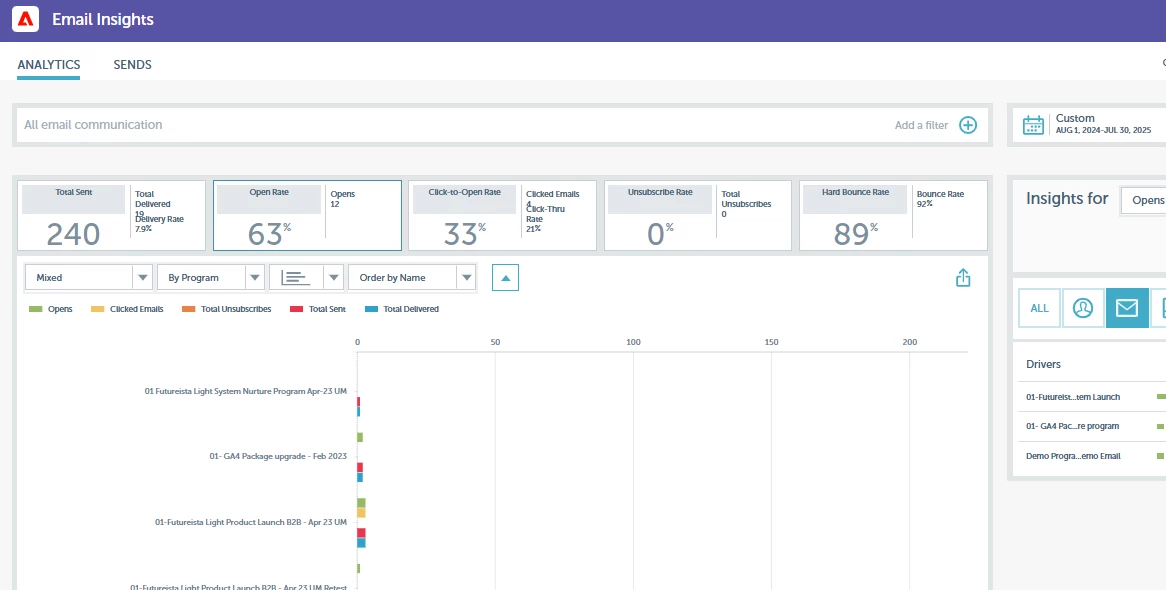
Best answer by uditmathur

HI @nehansh-2 ,

Use Email Insights & segregate data By program.

You can select the time period & specific workspace for which you want to see the data


1 reply

uditmathur
Community Advisor
Community Advisor
July 30, 2025

Hi @nehansh-2 ,

What are the parameters you are trying to track in the report.

As for all program related matrix you can use Program Performance report & than drill down to individual program to have a better outlook on the performance.

Else you can create Email Performance report within each program to get the matrices specific to that individual program.


Hope this Helps 🙂


Nehansh-2
Nehansh-2Author
Level 3
July 30, 2025

Hi @uditmathur 
The program performance report does not work in this case. The main ask is to get a email performance report but it is not possible to fetch it for each program. When we want to see the performance of emails per say in the last quarter, there are over 100+ emails sent from 40+ programs.

I was looking for some suggestion/workaround which can help with a program wise categorization of the email performance report (pulled for a workspace or a parent folder like 2025).

uditmathur
Community Advisor
uditmathurCommunity AdvisorAccepted solution
Community Advisor
July 30, 2025

HI @nehansh-2 ,

Use Email Insights & segregate data By program.

You can select the time period & specific workspace for which you want to see the data