Email formatting errors on Macs | Community
Skip to main content
Level 2
May 8, 2019
Question

Email formatting errors on Macs

  • May 8, 2019
  • 2 replies
  • 4553 views

I recently sent an email where one word was bold throughout the email. I use a pc and it rendered fine, but it appears that mac users viewed it with formatting errors. In every instance the word was bold, the space before and after was removed. (textBOLDtext)

What is the problem and how can it be solved?

Here is a screenshot link from a mac user:
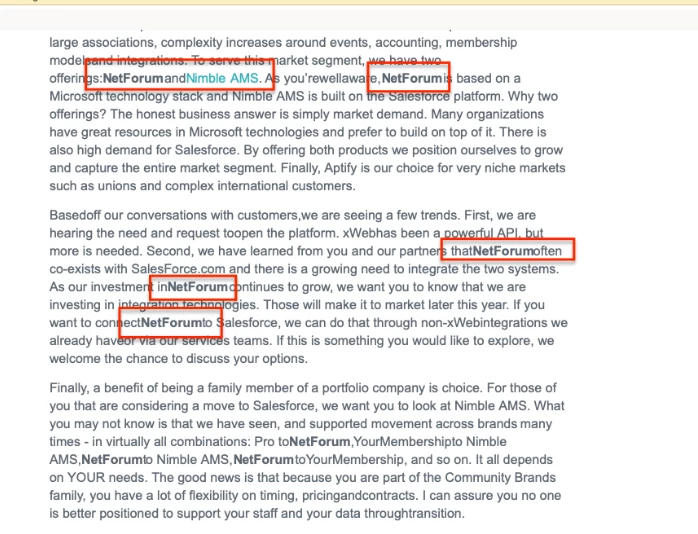
This post is no longer active and is closed to new replies. Need help? Start a new post to ask your question.

2 replies

Grace_Brebner3
Level 10
May 8, 2019

Hey Bianca,

We'll need to see the full code from your email and know exactly which version of which email client was being used here to be able to help. Most likely this is either going to be CSS styling that's being applied by one and ignored in the other, or client default styling that's overriding your styling. We can't know which one though without seeing the code & knowing which client.

Email is enormously challenging in terms of ensuring consistent display across clients - to the point that actually "consistent" (i.e., looks the same across all) display is basically impossible, and it's more a case of "as good as possible given each individual client's requirements and limitations". How an email looks can vary wildly across clients and devices and browsers and OS and client versions - to the extent of being totally fine on one and fundamentally broken on another (I'm looking particularly at Outlook here... shudder). If you're not using email testing software currently I'd strongly recommend looking into something like Litmus or Email on Acid - you might be surprised to see how different your emails look.

Hope that helps.

Level 2
May 8, 2019

Hi Grace, 

Thank you for replying. I have emails from several people regarding the issue. The common denominator is they are mac/apple users. My colleague saw the errors in mac mail and in outlook for mac. I also see the errors when I view the email on my iPhone. 

Should I just save the code on a word doc and attach here? 

Grace_Brebner3
Level 10
May 8, 2019

Hey Bianca,

While the common denominator might appear to be mac, email issues are always specific to the combination of client and OS and version and device. It may be that the "issue" seems like it's affecting them, but the reality is that the "break" is on your client side (e.g., if your client doesn't accept CSS, but every client that does accept CSS is displaying this styling). Email is a complicated beast!

To share your code with us, you can either share it as a .html file, or paste directly into a comment/your original post using the syntax highlighter set to HTML. Word's not a great tool for working with code.

Level 2
May 10, 2019

For some reason I don't have the same options you do, but hopefully this will work

file:///C:/Users/Bianca.OBrien/Downloads/mktoHTMLCode.html

I see the errors on my iPhone 6S | version 11.3.1 - both in the outlook app and gmail app. 

SanfordWhiteman
Level 10
May 10, 2019

That's a link to a file on your hard drive.

When hitting post or reply, choose the Advanced Editor link to get to the Syntax highlighter menu.

It's very important to post code, not attachments, and highlight the code so it's readable.