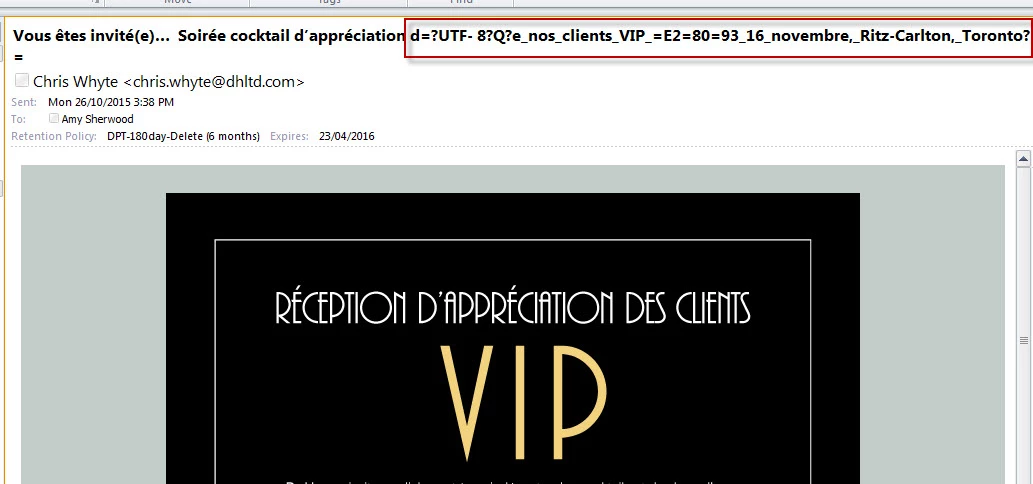
Email campaign subject line displays with extra code when received than it appears in the back end | Community
Skip to main content
October 26, 2015
Question

Email campaign subject line displays with extra code when received than it appears in the back end

  • October 26, 2015
  • 2 replies
  • 1395 views

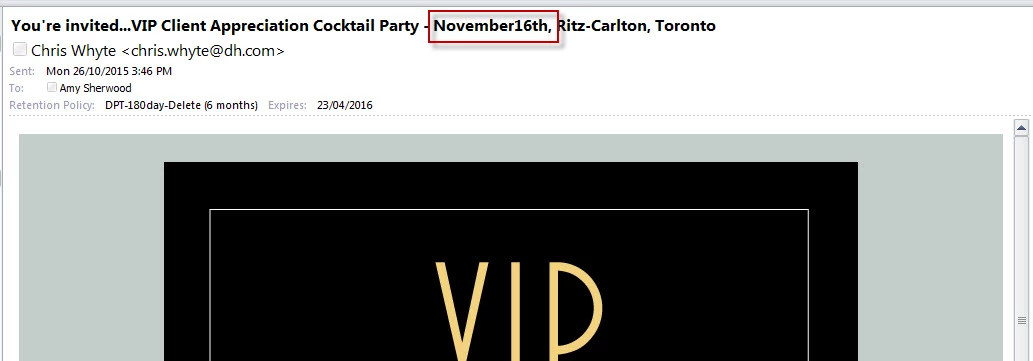
I've even tried to past the text into notepad to remove formatting and tried to type this out and i keep having the same issue. In the English version this extra code does not occur but some of the spacing is deleted and two words become one word. See below:

If anyone could please help it would be greatly appreciated as i need to send this invite out for tomorrow afternoon.

Thanks

This post is no longer active and is closed to new replies. Need help? Start a new post to ask your question.

2 replies

Kenny_Elkington
Adobe Employee
Adobe Employee
October 26, 2015

What does the subject line look like inside your email editor?

October 26, 2015

It looks the way it should lol like this:

Is there a way to see the HTML or coding behind the subject line?

Justin_Cooperm2
Level 10
October 26, 2015

This is so strange, I cannot reproduce your issue. It leads me to believe it may actually be the recipient email client not rendering the subject correctly. If you send a sample to a different account with different email client, does it work? I have tested using the following subject and it works for me on Outlook 2016 for Mac as well as iOS Mail and Outlook for iOS:

Vous êtes invité(e)... Soirée cocktail d’appréciation de nos clients VIP – 16 novembre, Ritz-Carlton, Toronto

October 27, 2015

Hi Justin

For some reason this also happens when sending to other email recipients. I've been researching and sometimes these odd characters can occur with subjects that have 75+ characters. I've tried to reduce the number of characters to 56 with spaces and everything looks normal right now!

Thank you for your help on this