
Grégoire_Miche2
Level 10
February 28, 2016
Question

Editing the duration of the download link for smart list subscriptions

  • February 28, 2016
  • 6 replies
  • 6354 views

If you need to change the duration of the download link for smart list subscriptions, do as follow:

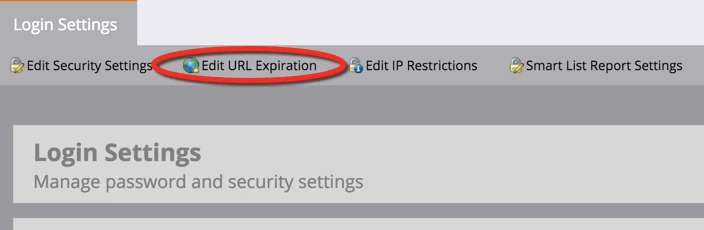
Go to admin -> security -> login settings. Click there:
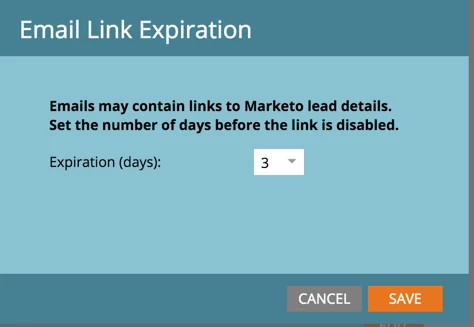
You will be able to set the duration from 1 to 30 days, but not to make it unlimited:
-Greg

This post is no longer active and is closed to new replies. Need help? Start a new post to ask your question.

6 replies

February 28, 2016

Nice one, I did not know you could do that

Michelle_Tizian
Level 10
February 29, 2016

Thanks Gregoire!

April 7, 2016

Hi Greg,

Did you test it and does it work? Email link expiration for subscribe to smart list is hardcoded to 4 days when we built it and afaik 'edit URL expiration' setting doesn't override that hardcoded value.

Thanks,

MJ

Michelle_Tizian
Level 10
April 7, 2016

Thanks Mahesh.  Unfortunately, Gregoire's suggestion didn't work for me, ergo the support ticket.  I was hoping it would work.  So if the instruction that Greg posted above doesn't work for the smart list, does that only apply to links in emails or for something else?

April 17, 2016

Michelle - It should work for other email notifications supported in Marketo including the subscription to reports.

Grégoire_Miche2
Level 10
April 7, 2016

Well, at least we tried

-Greg

Aida_Kamber
Level 2
July 6, 2017

Does anyone know if there is a solution to this now? I was hoping that Marketo would come up with one since the original post from over a year ago.

Grégoire_Miche2
Level 10
July 6, 2017

I am pretty sure there are some ideas to vote for

Aside of this, I do not think there is anything you can do about it.

-Greg

Ashley_Ruibal
Level 1
March 17, 2020

Hi there! Did you ever get an answer as to how this can be resolved? I'm encountering the same issue now where we would like to extend the expiration to at least 10 days. Thanks!