Editing Segmented Email Drafts | Community
Skip to main content
August 20, 2018
Question

Editing Segmented Email Drafts

  • August 20, 2018
  • 2 replies
  • 1293 views

Hi,

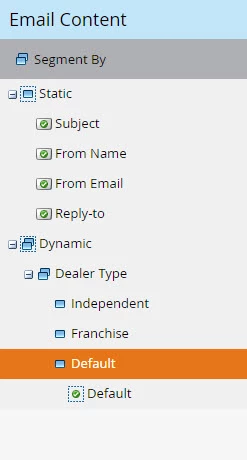
I have created a Segment within Marketo called "Dealer Type" for Franchise vs. Independent Car Dealerships and have applied the Segment to the Email Draft.

I am aware that any changes made to the Default draft are applied to the others.

If I click "Independent" and edit the title, it changes the title of the draft within tje "Franchise" and "Default" tabs as well. The same issue occurs when I make any changes to content within the email draft.

How do I make edits to each dynamic draft without effecting the others?
This post is no longer active and is closed to new replies. Need help? Start a new post to ask your question.

2 replies

Grace_Brebner3
Level 10
August 20, 2018

Hey Erica,

Are the areas you're trying to make edits to module(s) that have been made dynamic, or are you making changes outside of the dynamic module?

Try right clicking on the module you're trying to make changes to - if "make dynamic" shows as an option, the issue is probably due to the above - just make that module dynamic and try again.

August 20, 2018

Grace,

Thanks for your reply. When I right click, "Make static" is an option.

See screenshot for view I am editing in.