September 8, 2016
Question

Editing form validation and error messages

  • September 8, 2016
  • 1 reply
  • 3614 views

Is there a way I can change the CSS so that the yucky red box with white text doesn't appear when the error message appears?

I'd like to change it to my company's style guide. Please help!

Here is an example of the error message i'd like to change:
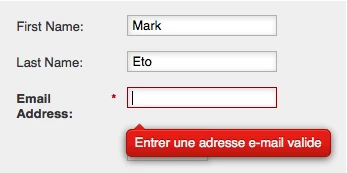
This post is no longer active and is closed to new replies. Need help? Start a new post to ask your question.

1 reply

SanfordWhiteman
Level 10
September 8, 2016

The error messages are styled using the DIV.mktoError and descendent elements/classes.

September 12, 2016

Thanks @Sanford Whiteman​. After a lot of trial and error, I finally found a way of inserting only our own custom css without having to override Marketo styling defaults, but what I can't figure out is how to adjust the markup they produce.

For example, we have a custom select dropdown that depends on additional markup being added for the 'down arrow.' How would would we go about making sure select fields can include that additional markup?

SanfordWhiteman
Level 10
September 12, 2016

You can manipulate the form HTML -- with some significant limitations -- in MktoForms2.whenRendered (if you're using Visibility Rules) or MktoForms2.whenReady (for simpler forms).

But at a certain point, if you're not familiar with the tricks of this particular trade, you should cut your losses and use an entirely custom form, then use the Forms 2 API to submit it: Make a Marketo Form Submission in the background