Edit view/preview view differs | Community
Skip to main content
August 20, 2015
Solved

Edit view/preview view differs

  • August 20, 2015
  • 2 replies
  • 1756 views

Hi,

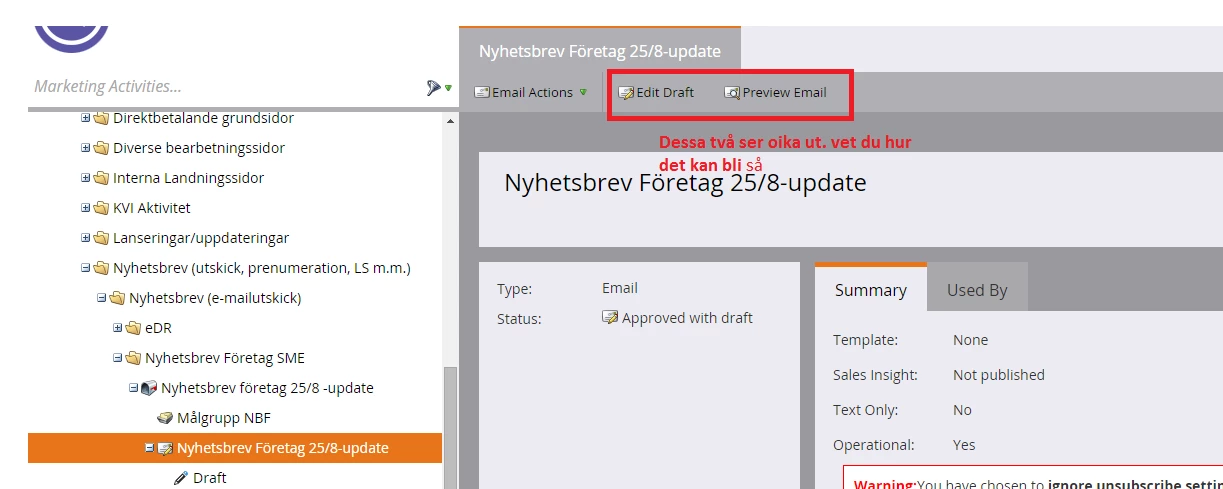
The same newsletter differs  from each other, in edit view and preview view. But still it is the letter. It looks like the changes in edit mode does not folow thorugh to preview view

Is it any answer for this? Or is it something which can be fixed?

Mvh thanks, Stina
This post is no longer active and is closed to new replies. Need help? Start a new post to ask your question.
Best answer by

Hi.

Ok. Many thx!

Skickat från min Windows Phone

2 replies

Level 9
August 20, 2015

Hi,

Are you approving the draft after you make the edits? If not, you'll want to "preview draft" (it's available if you use the email actions drop down or right click).

Kim

August 20, 2015

Hi,

I'm not sure what you mean. But I'll explain.

A collegue creates the newsletter  in edit mode.

I will look at her newsletter only in preview mode.

When I see that everything is ok I tell a third person to approve.

So the problem is: when I look at  the newsletter in preview mode, I don't see the changes that is made due to the different content in the same newsletter,  since it does not show the changes in my preview mode, that has been made in edit mode..

Many thanks, Stina

Josh_Hill13
Level 10
August 20, 2015

You need to Look at Preview Draft, not just Preview button. They are different.

I also never use Preview because it never renders 100% the same as the live version or sample email or page.

Accepted solution
August 20, 2015

Hi.

Ok. Many thx!

Skickat från min Windows Phone