Edit Select Arrow Styling in Forms | Community
Skip to main content
Lucho_Soto
Level 5
November 11, 2016
Solved

Edit Select Arrow Styling in Forms

  • November 11, 2016
  • 1 reply
  • 4491 views

Hi Marketo Community,

I'm trying to customize the downwards arrow next to "select" type questions on a Marketo form. Explorer, Chrome and Firefox all render the arrow differently (screenshots below) and I haven't been able to find anything in the form CSS that controls this.

I would also like to edit the outline of the dropdown once the arrow is clicked, this also varies among browsers. Any help/tips would be appreciated, thanks!

Explorer

Chrome
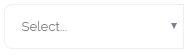
Firefox
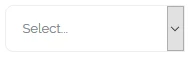
This post is no longer active and is closed to new replies. Need help? Start a new post to ask your question.
Best answer by SanfordWhiteman

<SELECT> tags by definition vary among browsers, and can only be partially restyled. There's no standard unless you replace the entire widget with a custom component. (This isn't a Marketo limitation.)

1 reply

SanfordWhiteman
SanfordWhitemanAccepted solution
Level 10
November 11, 2016

<SELECT> tags by definition vary among browsers, and can only be partially restyled. There's no standard unless you replace the entire widget with a custom component. (This isn't a Marketo limitation.)

Lucho_Soto
Level 5
November 11, 2016

That makes sense, thanks for your help.