Edit filter logic on engagement stream transition rules? | Community
Skip to main content
July 16, 2015
Question

Edit filter logic on engagement stream transition rules?

  • July 16, 2015
  • 1 reply
  • 2271 views

Hello,

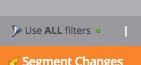
I'm setting up transition rules for my engagement streams and I'm not able to click the "Use ALL filters" button to change it. I click on and around the area but it doesn't respond at all.

I would like to be able to select "Use advanced filters" so that I can plug in some logic for the filters. Is this possible?
Thanks in advance!

This post is no longer active and is closed to new replies. Need help? Start a new post to ask your question.

1 reply

July 16, 2015

Advanced filters only becomes an option after you've added at least three filters into your smart list. Do you have the filters already added?

(Also note that advanced filters only apply to filters, not to triggers.)

July 16, 2015

Hi Kristen,

Thanks for the quick reply! I actually have 4 filters on the smart list and the filter button still isn't clickable.

July 17, 2015

Hey @Ashley Riddle ,

I actually don't believe you can have advanced filters in transition rules for engagement programs/nurture streams. A workaround to this would be to create your advanced filters in a separate smart list and add a filter for "Member of Smart List" below your trigger.

Hope that helps!