Displaying multiples thank you pages according to multiple conditions on the form | Community
Skip to main content
Adrien_Evangeli
Level 1
January 27, 2023
Solved

Displaying multiples thank you pages according to multiple conditions on the form

  • January 27, 2023
  • 1 reply
  • 989 views

Hello Marketo Com,


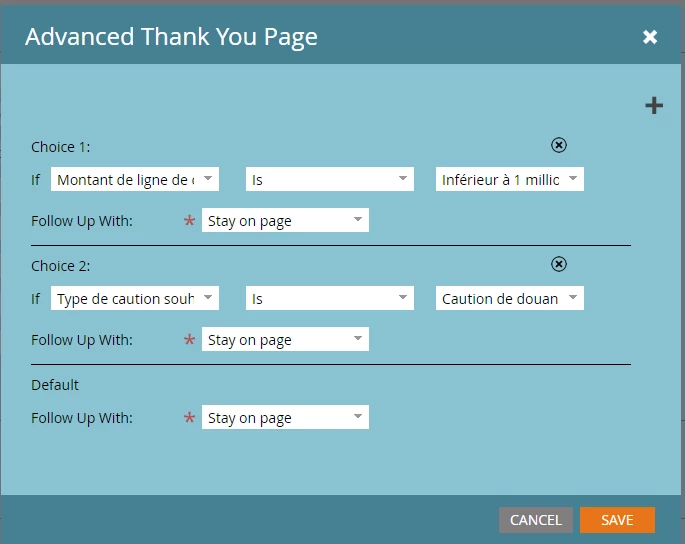
We are working on our thank you pages on MKTO but we want to have 2 conditions in order to display a different thank you page according to 2 form fields. 


Example : If field XXX is "123" and if field YYY is "234" Follow up page is "456"  

And etc. in order to have multiple thank you pages according to 2 conditions.


There is a screenshot but looks like we can't have 2 conditions together.
 

Thank you for your help! 


Best

Adrien EVANGELISTA

ALLIANZ TRADE FRANCE


This post is no longer active and is closed to new replies. Need help? Start a new post to ask your question.
Best answer by Darshil_Shah1

This could be done very easily using the Marketo Forms2 JS library - 


MktoForms2.loadForm("pages.example.com", "AAA-BBB-CCC", <insert-form-id>, function(form) { form.onSuccess(function(values, followUpUrl) { var vals = form.getValues(); if (vals.Field1 == "value1" && vals.Field2 == "value2") { //replace values & fields with the actual values location.href = "https://example.com/page1"; //add thank you page1 URL } else if (vals.Field1 == "value3" && vals.Field2 == "value4") { //replace values & fields with the actual values. location.href = "https://example.com/page2"; //add thank you page2 URL } //add more conditional statements if required return false; }); });


Since this is not configured at the form-level, you'd need to add script on webpages using this form, contrary to the form-level updates which get applied to all the pages using form upon approving the LPs.


1 reply

Darshil_Shah1
Community Advisor and Adobe Champion
Darshil_Shah1Community Advisor and Adobe ChampionAccepted solution
Community Advisor and Adobe Champion
January 27, 2023

This could be done very easily using the Marketo Forms2 JS library - 


MktoForms2.loadForm("pages.example.com", "AAA-BBB-CCC", <insert-form-id>, function(form) { form.onSuccess(function(values, followUpUrl) { var vals = form.getValues(); if (vals.Field1 == "value1" && vals.Field2 == "value2") { //replace values & fields with the actual values location.href = "https://example.com/page1"; //add thank you page1 URL } else if (vals.Field1 == "value3" && vals.Field2 == "value4") { //replace values & fields with the actual values. location.href = "https://example.com/page2"; //add thank you page2 URL } //add more conditional statements if required return false; }); });


Since this is not configured at the form-level, you'd need to add script on webpages using this form, contrary to the form-level updates which get applied to all the pages using form upon approving the LPs.