Discrepancy between Account Name and Company Name (and how we solved it) - SFDC & Marketo Integration | Community
Skip to main content
Daniel_Martin
Level 2
June 10, 2019
Question

Discrepancy between Account Name and Company Name (and how we solved it) - SFDC & Marketo Integration

  • June 10, 2019
  • 3 replies
  • 13704 views
  • What was the issue?

We found out recently that when a synced SFDC Contact was filling out a Marketo form, and writing data in the field "Company Name", that new data input was being populated across every Contact within the same account, but only on a Marketo level.

In Salesforce, there was no change of Account Name (as intended), but in Marketo, every single Contact under that SFDC Account would have automatically this new data input as their Company Name, up to the point the Account was updated and synced back to Marketo, changing the field Company Name back to the original.

This was reported before by the community (a couple of examples, here and there, but there was no proper solution apart from waiting for the Account to be synced back to Marketo.

  • What was our approach?

Given the importance of a correct Account / Company Name for us (including referring to Company Name on several email tokens), we decided to create a quick-response solution to prevent by any chance that data to "overwrite" the Account Name. 

We created a Formula field in SFDC, under the Account Object, that would replicate the Account Name. That field would not be shown in any Page Layout, so effectively it was a "hidden field". We called this field "Account backup name". Then, we set up a triggered Smart Campaign, to check any Data Value Changes for Company Name where the new value is not the Account Name value given by this formula field (and obviously activating the trigger only for SFDC Contacts).
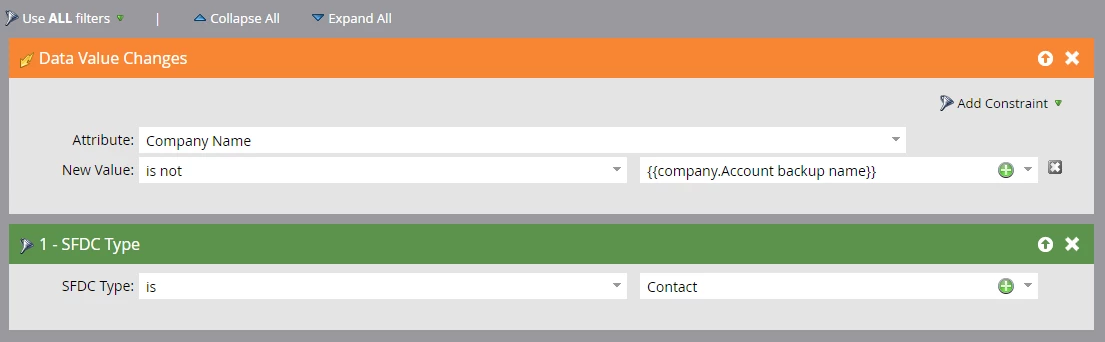
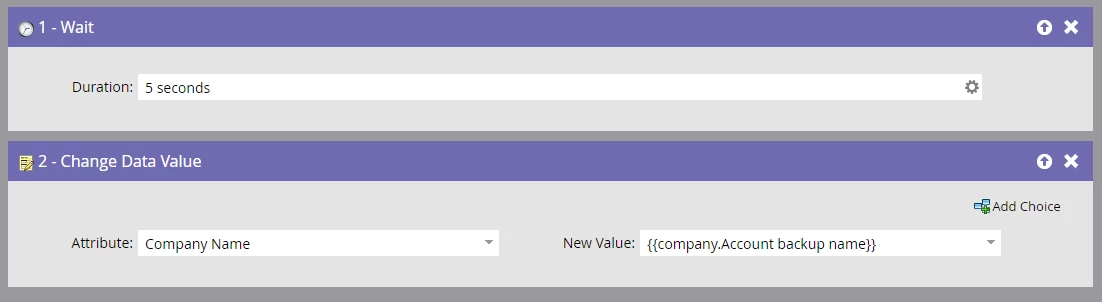
If the Smart Campaign was triggered, it would simply revert back the Company Name to the actual Account Name, and that change would be applied to all synced Contacts under that account.
  • Final thoughts

Our biggest fear was to exponentially increase Marketo's workload to a point that it would be noticed in the performance, but so far that is has not been the case. 

We are uncertain about whether this issue is also happening with the Microsoft Dynamics sync, but the solution's approach could be the same.

It may be a very simple solution, but it worked for us. We truly hope that this helps other Marketo users that were/are facing the same issue right now.

3 replies

Adobe Employee
June 10, 2019

Hi Daniel,

Interesting solution.

Am I correct in assuming that you do not want the Account Name for any of the contacts updated? including the contact that may have filled out a form?

So in the scenario where an existing contact has changed their company by filling out the form, are you looking to revert the Account Name back to the previous value?

If you are trying to avoid having the company name updated. You could easily just block updates to the Account Name field in Marketo.

Just my thoughts.

Thanks

Floyd

Daniel_Martin
Level 2
June 11, 2019

Hey Floyd,

Yes, we update Account Names manually, since we want to control the consistency on the field (and avoid the situations where one single company is spelled in 8 different ways).

Since our company operates in a B2B scenario, our Contacts are identified by their email domain (that needs to be corporate). Changes in their companies would come with a change of email address, and thouse would be created as new leads (and later converted to a Contact and allocated to an Account when necessary).

Regarding block updates, we are uncertain if that would stop this issue to trigger, since in reality the field changed is Company Name (that is connected to Account Name) and at the end, the field Account Name is a read-only that is not changing, seems to be what we called internally a Marketo hiccup. But thanks for the feedback!

SanfordWhiteman
Level 10
June 11, 2019

Sorry to break it to ya, but this trigger is not doing what you think it is!

The New Value you're comparing with isn't the value of the token {{company.Account backup name}}, it's the literal string "{{company.Account backup name}}".  Token values are not interpolated in Smart Lists. 

Of course you are free to use double-curly-braces and a string like "{{company.Whatever"}}", but that's not a variable, it's a string that happens to look like a variable.

So what this is actually doing is checking to see if the value changes to anything but the string "{{company.Account backup name}}".  Which for practical purposes means it's just checking to see if the Company Name changes at all, then setting it to the backup value. It's only because of Marketo's infinite loop protection that you manage to not create a really bad situation here.

Also, don't know why you'd have a Wait in there.  That's just making more work for the system, not less.

Daniel_Martin
Level 2
June 11, 2019

Greetings Sanford,

Thanks for noticing! So if effectively it is triggering on every data value change for that field when the person is a Contact, we will remove that condition from the trigger.

We will also remove the Wait step, you are completely right! Thanks for the feedback, very helpful.

SanfordWhiteman
Level 10
June 11, 2019
Thanks for noticing! So if effectively it is triggering on every data value change for that field when the person is a Contact, we will remove that condition from the trigger.


We will also remove the Wait step, you are completely right! Thanks for the feedback, very helpful.

Yes, but for clarity you should add an explicit constraint Reason [is] 'Web Form Fillout'. Don't rely on loop detection.

Dan_Stevens_
Level 10
June 12, 2019

We uncovered this issue a couple of years ago.  Thought it was just on the MS Dynamics side: nation.marketo.com/thread/43343-accounts-tip-company-name-mismatch