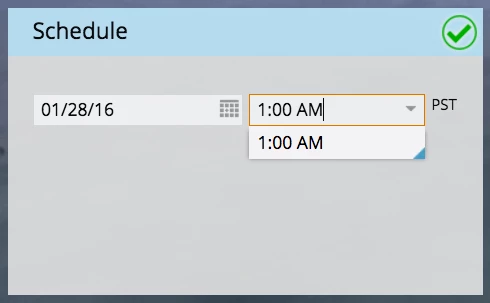
Disable autocomplete on email schedule time dropdown
This is a persistent annoyance. Using the latest Chrome on OSX, when I start typing a time in an email program's "Schedule" box, the autocomplete takes over, and selects a time that is completely unintended. It keeps trying to do this. It's very easy to type a time of day, I don't need autocomplete to help me, particularly if it keeps trying to enter the wrong time.
For instance, say I want to send my email at 11:50pm PST. The moment I type "1", the overzealous autocomplete decides that I'm trying to send this at 1:00 AM (see below). Nope. I delete it, go back and add the second "1" so it says 11. Autocomplete again takes over and decides I'm going for 11:00 AM. Nope. I keep having to go back and fix the wrong guesses.
When moving quickly through these things, this kind of "feature" can get really annoying. Especially when it's completely unnecessary.