
Differentiate email on category for reporting | Community
Skip to main content
Harish_Gupta6
Level 6
October 6, 2015
Solved

Differentiate email on category for reporting

  • October 6, 2015
  • 3 replies
  • 3800 views

Hello,

I have more than 1000 email in my system and now I want to differentiate all these emails in three category and wants to create report on category basis. But the problem is that I have not added any thing in email to make it differentiate. Please suggest what steps I should do now to divide emails on category basis.

Thanks in advance.
This post is no longer active and is closed to new replies. Need help? Start a new post to ask your question.
Best answer by Harish_Gupta6

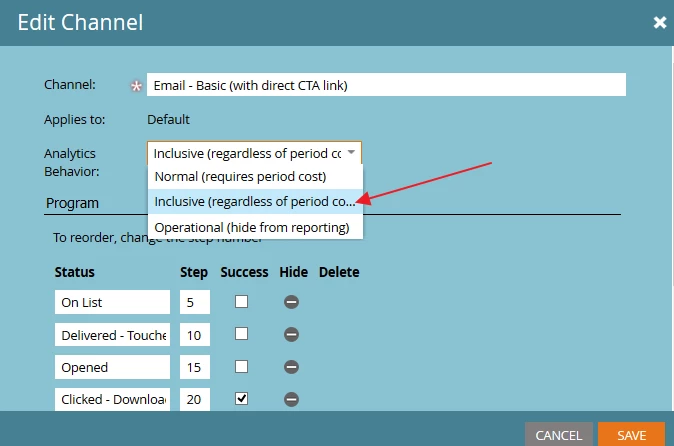
Harish, you do know that you can change this setting at the channel level and not define the cost individually within each program, correct?


Hi Dan, Yes I do know this and I have tried both the ways.

Thanks for help again.

3 replies

October 6, 2015

Hi Harish:

One thing you can do is to create a tag for your category, and add three values to the tag.  To do so go to the admin pane and select tag in the tree view.

Then in each program you will need to add the tag and select a value for it.  To do so go into the program and select the setup tab.

Since you now have over 1000 emails this will be a lot of work, but it will get the job done.  In the future you should just make adding tags an integral part of your email program set up.

Dan_Stevens_
Level 10
October 6, 2015

Like Jamie suggested, using tags is the best approach for this.  It's really one of the best ways to be able to slice and dice your data how you want (using RCE).  Here's how we're using tags - the "Content Type" is applied to programs that include emails and website content:

Harish_Gupta6
Level 6
October 8, 2015

Hi Jamie/Dan,

Thanks for your suggestion. I created tag and added those in email programs and even its reflected in RCE also. But still its not showing me that which email belongs to which category. I tried creating Email analysis report and Program Performance analysis.

Please suggest

Harish Gupta
Dan_Stevens_
Level 10
October 8, 2015

You won't find this using the Email Analysis report - you need to use the Program Analysis report, since you're reporting on the individual programs and the tags associated to those programs.  Then you'll be able to obtain a report that looks something like this using the following criteria:

Harish_Gupta6
Level 6
October 12, 2015

Hi Dan,

Thanks for help and Email performance report works for me. I missed the program cost so after adding the program cost, the report works perfect for me.

Harish Gupta