Different Colors for Form Field Caption and Form Fill | Community
Skip to main content
January 16, 2015
Solved

Different Colors for Form Field Caption and Form Fill

  • January 16, 2015
  • 5 replies
  • 1353 views
In the design studio, if I change the font color the white, the text that users enter in the fields also turns white. Does anyone know how to change the form field caption to one color while maintaining the default black form fill text color?

Thanks.
This post is no longer active and is closed to new replies. Need help? Start a new post to ask your question.
Best answer by
Add custom CSS code to the form itself that will override your other code.
open the form. go to form settings > form theme > select the gear icon
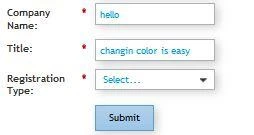
The code below work well. I also included an image of the form with color for reference.
.mktoForm input[type=text],
.mktoForm input[type=url],
.mktoForm input[type=email],
.mktoForm input[type=tel],
.mktoForm input[type=number],
.mktoForm input[type=date],
.mktoForm select.mktoField,
.mktoForm textarea.mktoField{
  -webkit-appearance: none;
    color:#00a0df;
  }

5 replies

Accepted solution
January 16, 2015
Add custom CSS code to the form itself that will override your other code.
open the form. go to form settings > form theme > select the gear icon
The code below work well. I also included an image of the form with color for reference.
.mktoForm input[type=text],
.mktoForm input[type=url],
.mktoForm input[type=email],
.mktoForm input[type=tel],
.mktoForm input[type=number],
.mktoForm input[type=date],
.mktoForm select.mktoField,
.mktoForm textarea.mktoField{
  -webkit-appearance: none;
    color:#00a0df;
  }
January 16, 2015
Shannon,

Thanks for the reply. This seems easy enough, but where can I find "form settings"?

Thanks.
January 16, 2015
Click on the form select edit form form settings is #2 on the left hand side bar.
Here is a link to an article that has photos showing how to get to the CSS to edit it..
https://community.marketo.com/MarketoArticle?id=kA050000000LHXhCAO
 
January 16, 2015
Thanks, Shannon. I wasn't using Forms 2.0 so I wasn't able to see that, but I got it set up.

Thanks for your help!
January 16, 2015
Glad you were able to get it fixed. Have a great weekend.