
Difference betwen Form Fillout and Flow change data value | Community
Skip to main content
Emmanuelle_Biss
Level 4
August 9, 2016
Solved

Difference betwen Form Fillout and Flow change data value

  • August 9, 2016
  • 1 reply
  • 2748 views

Hi everyone,

I have created a new field Original Source, and I do not want this field to be updated every time a lead comes to our website. I therefore want to block all these updates and only keep the original first source of their visits.

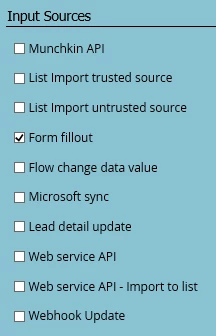
To do so, do I need to check Form fillout or Flow change data value (or both)? What's the difference between the two?
Thanks!

Emma

This post is no longer active and is closed to new replies. Need help? Start a new post to ask your question.
Best answer by Michaela_Iery3

Hi, Emmanuelle: Blocking updates to a field allows you to write to the field once and then retain the original value for the lifetime of the field. So in your specific instance: You have blocked updates to field Original Source in Admin. Then in a smart campaign, you want to change the data value of Original Source in your smart campaign's flow to "ABC." If a lead goes through that smart campaign and already has a value (any value) in the field Original Source, Marketo will not update the field for that lead. But for any lead who goes through your smart campaign, if they don't already have a value in Original Source, Marketo will update the Original Source field for that lead to "ABC." Thus preserving the value when it exists and capturing it for the first (and only) time when it doesn't already exist. More documentation on blocking field updates here: Block Updates to a Field - Marketo Docs - Product Docs

Hope this helps!

1 reply

Josh_Hill13
Level 10
August 9, 2016

You should check most of these to block field updates from those sources. Which methods would you permit to overwrite this data?

Form Fillout= When the lead fills out a form

Flow Change= Flow step of Change Data Value - the overwrite attempt will be ignored.

Emmanuelle_Biss
Level 4
August 9, 2016

@Josh Hill​ I only want to update this field if it is initially blank. If there already is data in this field, I do not want it to be erased.

Do I still need to check these even if when I create a Flow, I specify Change Data Value with the right attributes if blank, and specify the default choice to "Do Nothing" if not blank?

SanfordWhiteman
Level 10
August 9, 2016

Those flow choices will accomplish the same thing as blocking "Flow Change Data Value" but are harder to remember to do in all flows.